
I am a big user of Todo lists, as well as a big user of todo list tools. I use Remember the Milk, Workflowy, Yahoo! widgets, Lotus Notes todos, Tiddlywikis, Blackberry todos, text files…you name it, I try to use it if it helps.
Recently, though, I have settled on a new way of managing all my todos in one tool: a spreadsheet. I did this for a number of reasons:
- It was not easy integrating any one tool with all the others.
- I need to maintain different formats, depending on who I am working for.
- I need an easy way to focus on specific todos
I found a spreadsheet let me do all those things. Here’s how.
This is a typical worksheet in my todolist spreadsheet. (I keep a separate worksheet for each week.)
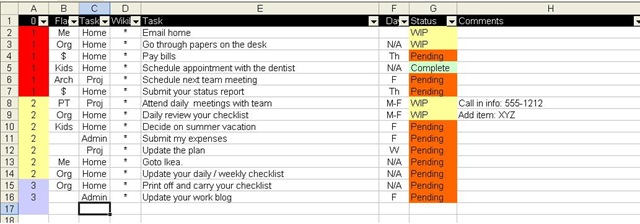
- Column A is the priority of the task.
- Column B is an arbitrary flag I use.
- Column C is a category tag. I have three categories of todos: Home, Proj(ect), and Admin. (Column B and C work together. For example, I can group all my Home related activities related to my kids by putting “Kids” in column B.).
- Column D I will explain later.
- Column E is the actual task itself
- Column F is the day the task will be worked on and completed.
- Column G is the tasks status. I have three: Complete, working on it (WIP = work in progress) or Pending (not yet working on it).
- Column H is for free form comments.
The first thing I can do is sort my tasks. For example, I can change the priorities in column A and then resort the worksheet in order to have all my priority 1s on top, followed by priorities 2 then 3 (like you see above).
Next, each column has a filter on it, so I can drill down on specific items. For example, here are all the todos I have listed concerning my current work project.

I can drill down on more than one column. For example, I could set the filters for all priority 1, project related todos that are due on the day of “F” (Friday) that are “Pending”. Or I could see all Home todos that are priority 1 that are not complete by setting a custom filter where the status field is not “Complete”. There are all sorts of ways of slicing and dicing the todo list, but what I end up with is one complete todo list, not a bunch of separate ones to manage.
Not only can I filter out specific todos, but I can filter out whole columns by hiding them. Here is the list of project related todos with just three fields.

Why? Well, for my status report, I need to fill in this table in a Word document, like this:

To fill that out, I just need to copy and paste.
I can also copy and paste into my other tools that I use, too. For example, here is the same three items put into a wiki, in this case, TiddlyWiki

Column D of the spreadsheet is used for the wiki’s markup language, in this case, an asterisk. I copied columns D and E right into the wiki and the wiki formatted it for me.
I then took column E and pasted it into Workflowy, like this:

That way I can look up the list easily via my old Blackberry, my Netbook, or my iPod touch.
I could also email the todolist to RememberTheMilk.com and have my todos updated there, also. Or I could store the spreadsheet in Zoho.com and access it there as well, though I think there filter support is limited.
Regardless, as you can see, I can do alot with this one spreadsheet. I can capture and update all my todos in one list, then copy them into other tools as I need to with little effort. I am sure people who are much better with these tools than I am could think of even better ways to go about doing this.
I hope you find this helpful.
 Smart People I Know
I would recommend checking out http://www.Gtdagenda.com for an online task manager.
You can use it to manage your goals, projects and tasks, set next actions and contexts, use checklists, schedules and a calendar.
Syncs with Evernote, and also comes with mobile-web version, and Android and iPhone apps.
it certainly was helpful.. thank you! 🙂
It is in point of fact a great and useful piece of info. I’m happy that you just shared this helpful information with us. Please keep us up to date like this. Thanks for sharing.