
Can be found here: Danziger Projects – BIG SHOTS

Can be found here: Danziger Projects – BIG SHOTS

This is a great recipe:

There’s not much I can add to improve this recipe. Make it in the 7 Ways that Mark Bittman suggests. Once you get the hang of it, you can do some things like add more or different vegetables. I think that would help. Otherwise it is simple and delicious. You will never buy lentil soup again, for this recipe is very easy and very cheap.
You might ask: Japan is a wealthy country, why should we in other parts of the world help? I think there are a number of good answers to that, but you need to know more about how this works. As this article states (Does Japan need your donation?)
The Japanese are world-renowned experts in disaster preparedness, relief and recovery, and Japan is the third largest economy in the world. There should be no mistake that the Japanese government and Japanese organizations are well-equipped to take the lead.
And as this article shows (Charities Rush to Help Japan, With Little Direction – NYTimes.com), some organizations, like
The Japanese Red Cross, for example, has said repeatedly since the day after the earthquake that it does not want or need outside assistance.
So, should you donate? Well, if you just read the headline of this, Don’t donate money to Japan by Felix Salmon at Reuters.com, you might not. But even he recommends donating to organizations who do this work day in, day out. Indeed, if you did donate to the Red Cross, and if they didn’t use the money in Japan, they would use it when the next disaster hits (as it surely will). Same with organizations like Doctors Without Borders (MSF). Indeed, as someone pointed out, just knowing that people care and are donating to help them will likely go along way to help the people of Japan psychologically. Your donation now will not be wasted.
It is going to take time for Japan to rebuild. There may be an opportunity to donate your time or money or efforts later as well. Even a visit once things are stable is something to consider. (I recall the tremendous promotion that NYC did after 9/11 to get people to come back and visit. It may be tourism, but it also helped the New York economy and New Yorkers too. What was true of New York will be true of Japan.)
So the money you donate to good organizations will help, if not Japan now, then some other desperate place later. What you donate now will help improve the morale of the people of Japan. And what you give later will be important too.
Japan may be a wealthy country with plenty of resources available to it, but in terrible times like this, anyone in their position could use help. So help any way you can.
FOMO: the Fear of Missing Out, is the topic at Caterina Fake’s blog, Caterina.net.
It’s a thoughtful post, and as I recall, it is a fear that I had when I was younger. However, as I get older (and I believe this is true generally), I think the predominant fear one has becomes the fear of being left out. What’s great about social media, wireless connectivity, mobile devices, and other technology developments is that it gets easier to be connected and stay connected. I was sitting on my couch one Saturday night and I was a) responding to email from the Nova Scotia b) texting my daughter to see what she was doing in Toronto c) listening to music being posted on blip.fm from friends in the U.S. d) looking at photos being posted on Facebook and flickr.com from around the world e) responding to people on twitter from everywhere. What struck me was how interconnected I was with the world. Where once I might have felt isolated being by myself, having all this technology allowed me to be connected, and it made me happy to have it. It was the joy of being connected.
Now I think FOMO is a better acronym that JOY-C. And I have no doubt that people experience FOMO. But I am happy to have all my additional connectivity and JOY-C.
Adam Schwabe (@adamschwabe on Twitter and a former colleague at IBM) has a good rundown on the cost of developing an app here: The Race to the Bottom for Native Apps | Teehan+Lax.
Any organization considering developing an app would do well to read this first in order to better understand what they are getting into. Adam is not just passing on what he has read elsewhere: he has strong experience with developing mobile apps, including the successful Rocket Radar. Take a look.
There are lots of good sources, but to me the best right now is NHK WORLD TV on USTREAM. It’s the official NHK WORLD TV news station from Japan (think CNN, CBC, BBC or Al Jazeera) and it is live and in English 24-hours a day. Watch.
She’s a great dancer. But here wikipedia entry says it better, with quotes like:
With her mane of platinum dreadlocks, her physical power and her mastery of the full-body barrel jump, which looks like a horizontal pirouette, her image was a signature for the company
and
…she gave heart and soul to her art. She embodied dance on the outer edge, performing with passion and generosity, dazzling audiences worldwide.
Now she will be performing here: Harbourfront Centre – World Stage 2010:11 | Louise Lecavalier
Here’s an old video of her from her days with La La La Human Steps (Infante c’est destroy). She dances great throughout, with an amazing display of her power and virtuosity starting around the 2:15 mark:
Well, you could do yourself a favour and check out this site: ONE DAY ONE APP | Showcase Of Selective iPad Apps. Not only do they have a ton of interesting apps you could download, but they come out with a new one every day. Plus, I am delighted to say they have my site listed in the footer of their blog. But even if they didn’t, I’d still recommend it. The iPad is great, but what makes it even greater is good apps. Go find some good ones at this site.

See the source: CGPortfolio – Pawel Hynek. Thanks to Andrew Sullivan for the pointer.
Can be seen here: Shot from the hip: B&W Toronto street portraiture. Shots like this:

Great stuff, and lots more. Check out the link.
From the always good blogTO.
Funny!
(thanks to @remarkk on twitter for this)
Google came up with this:

Like alot of IT shops, I believe, they thought being a good manager meant being more technical than the staff you manage. It turns out that isn’t it. The list above is more important. To see how Google came to it, see: Google’s 8-Point Plan to Help Managers Improve – NYTimes.com (which is where the list above came from).
Today, March 14, can also be written as 3.14, which just so happens to be the start of Pi! Hence the new “holiday”. 🙂
Speaking of Pi, check out this cool mnemonic by Alexander “Sasha” Volokh:
“How I need a drink, alcoholic of course, after the tough lectures involving quantum mechanics; but we did estimate some digits by making very bad, not accurate, but so greatly efficient tools! In quaintly valuable ways, a dedicated student — I, Volokh, Alexander — can determine beautiful and curious stuff, O! Smart, gorgeous me! Descartes himself knew wonderful ways that could ascertain it too! Revered, glorious — a wicked dude! Behold an unending number: pi! Thinkers’ ceaseless agonizing produces little, if anything! For this constant, it stops not — just as e, I suppose. Vainly, ancient geometers computed it — a task undoable. Legendre, Adrien Marie: ‘I say pi rational is not!’ Adrien proved this theorem. Therefore, all doubters have made errors. (Everybody that’s Greek.) Today, counting is as bad a problem as years ago, maybe centuries even. Moreover, I do consider that variable x, y, z, wouldn’t much avail. Is constant like i? No, buffoon!”
By counting the number of letters in each word, and considering the end of each sentence to represent a zero, one can easily reconstruct the value of pi to 167 digits after the decimal point:
3.1415926535 8979323846 2643383279 5028841971 6939937510 5820974944 5923078164 0628620899 8628034825 3421170679 8214808651 3282306647 0938446095 5058223172 5359408128 4811174502 8410270.
However many digits after the decimal you want to remember it, have a great pi day!
(Thanks to Eric Andersen @eric_andersen for this!)

Years ago, decades ago, I read how Steve Jobs pressed the developers of the early Macintosh to cut down on the boot up time of the machine. Think about it: for most Windows users, there is an acceptance that it takes minutes to boot up your machine. Jobs wanted the Mac to boot up in seconds. Now, years later, he is able to get the iPad to be available in no time at all.
There are a lot of reasons why Apple products are successful: I am sure this relentless perfectionism is one of them.
(Image from the NYTimes story, by Jim Wilson)
IPad ‘Smart Cover’ Opens to Instant Access – NYTimes.com
From The Sartorialist:
Some people have commented that they don’t relate to the runways shots that I have posted on the blog during fashion week. They say they can’t afford the clothes or the looks don’t relate to their everyday lives.
I understand these comments but I challenge you to try and look at these runway shots in a new way.
Fendi, for example, was really about fantastic color combinations. Even if you didn’t like the clothes you can focus on the color schemes. These suggestions of color can be used whether shopping Fendi, or Zara, or vintage.
Maybe another collection – like Yohji – would be all about proportion and texture. Wearing all black is difficult but new ideas in mixing shape and fabric textures can be invaluable in keeping a monotone wardrobe fresh.
Dries and Gaultier’s strength’s have always been their great ability to mix genres and cultural symbols. I love the idea of Tibetan Fireman.
All I’m saying is don’t let the lack of funds keep you from having fun with fashion.
Great advice.
is featured here. Very impressive!
(Thanks to Roger Ebert for this via twitter)
It seems that it is acceptible now to look down on people who don’t use Gmail as their prime email account: swissmiss | What your email domain says about you. As someone who has been using email since 1983 — well before the Interwebs, as the cool kids like to say — I must say this is totally ridiculous. I’ve used various forms of email over time, from internal IBM email to Yahoo! to Hotmail to Gmail and some others that have come and gone. I have stuck with Yahoo! because I have had my account there for along time and I am not keen on Gmail. I was happy Gmail came along: it forced Yahoo! to bump up their size limits and get competitive. But I am also a fan of Yahoo! in general. Gmail/Google fans are like Apple fans: they swear how great it is and are happy to overlook any deficiencies (like those recent thousands of Gmail accounts that recently disappeared). All online web services have their shortcomings, but to somehow assume that people are inferior because they use one form of email over another is terrible. It’s not the most terrible prejudice in the world, but it is still prejudice.
I have this Yahoo! widget* running on my desktop:
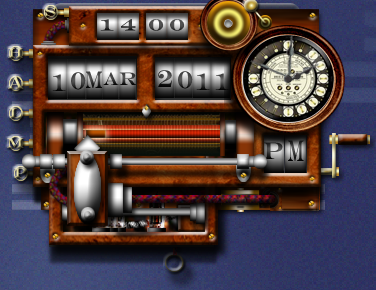
Every 15 minutes it chimes on the quarter hour, and every hour it chimes once for every hour. What I love about this widget, besides the steampunk look of it, is how it is resetting my notion of time back to what it used to be and what I think is better.
I also have this widget on my desk:

It is a timer that allows me to keep focused on a task. With all the distractions that my computer generates, having this timer allows me to focus. (E.g. I will spend 20 minutes on email, and when the timer goes off, I will quit that and work on producing a report for 30 minutes). While this approach is good, I find that time becomes very fluid. It is less fluid than allowing myself get distracted by every pop up that occurs or open tab on my browser, but it is something I control and sometimes let slip by.
What I love about the steampunk clock widget is that it implies that time is independent of me. Time is important. Each hour, each quarter hour is important, and it tells me it is important by announcing it. It makes me appreciate time more as a thing in itself, and not something that I slosh around, 10 minutes here, 20 minutes there. It also makes me appreciate the order of time: there is a quarter hour, and then three more and that takes us to the top of the hour. Time marches on with the first widget. Finally, I think 15 minute intervals of time are best. We are always trying to squeeze more out of time: a quick minute here, a five minute break there. The steampunk widget says: no, 15 minute intervals are best for dividing up the day, and anything worth doing will need 15 minutes at least. It changes the pace of the day.
I like playing around with time. I feel like I am always aware of it, and how it is speeding by. What I like about the steampunk widget is how it is reshaping my approach to time.
* Yes, I still use Yahoo! widgets. In fact, I use quite a few of them. I find them very helpful in making me more productive. I think the tools that Yahoo! provides are underappreciated. I hope that will change and that more and more widgets are developed.
I am a big user of Todo lists, as well as a big user of todo list tools. I use Remember the Milk, Workflowy, Yahoo! widgets, Lotus Notes todos, Tiddlywikis, Blackberry todos, text files…you name it, I try to use it if it helps.
Recently, though, I have settled on a new way of managing all my todos in one tool: a spreadsheet. I did this for a number of reasons:
I found a spreadsheet let me do all those things. Here’s how.
This is a typical worksheet in my todolist spreadsheet. (I keep a separate worksheet for each week.)
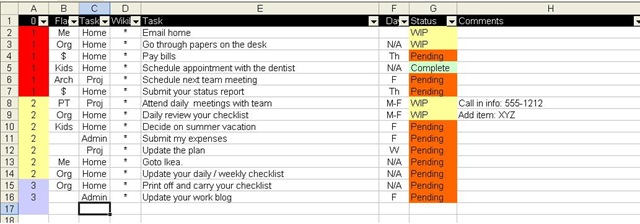
The first thing I can do is sort my tasks. For example, I can change the priorities in column A and then resort the worksheet in order to have all my priority 1s on top, followed by priorities 2 then 3 (like you see above).
Next, each column has a filter on it, so I can drill down on specific items. For example, here are all the todos I have listed concerning my current work project.

I can drill down on more than one column. For example, I could set the filters for all priority 1, project related todos that are due on the day of “F” (Friday) that are “Pending”. Or I could see all Home todos that are priority 1 that are not complete by setting a custom filter where the status field is not “Complete”. There are all sorts of ways of slicing and dicing the todo list, but what I end up with is one complete todo list, not a bunch of separate ones to manage.
Not only can I filter out specific todos, but I can filter out whole columns by hiding them. Here is the list of project related todos with just three fields.

Why? Well, for my status report, I need to fill in this table in a Word document, like this:

To fill that out, I just need to copy and paste.
I can also copy and paste into my other tools that I use, too. For example, here is the same three items put into a wiki, in this case, TiddlyWiki

Column D of the spreadsheet is used for the wiki’s markup language, in this case, an asterisk. I copied columns D and E right into the wiki and the wiki formatted it for me.
I then took column E and pasted it into Workflowy, like this:

That way I can look up the list easily via my old Blackberry, my Netbook, or my iPod touch.
I could also email the todolist to RememberTheMilk.com and have my todos updated there, also. Or I could store the spreadsheet in Zoho.com and access it there as well, though I think there filter support is limited.
Regardless, as you can see, I can do alot with this one spreadsheet. I can capture and update all my todos in one list, then copy them into other tools as I need to with little effort. I am sure people who are much better with these tools than I am could think of even better ways to go about doing this.
I hope you find this helpful.

Back in the day (circa 1990s), I managed to get my hands on one of these babies. It was the IBM PS/2 P70 386 Laptop Portable Computer 8573-121 Rare Vintage (you can buy it for $600!). What was so great about that, you might ask?! First off, it was very powerful at the time, as powerful as most PC desktops. It had an orange plasma screen, which not only was kinda cool, but also alot bigger than the monitors on other portables of the day, like Compaqs. It ran OS/2, not DOS or Windows 3.1. And back then, I could dial into the recently set up IBM internal network and work from off site locations, like home. I could work on it all day then lug it home and work some more.
I think it weighed around 40 pounds. After a summer of carrying it back and forth from work, my shoulder muscles were actually bigger than they were before I got it!
A great machine.

You can buy one of the original Think pads – no monitor, keyboard, or silicon anything – from the IBM Logo Merchandise Store. It looks like the ones given to new employees many years ago, albeit in a new and cooler black cover. When I joined IBM, everyone was given one of these as a reminder of what you were supposed to do. Awesome.

Fortran is great. For those of you not so old, you might find this particularly difficult to believe. If so, I recommend this article, FORTRAN, by Grady Booch, written up as part of IBM’s Centennial celebrations.
The article is well worth a read, but I would like to add my two cents. Before Fortran, if you wanted to program a computer, you had to write in assembly language. For computer programmers, this may have not been a big deal, but even for them it would be time consuming. What was magic about Fortran was that an engineer, scientist or mathematician could take their formula and their data and easily code it in a language that looked similar to what they were doing with pencil and paper. It made sense.
Don’t forget, back then, much of computing was doing calculations and processing data. It wasn’t word processing or email or anything text based. It was numbers and math. Fortran made all that easier. It made computers more accessible.
Part of the great history of computing is the expansion of use. Key pieces of technology have enabled more people to climb on the bandwagon of computing and take advantage of it. Fortran is one of those key pieces of technology.
While the opinions expressed here and do not represent IBM, I think I stand with alot of IBM employees when I say that I am proud to be associated with the work of others within IBM on the Fortran language. Hat’s off to John Backus and all the people who came with him and after to develop the Fortran language!
(Image is of The Fortran Automatic Coding System for the IBM 704 (October 15, 1956), the first Programmer’s Reference Manual for Fortran, from the Wikipedia entry on Fortran )

Now this comes from Nancy’s Pelosi’s flickr stream, but still, the data comes from the Bureau of Labor Statistics. The direction it is going in is a good one. Now if it could only increase further and faster.
This is incredible and impressive. Using a virtual machine, this video shows the upgrade of a single machine from the original Windows all the way up to Windows 7! Remarkably, most settings hold over all that time!
I love this video, since I have been using PCs since before DOS. Indeed, I can remember DOS 5 being advanced.
Here’s a link to the video: Upgrading through every version of windows

ITbusiness.ca has a rundown of the Six SEO sins that Google won’t forgive. I am not sure why legitimate businesses would engage in these practices, but they have. (Think BMW and JC Penney). In case you were thinking about taking steps to improve the standing of your site(s) in Google, make sure you read this.
Mark Bittman – The Minimalist – chose 25 of his favorite recipes before he moved on to other responsibilities at the NYTimes.com. Anyone looking to improve their cooking routine would do well to check these out. If you are a vegetarian, you will have lots to choose from, and if you love meat, you are in luck too (though try the meatless dishes too: they will be great).
You have to see it. It is almost an anti-web site. As if to say: most web sites are accessible and understandable and easy to navigate, but we do not want to be like most web sites, therefore we will be none of those things. They even messed up the blog. Dreadful.
Great shoes. Awful site. See Christian Louboutin official web site. Luxury french shoe and bag designer. and you will see why.
According to this, Crude Oil and Total Petroleum Imports Top 15 Countries, as of November 2010, the top source of crude oil for the US is…Canada. Followed by Mexico. Indeed, of the top 15 countries that import oil to the US, 51.33% of them are in North America. If we add the rest of the Americas, 60.04% comes from there. If you combined the imports of the “West” (i.e. Canada and European nations), you have 34.28%. All in all, the United States got over 75% of its crude oil from non Arab states in November of 2010.
Often when you hear talk about oil, you would get the impression that the US got all of its oil from the Middle East. If anything, most of it comes from elsewhere. And the biggest importer exporter of oil to the US is Canada.
Something to keep in mind.
P.S. Fixed a number of typos in this post (“it’s” now “its” and “importer” now “exporter”)
No, I don’t think so, although if you were to just skim the top of this article, you might think so, Blogs Wane as the Young Drift to Sites Like Twitter – NYTimes.com. Instead, read the entire article: it’s a great overview of what is happening in social media in 2011.
I would like to add that regardless of the platform, what is happening is that it getting easier to share information with others, and people are capitalizing on this. Furthermore, more and more people are using these tools. Alot of what people are doing now could be done with minicomputers in the 80s and PCs and BBSs in the 90s. Now, however, the tools are easier, better, and more pervasive, and many many more people have access to them. I expect by 2020, there will be even more platforms and a wider and richer way to share information. It’s exciting. Whethere blogs wax or wane is besides the point in the longer term.
With lots of possible choices, how did IBM and team come up with it? Fast Company Design has a good article on how Joshua Davis Created the Face of Watson, IBM’s Jeopardy Supercomputer.
Fascinating.
And it is coming out soon! I have been a fan of The great Bill Cunningham (as I wrote previously here) and I hope alot of people go out to see this film.
Here’s the trailer:
There is alot going on here, but one thing that struck me immediately was the contrast between his home and the home of the many people who comment on him. There’s a simple description of Nick Carraway in The Great Gatsby: I was within and without. Bill seems like that too.

Like the recipe for Kentucky Fried Chicken, the recipe for Coca-Cola was, I thought, some great mystery. Well according to This American Life, it is not, and you are seeing a copy in that photograph. Because that is hard to read, the good folks of This American Life have not only given the details on the recipe, but they tell you where you can get the more obscure ingredients and how you should mix them.
It is something that is fascinating yet not worth the effort, to me. I’d prefer to get my Coke from a bottle, premade. Still, the article is worthwhile.


 Smart People I Know
