On the book, “How to Keep House While Drowning” by KC Davis

As someone who struggles with keeping a clean house, I was drawn to the book, “How to Keep House While Drowning – A Gentle Approach to Cleaning and Organizing” by KC Davis.

Some points in it that struck me:

  • laziness is likely not the reason you are not cleaning your house…indeed laziness may not even exist. Laziness may mask fatigue, anxiety, depression, and a sense of being overwhelmed, conflicting priorities, and much more
  • you don’t exist to serve your space: your space exists to serve you
  • care tasks are morally neutral. Being good or bad at caring for your space has zero bearing on whether or not you are a good or bad person
  • The five things tidying method: there are five things in any room 1) trash 2) dishes 3) laundry 4) things that have a place and are not in their place 5) things that do not have a place
  • You don’t have chores, you have care tasks. Care tasks are functional.
  • Don’t thinking of cleaning, which is endless, but think of resetting the space, which is not.
  • Care tasks have three layers: health and safety, comfort, happiness.
  • You can’t save the rainforest if you are depressed.

The last point is an important one. This book examines our mental states that make it difficult to deal with the care of our space and provides guidance for dealing with such states. I know for some people, caring for your home is easy, a joy even. (I’m looking at the CleanTok people when I say this.) But for others like me, their current mental states make cleaning it difficult. This books helps us with those mental states and helps us deal with them such that you can have a cleaner home.

I got a tremendous amount of value from this book. So much so I am going to order it and put it on my shelf of self help books that made a big impact on me. I’ve reread it a few times now and I expect to do more of it over the following months. If you have a chance to read it, I highly recommend it.

P.S. I do not recommend CleanTok or “cleanfluencers”: they are the opposite of the ideas expressed in this book. They take care tasks well beyond the three layers into a four layer of mania.

Will middle management survive AI? Jack Dorsey says no. Let’s consider some history

Jack Dorsey, a rich man who many mistake for a smart man, wants to use A.I. to help eliminate middle management. According to this article:

Jack Dorsey wants all 6,000 Block employees to report directly to him — with zero management layers — using AI to replace the coordination and oversight work that middle managers have historically done.

Block already cut 4,000 jobs — nearly half its workforce — in February 2026, shrinking the company from roughly 10,000 to 6,000 employees. Dorsey says most other companies will follow the same path within a year.

Wow. Sounds impressive. You can read the article to see how he plans to do it, but it sounds like a bunch of hand waving to me, amounting to not much of anything.

People have been talking about how computers would eliminate middle management since the 1950s. Indeed, as you can see in this PC Mag piece from 1984, the belief that middle management could be eliminated resurfaced with the surge of personal computers coming to organizations. And yet organizations, including IT organizations, continue to have multiple layers of management despite the omnipresence of personal computers.

So no, I don’t believe AI will allow Jack Dorsey or any CEO to eliminate middle management completely, any more than AI will eliminate bullshit jobs. It didn’t happen in the 1980s and it won’t happen in the 2020s.

P.S. I think Dorsey used AI — AI washing — to cover for the bad management decisions that led up to the 4000 job cuts. The Guardian mentions: ‘overstuffed teams outside of the “bitcoin hardware team” and the company’s “bloated headcount era”, which began in 2020, fueled by nearly nonexistent interest rates in the US’. Dorsey denied this, but I’m inclined to believe Jason Karsh who used to work there. Dorsey has a talent for being in the right place at the right time and spouting ideas that make him look like a leader, but both his decisions at Block and his poor leadership at Twitter makes me say one should never look to him for ideas on how to run an organization.

How to become an expert in your own way by adopting the Wirecutter way and Amy Stewart’s way

You may not know it, but you are an expert. So am I. So are most people you meet.

I was thinking about this when I was reading this piece by Amy Stewart on The Self Appointed Expert. I especially liked her templated approach:

And this is exactly the template for becoming an expert in anything:

  • Do the thing
  • Read about the thing
  • Take classes about the thing
  • Talk to people / hang out with people who know about the thing
  • Be a member of the organizations that promote the thing
  • Go to the events / conventions / festivals etc about the thing
  • Write or draw or photograph or record the thing
  • Repeat

I think this is an excellent template. I would add that this likely won’t make you THE expert on a topic, but it will make you AN expert on a topic. Likewise, you don’t have to be an expert on something on a large scale: you can have a narrow range of expertise but you are still an expert.

If you are communicating with others about a topic in your area of expertise, I would go recommend you use an approach some of the writers at The Wirecutter use. At the end of some of their assessments they will have:

  • Why you should trust us. In this section, they will outline how they did their research and anything else they did to become and expert or demonstrate expertise.
  • How we picked. Here they show the qualities they looked for in picking the best item.
  • How we tested. Basically how they made sure the items being reviewed had these qualities.

Even if you don’t agree with their picks, it may be because you value certain qualities different than they do. And if you can’t do that, perhaps you have opinions on a topic but you aren’t necessarily an expert.

It’s good to be an expert in things, even if it is for something arcane. Even if someone stops you and asks for directions, they are assuming you have enough expertise of the area to tell them where to go.

Go check out Amy’s piece for more advice. For an example of how the Wirecutter reviews things, go here.

Free or a small fee: Libby and Bookbub help make reading easier for me again

My reading has really dropped off since the pandemic. Perhaps that has happened to you as well. I’ve tried various ways to read more, but two things I’ve recently adopted that have helped me read more are the Libby app and the Bookbub site.

The Libby app in conjunction with a library card from the Toronto Public Library gives me access to thousands of ebooks for free. Not to mention audiobooks, magazines and more. That wide access combined with the easy of use features of the app means I am more likely to find something I want to read and then read it once I find it. I now enjoy going to the library again, even if the library comes through my iPad. (You can use Libby on your phone and even through your web browser, but I find the experience through my iPad is the best of them all.)

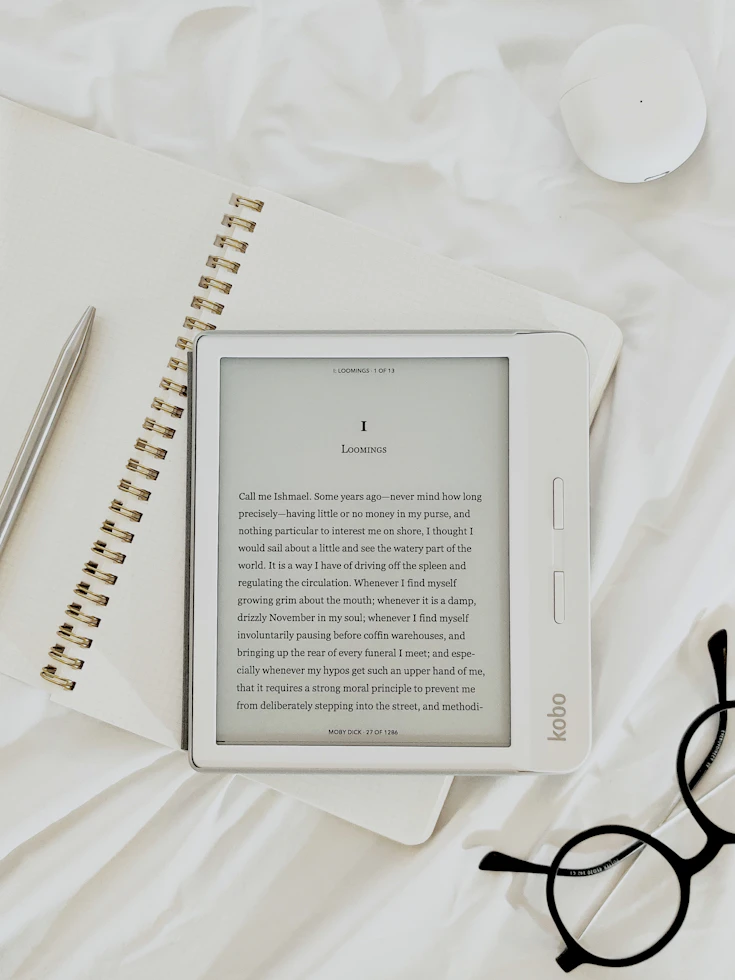
While Libby provides a massive amount of things to read, there are still times when I want something they don’t have. That’s where Bookbub comes in. I’ve subscribed to Bookbub’s service and several times a week it emails me a list of low cost ebooks to sample and then purchase. When you sign up, you tell it the subject areas you are interested in and then it proceeds to send you emails with a list of books you might like. I’ve already bought several which I then read using the Apple Books app. It also provides access to books for Google Books, the Kindle, and the Kobo, if you are not an Apple user.

For more on the Libby app, go here or here. For more on Bookbub, go here.

Happy reading!

My Top 20 tools: iPhone apps edition (2026)

Previously I wrote about my top 10 desktop tools. Here’s what I would say are the top 20 tools (apps) I use on my iPhone. I use far more apps than I do desktop tools these days. I suspect others are like that too.

  1. NYTimes: Every day I wake up and check the news. And while I might use apps for CBC News, the BBC, or The Star (Toronto news), the NYTimes is the one I depend on. Besides its great content, I believe it is the one of the best apps out there.
  2. Instagram and Bluesky: besides the news, these are the two social media sites I check when I wake up now. I gave up Facebook ages ago. Twitter died to me when Musk took over. And Threads I lost interest in. But Instagram allows me to keep up with what my friends and favorites are up to, and Bluesky lets me track the news in a different way. Also I use Bluesky as a logging journal in a way. Often when I don’t know what to blog about, I’ll use my posts on Bluesky as inspiration.
  3. Slack: another app I check first thing. It’s indispensable for work communication, especially when I am on the go. Email still lives, but Slack has taken over much of its functionality I find.
  4. Simplenote and Joplin: I mainly create and update notes using these two tools on my desktop and limit my use of the apps for reading only, but occasionally I will take notes on my phone.
  5. Workflowy: what is true for Simplenote and Joplin is also true for Workflowy. I refer to it often on my phone. In addition, when I am doing my todo list in the Workflowy app, I will cross off todos there.
  6. Google Drive: this app gets me the information I need that isn’t in the note taking apps like Simplenote. I hit it up frequently throughout the week.
  7. Jetpack: each day I like to check on how this blog is doing and Jetpack is the app that lets me do that. I can also use it to do an occasional post on this or other WordPress blogs I have, or approve people’s comments on a post.
  8. Airline Apps: if I am flying somewhere, airline apps are a must. They just make travel easier, from providing my itinerary, to guiding me through the airport, to alerting me when it is time to board. Travelling without airline apps would be that much harder without the apps.
  9. Fitbit and Wyze: if you have scales from these two companies as I have, then the apps that go with the scale are a must. Same is true for other devices that they make, like the Fitbit fitness trackers.
  10. Habit List: a great app to track your habits. It’s simple to use but it provides many good features. Recommended.
  11. TOwaste: it’s easy to lose track of what goes on the curb when. This app helps me with that. (Yes I do have many tracking apps! Maybe too many!)
  12. Spotify: Spotify is my radio. What can I say? I like music and Spotify is my source of music these days, even though I have a ton of CDs around the house.
  13. Libby: one of my favorite apps. I still read physical books, but I do much of my reading of library books using Libby. I especially love reading magazines with Libby on my iPad. It is fantastic for that.
  14. Instacart: I joke that Instacart is my favorite app. I really use it many times a week. I use it when I can’t sleep. I get it to help me find the best deals on groceries. I use it to find rare products. I should write a separate post on just all the ways I use it. It’s the best.
  15. Hue: my own personal light switch. I have around a dozen Hue devices from Philips in my house and the Hue app controls them all. It’s excellent.
  16. Scotiabank: my banking app. I can’t say if there are better banking apps. I will say I use it daily.
  17. Feedly: there are other ways of keeping track of other people’s blogs and RSS feeds, but I find Feedly the best. And there are still plenty of good RSS feeds to read, so I try and use this one at least once a week.
  18. Authenticator apps: I make an effort to use two factor authentication whenever I can. Authenticator apps make that happen.
  19. Pushover: I have remote devices I want to send me notifications occasionally. I use Pushover as a service to manage those notifications. For instance my Ubuntu server sends out an “alive and well” message every day by calling the Pushover api. The message in that api call gets transmitted to the Pushover app on my phone. If I set up a VM in the cloud, I will sometimes use pushover to get updates on that VM. It’s a fine service and a fine app.
  20. Apple apps: Almost too many to mention. They aren’t necessarily fun, but they are all highly functional and important. I’d be lost without default Apple apps like Maps, Calendar, Clock, Message, Mail, Photos, Health, Fitness, and Books.


My Top 10 tools: desktop edition (2026)

I think people benefit from seeing the tools other commonly use. Here’s mine: hopefully you’ll find it useful. A one on my iPhone apps will follow this post.

  1. Microsoft Excel: No surprise, but I use this every day. Specifically I have a master checklist in Excel that I use with supporting worksheets. One worksheet is a daily checklist, another contains my weekly goals, a third tracks meals, etc. It helps me stay focused and it helps me track what I need to stay on top of throughout the day, month, year. While I use Excel for many other reasons, that is my chief reason.
  2. Easylog, my private logging program: related to my master todo list, I have a simple logging program I wrote in python that allows me to track everything from how much I slept that night, to things I’ve accomplished, to what the weather is like. Each entry is a one liner, and each entry simultaneously goes into a local xlsx file and a remote Google sheet as a backup. It’s my one stop shop for logging what I need to log. Some things I’ve logged for years, while other items are ad hoc (e.g., headaches post brain bleed).
  3. Workflowy: another program I use many times a day is Workflowy. I use it mainly as a giant todo list. But I also use it to keep a list of things to blog about, recipes I want to cook, my bucket list, and more. As a bonus, I get it to help me whenever I am working on an outline: I can quickly draft an outline in Workflowy, sort things around, then export it into another tool. Do I use it for any form of planning? I certainly do, since it is great for that too.
  4. Simplenote and Joplin: these two tools are complimentary. Simplenote I use as my personal note-taking app, and Joplin I use for work note-taking (though I have started to use Microsoft OneNote). I used to use only Evernote, but as it got more difficult to use, I switched to Joplin. However I like Simplenote for personal items, especially recipes. My Simplenote is filled with recipes. And much much more. (Shout out to Quick Draft. Like Workflowy and Simplenote and Joplin, it has an iPhone version and a desktop version, so when I do updates on my phone, they automatically replicate to my desktop, and vice versa. I use Quickdraft to take random notes, like a scratchpad.)
  5. BOX / Google Drive / OneDrive: I use these three (and occasionally Dropbox, though less and less) for all my cloud storage needs. BOX and OneDrive are where work files go and Google Drive is where personal files get backed up. I have a custom python script to keep files on my different laptops in sync using those three storage services.
  6. bbedit: this tool is my text editor of choice. Very powerful, very dependable. A workhorse tool.
  7. IFTTT: I use IFTTT for some home automation my life. I don’t use it as much as I used to…maybe I need to reconsider that.
  8. Ccleaner and JDisk Report: maybe some day I will get a massive hard disk for my Mac, but for now mine is relatively small, so I use ccleaner to clean out files I don’t need and give me free disk space. When I need to find out what is on my Mac that is still taking up all that space, I use JDisk Report.
  9. ollama: ollama is a nice tool that allows me to run LLMs (large language models) on my Mac. I use this for work when I want to test various LLMs to see how they respond. But I have also found that with ollama and the LLM GPT-OSS-20B, I get the capability of SaaS tools like Claude or ChatGPT and the comfort in knowing my question is not being used as input for future training. Plus I just like the format of the response. If you have a Mac or a Windows machine with GPUs, I think ollama plus that LLM is a nice thing to use as your own personal AI.
  10. Visual Studio (VS) code + Roo Code / IBM Bob: most of my work these days is done using AI tools like Roo Code within VS Code or IBM Bob. Both of them are powerful interfaces to Claude Sonnet, the LLM that provides them the smarts they need. Both of them have many similarities. These AI tools have revolutionized how I do my work.

Shout out to Google Chrome which is so indispensable I don’t even think of it as a separate tool. Same goes for Terminal, which I have on the go constantly. Same for Outlook and Mail and Word and Slack. Do I use Teams? I do. Do I like Teams? I prefer Slack for messaging, but Teams is useful for meetings.

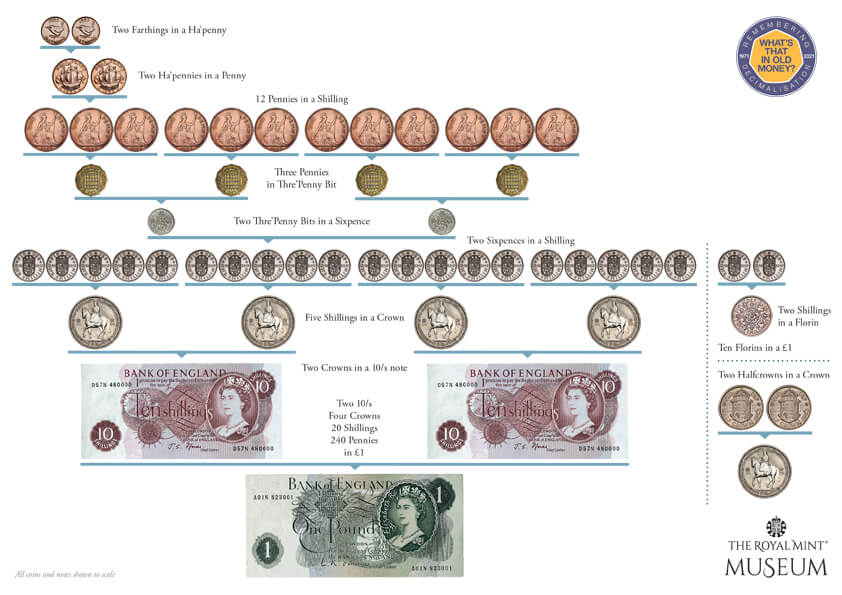
Sixpence none the richer, a half penny will do, and other thoughts on the old English currency

I was in London recently when someone said something was 50p. It got me thinking: do they still have half pence or shillings any more in England? With a bit of research I quickly discovered that a) they do not b) they got rid of all of that currency and went with a decimal system, much like Canadians did when we got rid of imperial measures and moved to the metric system in the second half of the 20th century.

The old money, like the imperial units, had a certain charm that their newer counterparts lack. Charm aside, the new replacements are easier to work with. (Although leave it to Canadians to invent the Loonie and the Twonie as coins!) I’m glad for the decimal units of money when I go to England, and I am believe most Brits must feel the same way.

For more on the old system of English money and how it was upgraded, check out this, Decimalisation, and also this, Pounds, Shillings and Pence.