My Top 20 tools: iPhone apps edition (2026)

Previously I wrote about my top 10 desktop tools. Here’s what I would say are the top 20 tools (apps) I use on my iPhone. I use far more apps than I do desktop tools these days. I suspect others are like that too.

  1. NYTimes: Every day I wake up and check the news. And while I might use apps for CBC News, the BBC, or The Star (Toronto news), the NYTimes is the one I depend on. Besides its great content, I believe it is the one of the best apps out there.
  2. Instagram and Bluesky: besides the news, these are the two social media sites I check when I wake up now. I gave up Facebook ages ago. Twitter died to me when Musk took over. And Threads I lost interest in. But Instagram allows me to keep up with what my friends and favorites are up to, and Bluesky lets me track the news in a different way. Also I use Bluesky as a logging journal in a way. Often when I don’t know what to blog about, I’ll use my posts on Bluesky as inspiration.
  3. Slack: another app I check first thing. It’s indispensable for work communication, especially when I am on the go. Email still lives, but Slack has taken over much of its functionality I find.
  4. Simplenote and Joplin: I mainly create and update notes using these two tools on my desktop and limit my use of the apps for reading only, but occasionally I will take notes on my phone.
  5. Workflowy: what is true for Simplenote and Joplin is also true for Workflowy. I refer to it often on my phone. In addition, when I am doing my todo list in the Workflowy app, I will cross off todos there.
  6. Google Drive: this app gets me the information I need that isn’t in the note taking apps like Simplenote. I hit it up frequently throughout the week.
  7. Jetpack: each day I like to check on how this blog is doing and Jetpack is the app that lets me do that. I can also use it to do an occasional post on this or other WordPress blogs I have, or approve people’s comments on a post.
  8. Airline Apps: if I am flying somewhere, airline apps are a must. They just make travel easier, from providing my itinerary, to guiding me through the airport, to alerting me when it is time to board. Travelling without airline apps would be that much harder without the apps.
  9. Fitbit and Wyze: if you have scales from these two companies as I have, then the apps that go with the scale are a must. Same is true for other devices that they make, like the Fitbit fitness trackers.
  10. Habit List: a great app to track your habits. It’s simple to use but it provides many good features. Recommended.
  11. TOwaste: it’s easy to lose track of what goes on the curb when. This app helps me with that. (Yes I do have many tracking apps! Maybe too many!)
  12. Spotify: Spotify is my radio. What can I say? I like music and Spotify is my source of music these days, even though I have a ton of CDs around the house.
  13. Libby: one of my favorite apps. I still read physical books, but I do much of my reading of library books using Libby. I especially love reading magazines with Libby on my iPad. It is fantastic for that.
  14. Instacart: I joke that Instacart is my favorite app. I really use it many times a week. I use it when I can’t sleep. I get it to help me find the best deals on groceries. I use it to find rare products. I should write a separate post on just all the ways I use it. It’s the best.
  15. Hue: my own personal light switch. I have around a dozen Hue devices from Philips in my house and the Hue app controls them all. It’s excellent.
  16. Scotiabank: my banking app. I can’t say if there are better banking apps. I will say I use it daily.
  17. Feedly: there are other ways of keeping track of other people’s blogs and RSS feeds, but I find Feedly the best. And there are still plenty of good RSS feeds to read, so I try and use this one at least once a week.
  18. Authenticator apps: I make an effort to use two factor authentication whenever I can. Authenticator apps make that happen.
  19. Pushover: I have remote devices I want to send me notifications occasionally. I use Pushover as a service to manage those notifications. For instance my Ubuntu server sends out an “alive and well” message every day by calling the Pushover api. The message in that api call gets transmitted to the Pushover app on my phone. If I set up a VM in the cloud, I will sometimes use pushover to get updates on that VM. It’s a fine service and a fine app.
  20. Apple apps: Almost too many to mention. They aren’t necessarily fun, but they are all highly functional and important. I’d be lost without default Apple apps like Maps, Calendar, Clock, Message, Mail, Photos, Health, Fitness, and Books.


My Top 10 tools: desktop edition (2026)

I think people benefit from seeing the tools other commonly use. Here’s mine: hopefully you’ll find it useful. A one on my iPhone apps will follow this post.

  1. Microsoft Excel: No surprise, but I use this every day. Specifically I have a master checklist in Excel that I use with supporting worksheets. One worksheet is a daily checklist, another contains my weekly goals, a third tracks meals, etc. It helps me stay focused and it helps me track what I need to stay on top of throughout the day, month, year. While I use Excel for many other reasons, that is my chief reason.
  2. Easylog, my private logging program: related to my master todo list, I have a simple logging program I wrote in python that allows me to track everything from how much I slept that night, to things I’ve accomplished, to what the weather is like. Each entry is a one liner, and each entry simultaneously goes into a local xlsx file and a remote Google sheet as a backup. It’s my one stop shop for logging what I need to log. Some things I’ve logged for years, while other items are ad hoc (e.g., headaches post brain bleed).
  3. Workflowy: another program I use many times a day is Workflowy. I use it mainly as a giant todo list. But I also use it to keep a list of things to blog about, recipes I want to cook, my bucket list, and more. As a bonus, I get it to help me whenever I am working on an outline: I can quickly draft an outline in Workflowy, sort things around, then export it into another tool. Do I use it for any form of planning? I certainly do, since it is great for that too.
  4. Simplenote and Joplin: these two tools are complimentary. Simplenote I use as my personal note-taking app, and Joplin I use for work note-taking (though I have started to use Microsoft OneNote). I used to use only Evernote, but as it got more difficult to use, I switched to Joplin. However I like Simplenote for personal items, especially recipes. My Simplenote is filled with recipes. And much much more. (Shout out to Quick Draft. Like Workflowy and Simplenote and Joplin, it has an iPhone version and a desktop version, so when I do updates on my phone, they automatically replicate to my desktop, and vice versa. I use Quickdraft to take random notes, like a scratchpad.)
  5. BOX / Google Drive / OneDrive: I use these three (and occasionally Dropbox, though less and less) for all my cloud storage needs. BOX and OneDrive are where work files go and Google Drive is where personal files get backed up. I have a custom python script to keep files on my different laptops in sync using those three storage services.
  6. bbedit: this tool is my text editor of choice. Very powerful, very dependable. A workhorse tool.
  7. IFTTT: I use IFTTT for some home automation my life. I don’t use it as much as I used to…maybe I need to reconsider that.
  8. Ccleaner and JDisk Report: maybe some day I will get a massive hard disk for my Mac, but for now mine is relatively small, so I use ccleaner to clean out files I don’t need and give me free disk space. When I need to find out what is on my Mac that is still taking up all that space, I use JDisk Report.
  9. ollama: ollama is a nice tool that allows me to run LLMs (large language models) on my Mac. I use this for work when I want to test various LLMs to see how they respond. But I have also found that with ollama and the LLM GPT-OSS-20B, I get the capability of SaaS tools like Claude or ChatGPT and the comfort in knowing my question is not being used as input for future training. Plus I just like the format of the response. If you have a Mac or a Windows machine with GPUs, I think ollama plus that LLM is a nice thing to use as your own personal AI.
  10. Visual Studio (VS) code + Roo Code / IBM Bob: most of my work these days is done using AI tools like Roo Code within VS Code or IBM Bob. Both of them are powerful interfaces to Claude Sonnet, the LLM that provides them the smarts they need. Both of them have many similarities. These AI tools have revolutionized how I do my work.

Shout out to Google Chrome which is so indispensable I don’t even think of it as a separate tool. Same goes for Terminal, which I have on the go constantly. Same for Outlook and Mail and Word and Slack. Do I use Teams? I do. Do I like Teams? I prefer Slack for messaging, but Teams is useful for meetings.

Habit List: an app that has really helped me with keeping my habits

If you are looking for an app that can help you form good habits, I highly recommend this one: Habit List

Things I like about it:

  • it is easy to add new habits to your list
  • you can decide the frequency of the habit: daily, weekly, 3 times a week, etc. It’s very flexible
  • it’s quick to update
  • you can track your streaks, completions, and best streaks which I find motivating
  • you can set reminders
  • you can export your data
  • it is priced reasonably: you can track a few habits for free and after that I think it has a one time charge of less than $10. Compared to some apps that want you to pay over $100 / year, it’s a bargain.

Check out the link above for more details. If it sounds good, download it for free and start with a few habits you want to work on. I think you’ll be glad you did.


If you have to buy one chef’s knife…

If you have to buy a chef’s knife, then head on over to the Wirecutter and check out their list of the 4 Best Chef’s Knives of 2023. Here’s their recommendations:

  • Mac Mighty MTH-80 – The best chef’s knife
  • Tojiro DP F-808 – An affordable Japanese knife
  • WĂĽsthof Classic Ikon 8-Inch Cook’s Knife – A classic German knife
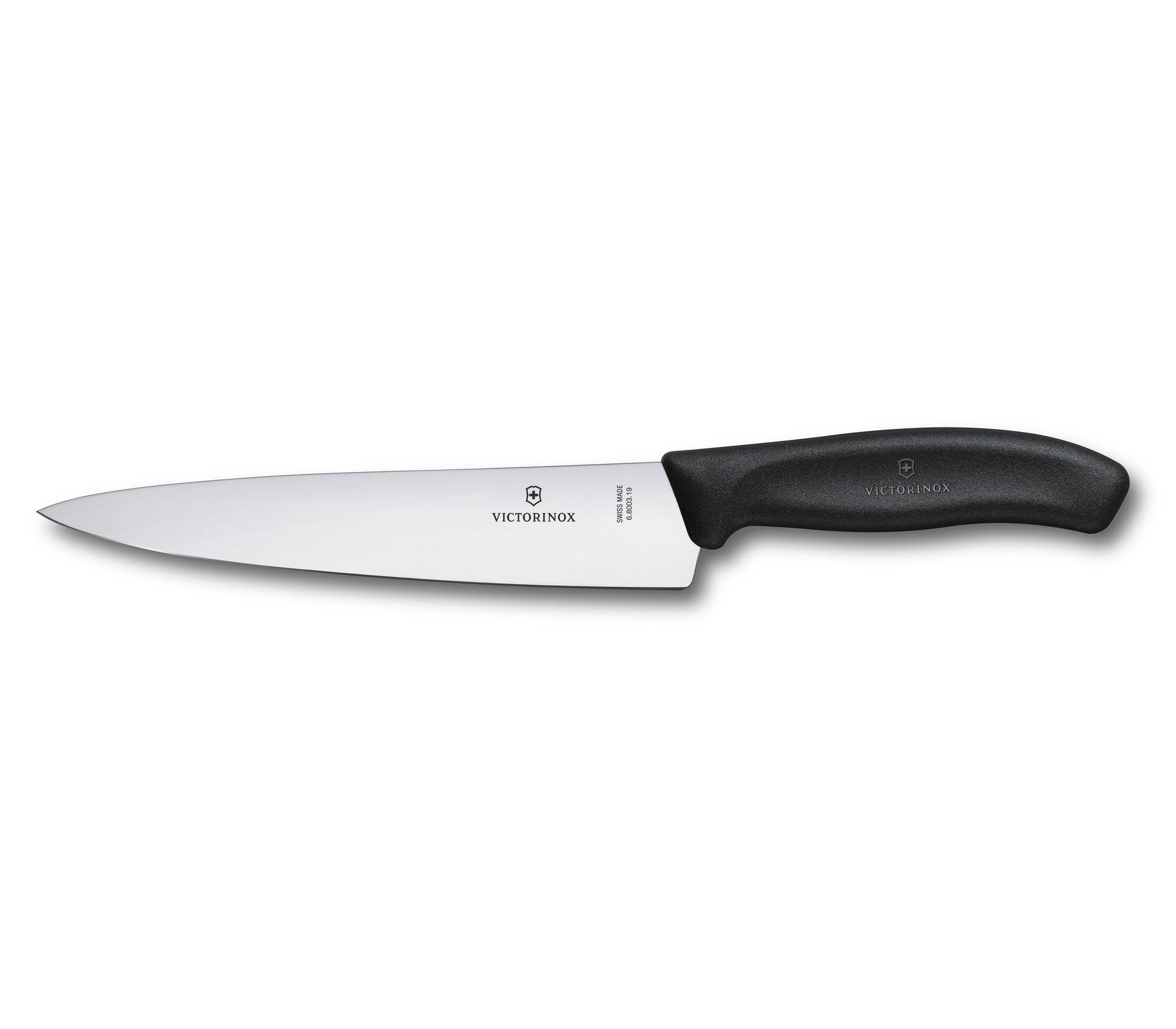
  • Victorinox Fibrox Pro 8-Inch Chef’s Knife – Sharp and affordable

If you have to buy only one and money is an issue, then go with the Victorinox. It’s not just the Wirecutter: I’ve seen a number of places that recommend it as the best budget knife, like The Food Network.

It’s easy if you have the money to stock up on kitchen knives. They all have different feels, different steel, and of course different blades. But if your options are limited, go with the Victorinox.

On Palomino Blackwing pencils

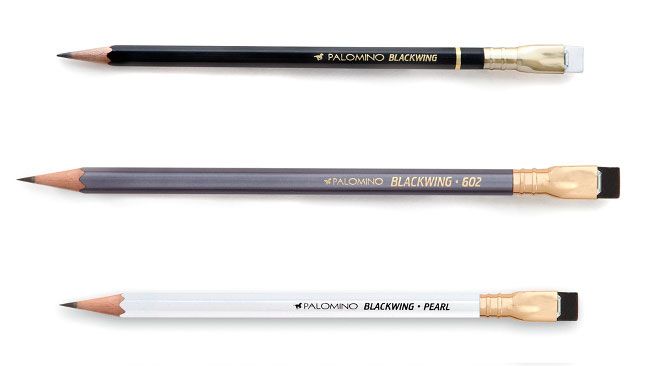
Plenty of people are big fans of these pencils, including the person who wrote this: Palomino Blackwing Pencils review | Creative Bloq. (10/10) One thing they highlighted about them was their softness:

The Blackwing is the softest, then the Pearl, then the 602. We would compare them to 5B, 4B and 3B pencils in value.

I’ve been using a Blackwing consistently over the past few week and I found that as well: it does write like a 4-5B pencil. If you like that kind of line, great. If you like a harder lead like I do, you might want to avoid them.

Other reasons to avoid them are they are expensive and you have to sharpen them a lot because soft.

It’s a nice looking pencil. But I think I might stick to harder pencils that cost less.

MindMup 2: a good web based mindmapping too

I’m a fan of mindmapping tools in general. One I’ve been using and enjoying lately is MindMup 2. 

Two things I like about it:

  1. It’s simple to modify your mindmaps on the go. You don’t need to do much to add or modify your map.
  2. It’s also simple to export your mindmap into a number of different formats. If you occasionally use mindmaps or you want to start with a mindmap to generate ideas but then you want to do the majority of the work in Word or some other tool, this is a good feature.

Mindmup_2 is a good tool. Go map your thoughts.

You need good work tools to be your best at work. Here’s 11 for you to consider


We all get in ruts where we use the same tools every day for our office work. When that happens, what we need is someone to come along with a new list of tools and what makes them great.

Here is such a list. I didn’t create it, but I have used 3 of the 11 tools here and I can say they are key to making me more productive every day. I plan to use the rest of them too, based on the description of them.

Sure, you can do fine with Microsoft Office tools. This list will help you do better: 11 Most Used Tools & Apps Essential to my Work – DESK Magazine

(Image via pexels.com)

How many days until….

Clock
If you want a simple way to determine how many days until a certain date, or have a count down clock on your screen, consider the web site days.to. If you go to that link, you can see all the things you can do with the site. If you want to determine how many dates until a certain date, enter https://days.to/dd-month/year. For example, if you want to know how many days until January 1, 2020, enter: https://days.to/1-january/2020

Great little site!

My new productivity tool: E.gg Timer – a simple countdown timer

My new favorite productivity tool is this site: E.gg Timer – a simple countdown timer. Whenever I am procrastinating, I will use it to get myself to focus by starting it for 5, 10, or more minutes and telling myself: I will focus until the timer goes off. I have found this approach very effective, and this site helps me. It also helps because if I find myself going to my browser to mindlessly go on some time wasting site (hello, Twitter!) I will see this and I will remember to focus.

Fans of the pomodoro technique will see there is a special timer just for it.

As a bonus, you can use it to do a high intensity tabata workout.

Great tool. Highly recommended.

Want to start a startup? All you need for that is here

And by here, I mean this site: Startup Stash – Curated resources and tools for startups. It is an amazing collection of tools you likely will need, for one thing. Plus, it has a superb user interface that not only groups the tools well, but gives you a sense of all the things you need to think about if you are going to go forward and create your own startup.

If you aren’t seriously thinking about startups, but would like to know about new tools to make you more productive at work, then I recommend you check out this site too.

Kudos to the creator of the site. Well worth a visit.

Are you trying to convert Word documents to HTML?

If so, you know of all the …stuff…Word will add in there. I understand why Microsoft does it, but I would rather not have it. If you are in the same boat, I recommend you check out this site: Convert Word Documents to Clean HTML. It gives you the ability to take snippets of said HTML and clean it up for you.

It has it’s limits, but worth a look. Or to your tool box.

10 ways to get more out of another great tool, Evernote

Yesterday was about ifttt. Today it is all about another great tool I highly depend on: Evernote. Evernote has become my go to tool for capturing information. (Bonus: it works great with ifttt). There are many great ways of using Evernote. If you are using it or planning to, here are at 10 for starters: 10 Tips On How to Use Evernote To Its Fullest « The Solopreneur Life®.

Please share any other tips you have. I find the one key tip I have for users of Evernote is this: the more you use it, the better it gets.


Uber.com – build better personal sites with Uber and take advantage of the web 2.0 facilities

is a site for building your own web site around web 2.0 concepts. It is “alpha” if you ask me, but it has alot of potential to be great.

One feature I really like is the ability to make great slideshows. This part is good. Here’s a few I made as a test

http://berniemichalik.uber.com/SC_parade_2007

http://berniemichalik.uber.com/Dec2007

or go to Uber for more info.

Zoho Gets better and Better

Over at the blog Compiler from Wired.com is a good review of the latest AND greatest features in Zoho Writer. Key quote:

While it isn’t feature complete just yet, Zoho Writer is getting very close to the ideal in online editing with word processing software that works equally well in offline and online modes. With big names like Google Docs, Microsoft Live and even Adobe all vying for your online office loyalty, there’s no doubt that if offline functionality matters to you, Zoho has the lead.

The great Kevin Kelly

One of FM’s author is Kevin Kelly, of Kevin Kelly — Cool Tools

He’s much more than this. He has been doing cool stuff for many years, whether he was working on the Whole Earth Catalog (the Internet in a catalog form 🙂 ) or helping launch WiReD (before it became TiReD). His cool tools section of his web site always has interesting articles in it.

It’s a shame the Whole Earth Review isn’t around anymore. But KK’s web site is: soak it up.