
Instacart recipes have a secret ingredient: AI. What cooks should know.

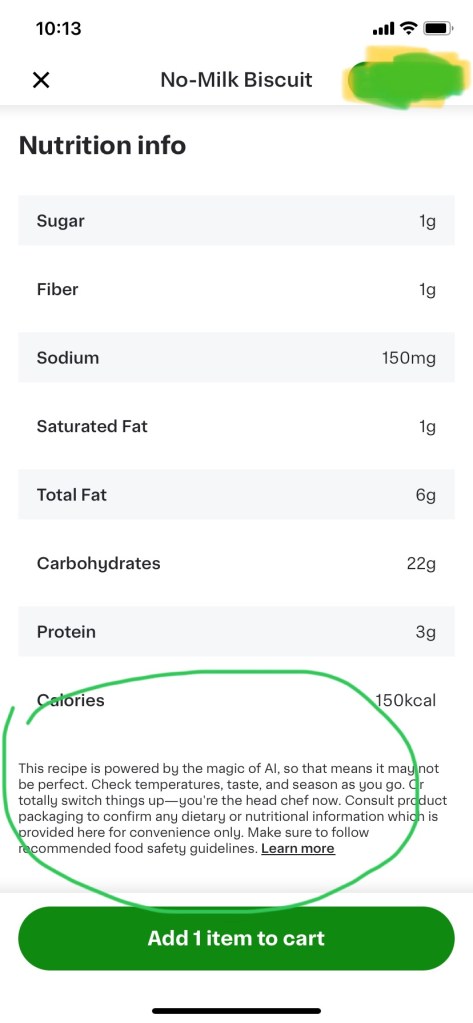
One convenient feature of Instacart is a listing of “Related recipes” it will provide you if you are searching for a product or ingredient. For instance, I was searching for “biscuits” and one of the recipes that appeared to me was no-milk biscuits. Hmmmm, that could be good and simple, I thought. Seemed reasonable too. Then I scrolled down the bottom to the recipe and came across the text: this recipe is powered by the magic of AI.

First off, let me say: AI is not magic. Second, this COULD be a good recipe. Or it could be something where AI hallucinated ingredients or quantities. For this recipe, it is somewhat close to this recipe for dairy free biscuits at allRecipes.com, but it is missing some ingredients and the quantities of some of the ingredients are different. I searched other recipes at other sites, and while it is close to them, it seems…lacking…in comparison.

Simply put: you would be better off getting recipes from either reputable cookbooks or websites where recipes are tested and confirmed. It is convenient to use the recipes in places like Instacart, because you can easily add the ingredients of the recipe to your shopping cart, but the results from the recipes generated by AI could leave you very disappointed. Especially when it comes to baking!

P.S. Not to pick just on Instacart: I suspect we are going to see more and more of this type of AI generated advice on websites. Keep an eye out for it.

Things better on the iPad than my iPhone

Apple released it’s latest iPad (Pro) recently and whenever this happens people debate the value of the iPad in general and ask questions like: is the iPad worth it? 

I used to ask myself that question too. After all, between my iPhone and my Macbook, I thought I had all the computing technology I needed. But in the last year I got a new iPad — not even the latest and greatest — and I have to say that the iPad just does certain things better than either one. It’s especially better than my iPhone for:

  • Streaming video: Disney, Netflix, YouTube and more are all much better than my iPhone.
  • The library app Libby is much better, especially with the magazine section
  • The news sites like the New York Times and Washington Post are great on the iPad
  • Instacart: I can see more options when I order from it
  • Shopping sites like Zara and Uniqlo are better too for the same reason
  • X and other social media sites look great on my iPad, but not threads or Instagram because of some design ideas Meta has that are wrong.

And what I like about the iPad over my Macbook is a) there is no work apps on it so I don’t get distracted by work b) I can recline with the iPad (I don’t like doing that with the Macbook…it’s just no comfortable).

That’s just a start of my list.  I’ll keep updating this list for anyone debating getting an iPad. 

What’s it like to be an instacart shopper

I’ve written a number of things on Instacart from the viewpoint of a user of the service. Now here is something on what it’s like to be an Instacart shopper. The piece is centered on a day in the life of Larry Askew, who works for Instacart early in the morning and Uber at night. Larry alone is worth reading about.

One thing that struck me was how some shoppers use bots to scoop up the best of what Instacart offers its shoppers. I imagine it’s not unlike people using bots to snag tickets for events.

Besides that, I learned a lot about the service I didn’t know before. It’s a good piece, and if you use Instacart, I highly recommend it.

P.S. Always treat your shopper well, and that includes tipping. Do not tipbait, especially. Thank you.


Instacart users: is Instacart changing the default tip percentage from 5% to 10%?

According to Instacart Help Center on Tipping

Instacart suggests a default tip based on a number of factors, such as order attributes and your tip history. The minimum default tip is 5% of your order total.

Which it has been for some time. But my last few orders the default tip was 10%. If you are like me and you just automatically power through all the things they put in front of you on your way to complete your order, you might not even notice it.

There does not seem to be a way to change the percentage back. You have to do it manually each time you get an order.

If 10% is what you normally tipped anyway, then you are all set.  If you want more flexibility over your tip, be advised.

Instacart tips, (some) from Food & Wine and (lots from) me


Over at Food & Wine, they have a good set of tips on: How to Be a Better Instacart Customer. Some of them are blatantly obvious (“Don’t Weaponize Your Tips”…yeah, no kidding) and others are good reminders (“If you don’t communicate clearly, shoppers can’t do their job.”)

I’ve been using it for awhile, and I like it. Here’s some tips from me that I find make my shopping experience better:

  • Use the Buy it Again feature. It can save you time.
  • If you are going through the Buy it Again feature, you can always search for something new, then come back to where you were in Buy it Again.
  • Double check your order before you order it. You might find you ordered two or more similar items. You can also take the time to delete those impulse items you threw in your cart.
  • It can be faster to add things to your cart at first and then delete before you buy, rather than looking up things one at a time.
  • Get creative on your searches. Typing the name of a cuisine (e.g. Chinese) might not only show your products you expect, but some you did not that you might be keen to order.
  • Check your order as soon as it arrives. I put mine away once and only hours later did I realize that I was missing a whole bag of food.
  • If you are missing things, let Instagram know. Hey, it doesn’t often happen, but it can happen. They will credit you if you are missing something. And when I have received something I shouldn’t, they let me just keep it. YMMV.
  • Be available for when you will be getting the order. You don’t want your order sitting outside for ages.
  • Book your order for later if you can. You can save a couple of bucks that way. But you should know that  it will often come earlier than you signed up for. The idea seems to be to get you your order ASAP.
  • Be specific where you want your order. I tell people not to put it in front of my door, because it opens out, not in, and I can’t get out to get the food if it blocks the door.
  • Look for things that are in stock. You are less likely to be disappointed.
  • Look for deals. Not everyone has them. Walmart, for instance, used to have them, but not anymore (at least in Toronto).
  • Comparison shop between stores. You may be shocked by the differences. But don’t get fooled by loss leaders: you might save on a few items, only to end up paying out more in the end.
  • Make sure you have Replacements listed for things you really need to have. If you really need eggs or milk, make sure you have a good replacement (e.g. XL eggs instead of large, 1% milk instead of 2%).
  • Don’t assume all shoppers will look for replacements and ask you. Some are great, others seem to just refund many things. Most are really good, in my experience.”