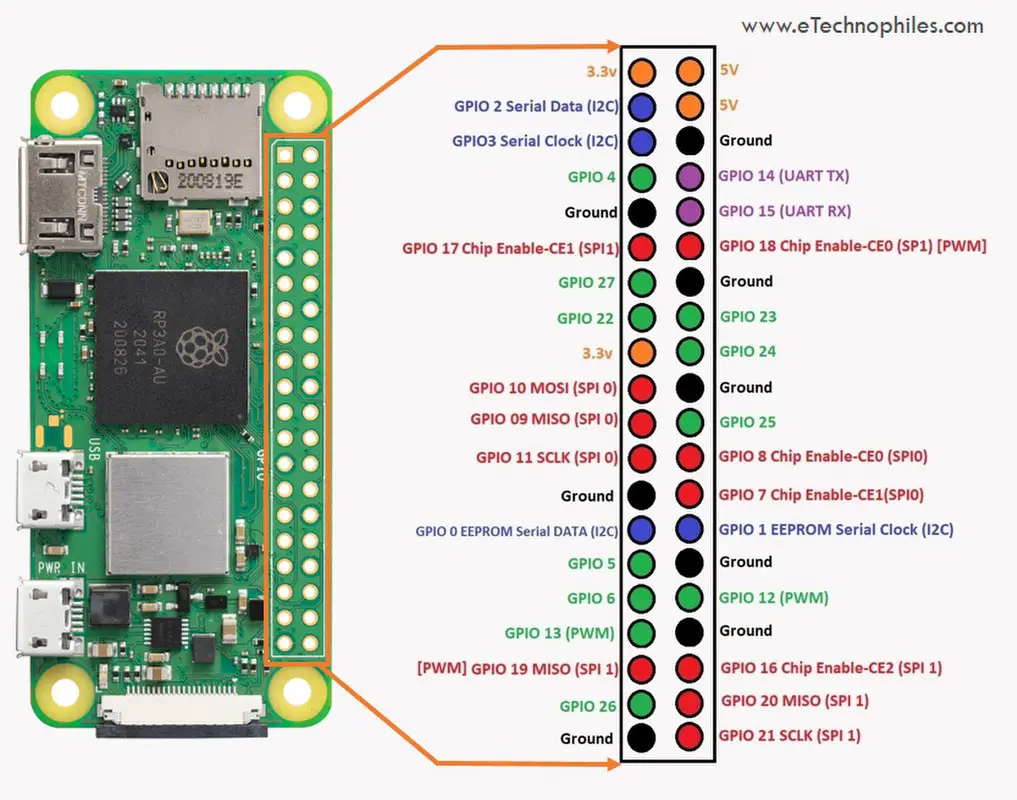
Over the last year I’ve been working with various Raspberry Pi products, from the Pi Pico to the all-in-1 400 series. Along the way, I’ve found these links / articles to be useful for me. I hope they might help you too.
How To Guides: Here’s a variety of how to articles for various Raspberry Pi products:
- Here’s how to disable Auto-Login on Raspberry Pi OS
- Herer’s How to install pip on the Raspberry Pi
- Here’s wow to power the Raspberry Pi Pico? 6 Different ways
- How to boot without starting x server.
- How to raspberry pis working with remote ir receivers.
- How to use ifttt with the raspberry pi.
- How to get the display settings right on Raspberry Pi.
- How to use the Raspberry Pi Touch Display.
- How to set up a raspberry pi pico weather station.
- More on the pi zero and blinking an led. And some more good stuff on basic gpio control on raspberry pi zero w to get a blinking an led.
LCD/OLED output: If you want to use LCD or oled displays with your Pi, check out how to get Billboard Scrolling with LCD Display & Raspberry Pi Pico. Here’s how to get your raspberry pi working with your oled. More on that, here: using ssd1315 oleds with the raspberry pi pico. Also here .
RPis’ config.txt: If you want to use your Pi with an old composite display, then you need to learn more about the config.txt file. So here’s click on the links to know about the config.txt file: here and here and here and here.
If you are having problems with output display, check those out. Also, how do i shrink the screen with composite out is good. So is this: how to add an rca tv connector to a raspberry pi zero.
Pin settings: Pin settings articles for the Raspberry Pi are here and here and here. Finally, here’s the pin layout for the Digispark Pro. More on the Digispark here.
P.S. Posted on 3/14 for obvious reasons. 🙂


 It’s been a tumultuous time when it comes to the current workplace, or at least business writers think so.




 Smart People I Know