1984: the year computing changed

The above photo is from a 1984 photo of a worker at IBM in Böblingen. It’s a fairly typical image from then (I know, I was there at that time, though in a different place.) Most of the computer equipment in that room is associated with the mainframe that he’s working on: tape drives (back right), storage (front right), network (front left), consoles (middle). The one exception is the IBM PC behind him.

1984 was the year Apple introduces Macintosh. 1984 is the start of the personal computer revolution that would sweep all that mainframe technology aside. And while the Mac was important in the PC revolution, the IBM PC was just as important.

P.S. I thought of that when I heard the IBM campus at Böblingen is being phased out.

P.S.S. IKEA is currently selling a version of that table, here (the BAGGBODA).


On the recent AWS outage of October 2025

Looks like AWS just published their post-mortem of their big outage this week: you can find it here.

For a lay person, this explanation might suffice.

CNN also has a good synopsis that includes other recent major outages and asks: why does this keep happening?

I think it is safe to say that we will see more of these major outages in this decade. So keep good backups, among other precautions. 🙂

My dream of working from home started with this ad for IBM and Coppola’s Thinkpad (publish those visions you have)

The computer above, and the ad it is, came out in the mid 90s.

It was possible to work from home then, but it was not easy. I used to have a luggable computer that weighed 40 pounds and which I would …lug… home every day one summer to work from home. What I dreamed for, though, was to work from home with a small laptop like Coppola’s. A laptop where I could work from home daily, be it at a desk or in a beautiful kitchen like the one above.

It eventually happened. The laptops got better, the networks got better, and eventually the work cultures got better and I could do this. My kitchen wasn’t as nice, but everything else was nice.

Creative people, keep putting out your visions for a better world. You never know what dreams people will have. It might be as simple as a dream of working on a laptop in a kitchen. A dream that becomes more achievable once people can envision it.

My annual robot survey, 2025 edition


Time for my annual review of what I’ve seen happening in the world of robotics in the last 12 months. Progress in robots, unlike other forms of IT, tends to be slower and incremental. Not surprising: robotics is hard. If you look at the robots I featured last year and compared them to these robots, you won’t see dramatic changes. Still, it is interesting to note the progress made and the limitations still encountered.

Robots in factories are still where the bulk of robots can be found. Despite widespread adoption, they still have issues with basic tasks, as this study of robots in Amazon warehouses shows. Will that mean we are away off from amazon having package delivery humanoid robots? I’d say yes.

Home robots tend to be limited to one floor. But according to this, they are close to navigating stairs. That could be a game changer. Maybe some robots will get around your house like this tiny pogo robot does? Call me skeptical. Still, engineers keep trying to give robots more range, as we see here.

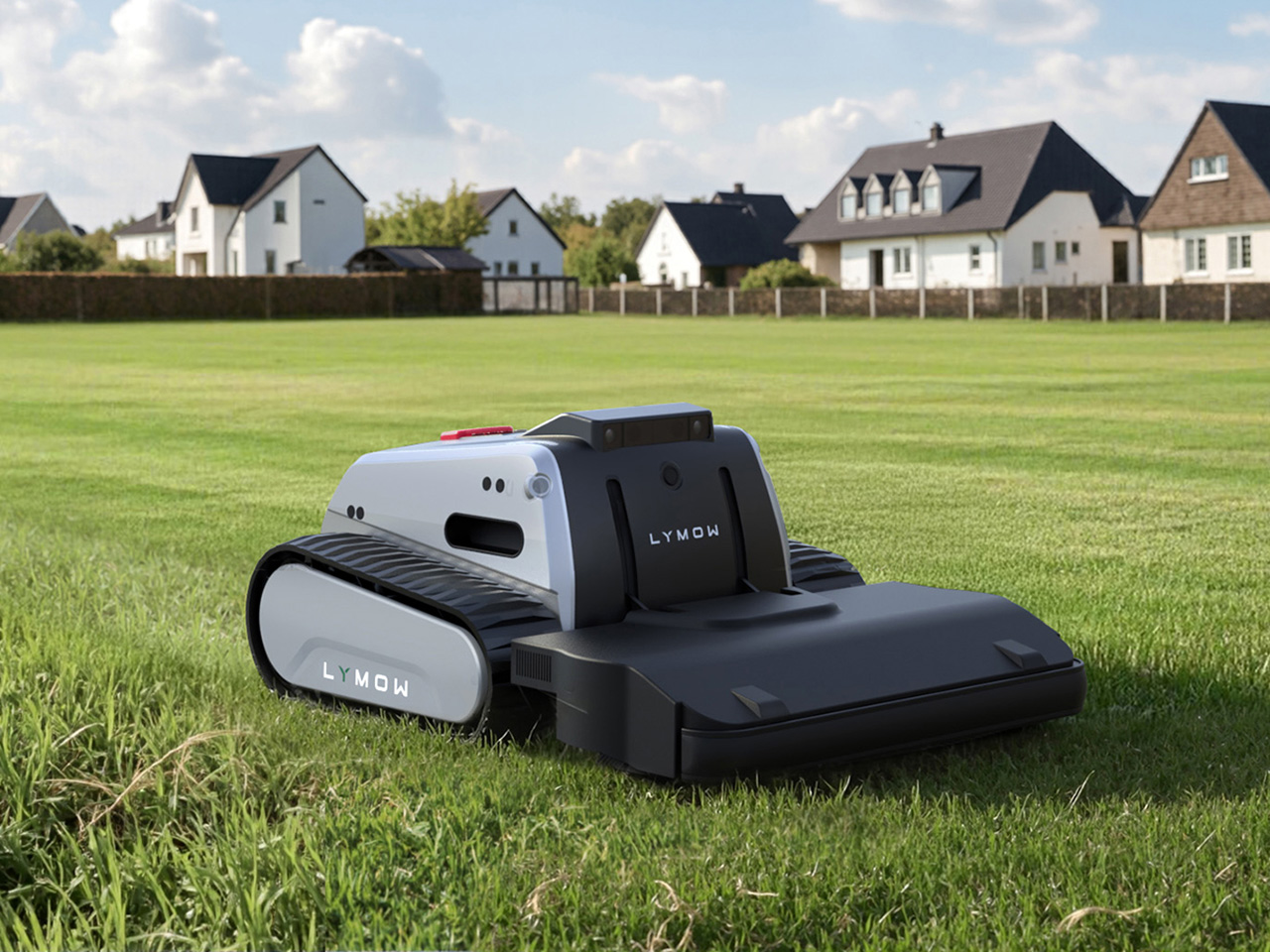
Not all home robots are limited to the floors of your house. This here contratrapion is a brainless soft robot that runs on air, while these 5 robotic lawnmowers hit the great outdoors. Speaking of robots and grass, there may come a day when your caddie is a robot.

It’s not all hard labour for home robots. These cute little fellows are mainly for emotional support for seniors. I question whether this pomodoro desk robot is an actual robot but I do agree it is the “cutest way to boost your productivity “. Speaking of desktop robots, this cute desktop robot gets gloomy when your room becomes unhealthy.

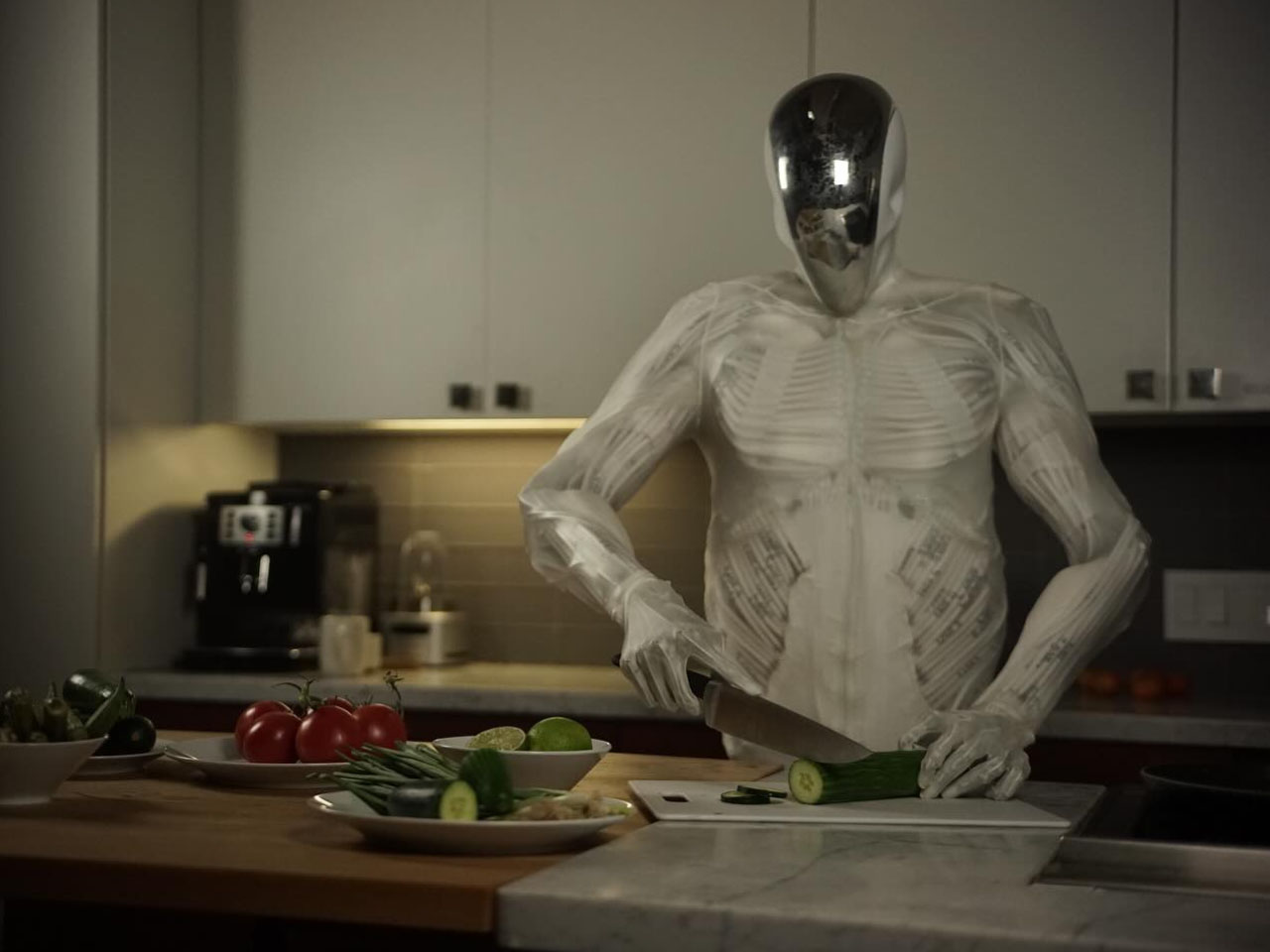
Finally, not all robots are cute: a lifelike robot that mimics human anatomy with complex muscular system is pretttttty creepy (see below).

One last note: the province of Ontario “began a ten-year pilot program in 2016 to allow the testing of automated vehicles (AVs) on Ontario’s roads under strict conditions, including a requirement to have a driver for safety reasons.” (In my mind, AVs are just another form of robots.) The program is still on going and I expect to see more developments on it. You can read more on that, here.

Thanks for reading this. I’ll be curious to see what happens with robots over the next year. Let’s see!

A good guide of how to create a web page with some css

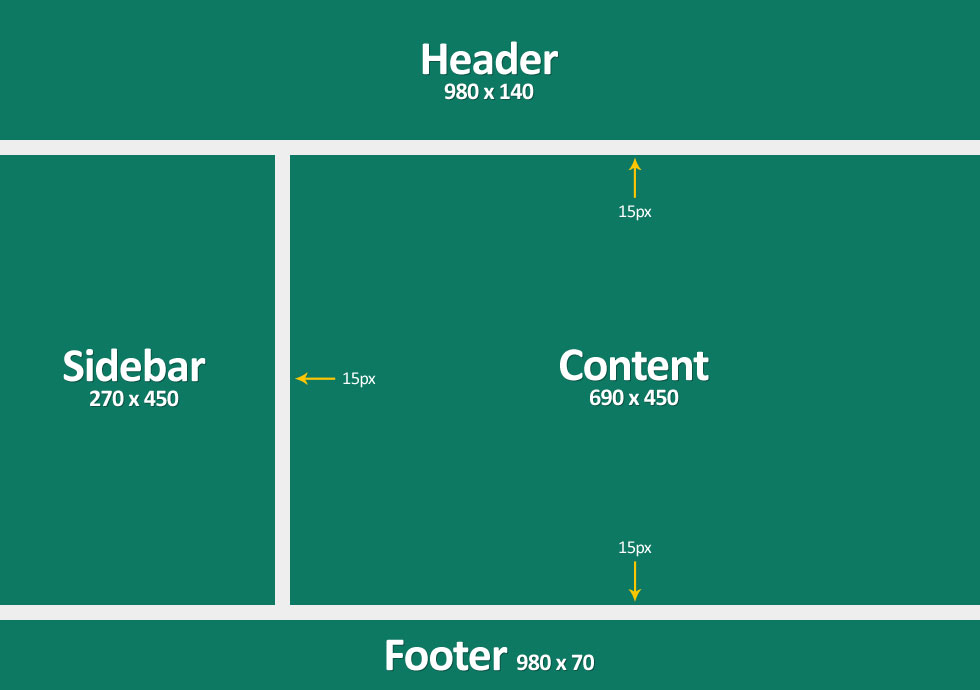
If you want to create a basic web page with some css, I recommend you check out this. In no time you will have a web page structured like this:

If you want to have something even simpler, I have it here.

Of course you can use something bootstrap to make a nice webpage too. Indeed a page built with bootstrap is more flexible than the page above. For more on that, check this page out.

Some thoughts on using chatGPT to write a program to determine which foods are fresh in Ontario

It is easy to find out which foods are fresh in Ontario. There are several guides, including this one from Foodland Ontario, that can help you with this. However, I wanted a particular guide that would list for me all the fresh foods for a given month only.  And since I couldn’t find a guide like that, I decide to write a python program to make such a guide.

In the past, to write a program like that, I would go through sample code I have, pull out bits of code that were good, and cobble together something from all these bits. Lately, though, I simply ask a service like ChatGPT or others to write the code for me. I find nowadays it’s just so much faster to go that route. Call me lazy. 🙂

Since I wanted this done quickly, I pointed chatGPT at the Foodland Ontario guide and asked it to do the following:

Write a python program that strips out the text on this page https://www.ontario.ca/foodland/page/availability-guide?gad_campaignid=22412095602
and leaves just the foods and the month they are grown on. Include all food that states that is Year Round.

Did ChatGPT do that? Yes, it did. Was the program any good? No, it was not! It somehow looked at that web page and decided the values were stored in a table, even though they were not. The web page is more complex than that and so the program was a pretty failure.

After many prompts, I gave up and took an alternative approach. For this new approach, I stripped out the data manually and created a simple CSV file. I then asked ChatGPT to write a program to process the CSV file. Since it is a simpler file, ChatGPT was able to produce a workable Python program that was able to process the CSV file and output the information I needed.

Perhaps a more skilled prompt engineer could have written a better prompt to process the code. I dunno. I am finding that LLMs — not just ChatGPT — are fine with writing some straightforward code based on non-complex inputs and outputs. They are not so fine once the inputs or outputs get complex. But that’s just my experience. YMMV.

I have also concluded that even warmer months like May in Ontario do not have much in the way of fresh food. No wonder there are so many food stories on asparagus and rhubarb! 🙂 You really need to hit June or later before you get into a cornucopia of fresh produce.

If you’d like to see the end result of my coding, go here to this repo: https://github.com/blm849/ontfoods


It’s time for PI (What I find interesting in tech, special raspberry pi edition, Mar. 2025)


Over the last year I’ve been working with various Raspberry Pi products, from the Pi Pico to the all-in-1 400 series. Along the way, I’ve found these links / articles to be useful for me. I hope they might help you too.

How To Guides: Here’s a variety of how to articles for various Raspberry Pi products:

LCD/OLED output: If you want to use LCD or oled displays with your Pi, check out how to get Billboard Scrolling with LCD Display & Raspberry Pi Pico. Here’s how to get your raspberry pi working with your oled. More on that, here: using ssd1315 oleds with the raspberry pi pico. Also here .

RPis’ config.txt: If you want to use your Pi with an old composite display, then you need to learn more about the config.txt file. So here’s click on the links to know about the config.txt file: here and here and here and here.

If you are having problems with output display, check those out. Also, how do i shrink the screen with composite out is good. So is this: how to add an rca tv connector to a raspberry pi zero. 

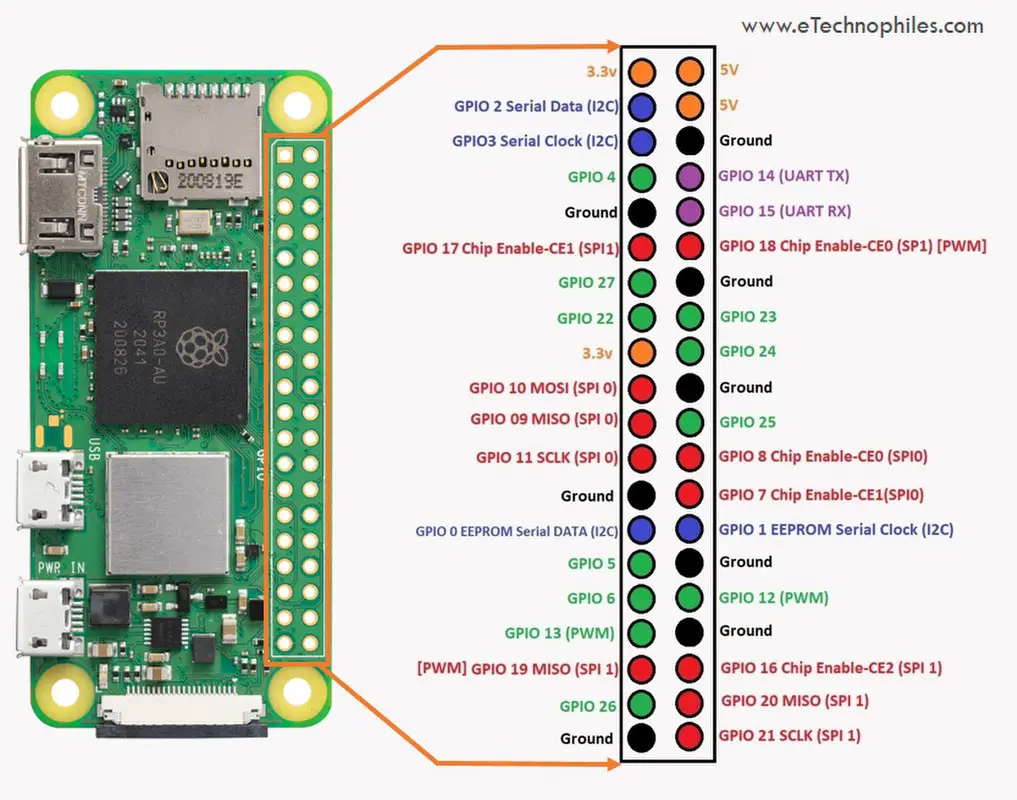
Pin settings: Pin settings articles for the Raspberry Pi are here and  here and  here. Finally, here’s the pin layout for the  Digispark Pro. More on the Digispark here.

P.S. Posted on 3/14 for obvious reasons. 🙂

Generative AI = relational databases

tables of information


Imagine you have a database with two tables of information: customer information and account information. The one piece of data that both tables share is account ID. With relational database software, you can use it to tie the two tables together. So if a customer comes to you and asks for their current balance, you can ask them for their account ID and some other personal info. Then you can query that database with the account ID and verify who they are because you can see their customer information and then once you validate them you can also see their account information and you can get the computer to print out their balance. The database, in this case a relational database, relates the two source of information (customer info and account info) and lets you retrieve that information.

Now the nice thing about relational databases is you can further relate that information to other sources of information. If you have a table of products you want to promote to customers depending on their net worth, you can query the database for the accounts that meet the product criteria and then pull up the customer information and mail them the information about their product. You’ve related three different tables of information to do this and pulled it together using a query.

When it comes to generative AI, the prompt you enter is also a query. The gen AI system doesn’t search tables though. Instead it searches a model it has that was build with sources of information it was trained on. If it was trained on Wikipedia, then all those pages of Wikipedia are not unlike tables being queried. The difference is the gen AI system uses its algorithm to determine how all that Wikipedia knowledge relates to your query before it gives you a result. But in many ways you are querying the gen AI systems just like you might query a relational database.

Of course generative AI has much more power than a simple relational database. But in many ways the two things are the same. We need to start looking at it then the same way. we can do many clever things with relational databases but don’t think of them as intelligent. The same should hold for generative AI.


Some thoughts on data centres and the environment

325 Front Street West III

People are worried about data centres.

People are worried about data centres and carbon emissions, especially if they read articles like these: Google’s carbon footprint balloons in its Gemini AI era, or Microsoft’s AI obsession is jeopardizing its climate ambitions or Google’s greenhouse gas emissions are soaring thanks to AI or Exxon Plans to Sell Electricity to Data Centers.

People are also worried about data centres and water usage after they read articles about how much water is used for each ChatGPT query.

And when people read pieces like this, Amid Arizona’s data center boom, many Native Americans live without power, they are no doubt worried about what data centres do to the communities where they reside.

My thoughts on this, as someone who has worked in data centres for 40 years, is that there are valid reasons to be concerned, but there are positive aspects to data centre growth and it’s important to keep those in mind.

Data centres are simply places with a concentration of information technology (IT). One time companies had data centres on a floor of their building, or in special buildings in locations like the one pictured about on 325 Front St in Toronto. These days, many companies are moving from hosting their own technology in their own buildings and moving that tech to cloud computing locations, which are just another form of data centre.

I believe that’s this migration to the cloud is a good thing. As this states:

Research published in 2020 found that the computing output of data centers increased 550% between 2010 and 2018. However, energy consumption from those data centers grew just 6%. As of 2018, data centers consumed about 1% of the world’s electricity output.

Moving workloads from on premise infrastructure to cloud infrastructure hosted in big cloud data centres saves on energy consumption.  One of the reason for the savings is this:

…normally IT infrastructure is used on average at 40%. When we move to cloud providers, the rate of efficiency using servers is 85%. So with the same energy, we are managing double or more than double the workloads.

You might think all this data centre growth is being driven by things like AI and crypto, but according to this IEA report:

Demand for digital services is growing rapidly. Since 2010, the number of internet users worldwide has more than doubled, while global internet traffic has expanded 25-fold. Rapid improvements in energy efficiency have, however, helped moderate growth in energy demand from data centres and data transmission networks, which each account for 1-1.5% of global electricity use.

That’s the key point: the demand for digital services is driving the growth of data centres. Every time you watch a video on your phone or pay your bills on your computer, you are using a data centre. Even things like the smart meter on your house or the computer in your car or the digital signs you see interact with a data centre. You use data centres pretty much all day, sometimes without knowing it.

The good news is that there are innovations to make them greener are happening with them, like this new method for liquid-cooling data centres that could make the waste heat useful. And it’s good that IT professionals are moving towards green cloud computing.  But it’s not good that with the rise of technologies like generative AI, IT companies are having a difficult time keeping up with the demand and sticking to their green targets.

Speaking of gen AI, I think energy costs associated with AI will peak and come down from the initial estimates. Indeed, when I read this article Data centres & networks – IEA, and in particular this…

Early studies focused on the energy and carbon emissions associated with training large ML models, but recent data from Meta and Google indicate that the training phase only accounts for around 20–40% of overall ML-related energy use, with 60–70% for inference (the application or use of AI models) and up to 10% for model development (experimentation). Google estimates that ML accounted for 10-15% of its total energy use in 2019-2021, growing at a rate comparable with overall energy growth (+20-25% per year over the same period).

… then I am optimistic that energy costs will not be as bad as initially estimated when it comes to AI. I am not optimistic that we will not decrease our demand for digital services any time soon. Because of that demand, we need not just more data centres, but better ones. It’s up to companies to build them, and it’s up to citizens to keep the companies accountable. The best way to keep them accountable is to better understand how data centres work. I hope this post went some small way to doing that.

P.S. All the opinions expressed here are my own and do not represent the views of my employer.

(Photo by Jack Landau on Flickr)

Lessons learned from working on my Raspberry Pi devices (and Raspberry Picos too)

This week I successfully set up five Raspberry Pi devices at home: 3 Pi Zeros, 1 Pi 400, and 1 Pi original. Plus I have two old C.H.I.P. computers that work. I had struggled with using them in the past, but this time it was a breeze due to the lessons I’ve learned. Here’s some of these lessons:

Get wireless ones: I originally had Pi Zeros and Picos without wireless capability. And that can be fine if you know you don’t need it. But it is helpful to be able to have them communicate wirelessly and it gives you more flexibility, even if it costs a few more bucks.

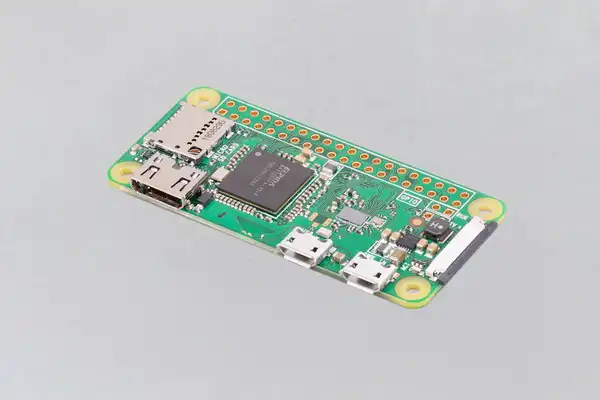
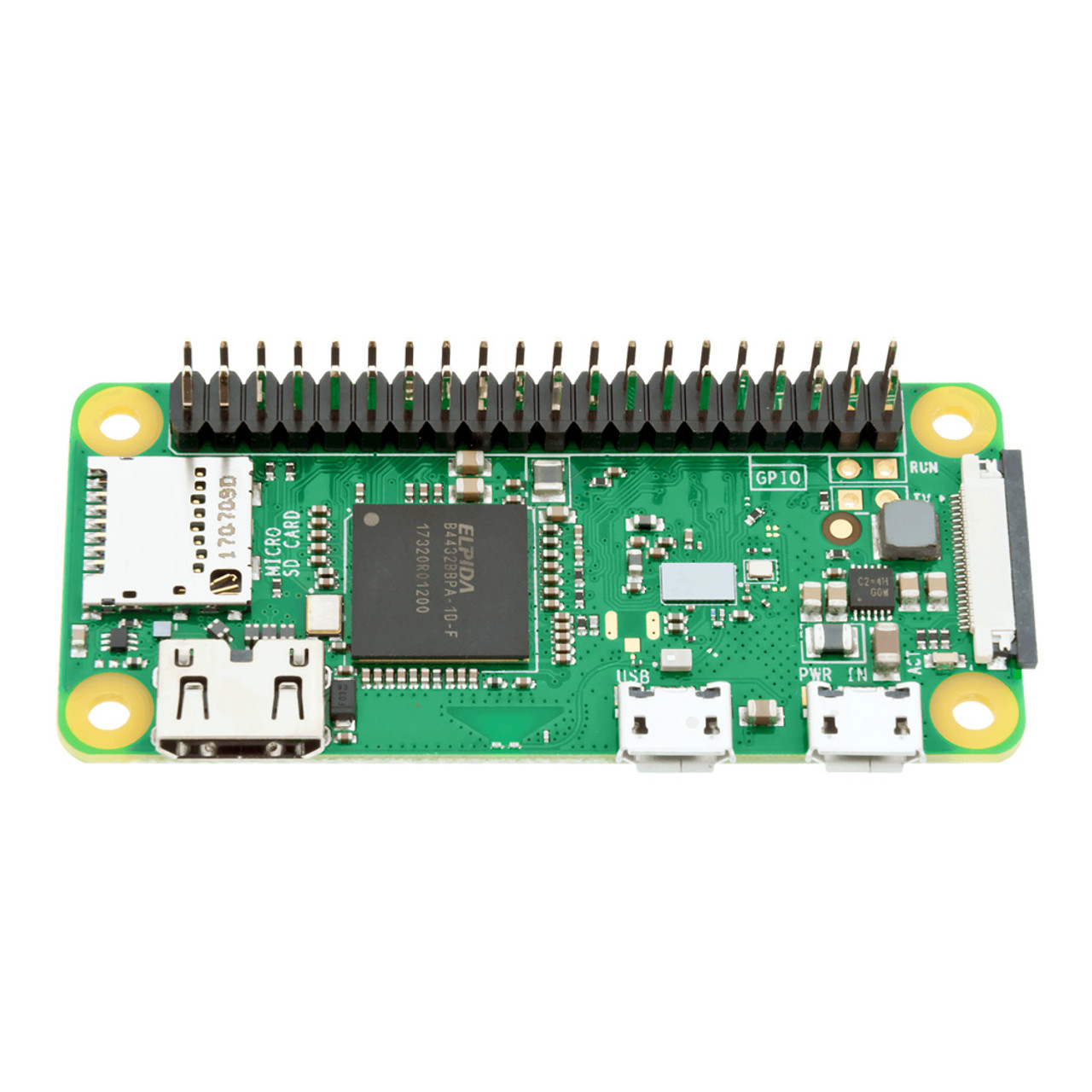
Get headers: again, I had some Pi Zeros and Picos without headers. Unless you are good with soldering, get the ones with headers. It just makes it easier physically  connect them to other technology. The Pi Zero above has no headers, the one below does.

Keep track of all the connectors you need and kept them handy: With the Pi Zeroes, I have a set of adapters that allow me to connect it to power, USB and HDMI. Once I have it set up, I just need a cable to provide power and I run it in headless mode (which I can do because of wireless). I have a special box for all that stuff so I can easily find it.

Give your Pis unique hostnames: if you are going to be connecting to them via ssh or scp, then give them a unique host name. You can do this when you set them up. What’s nice about that is once they connect to the wireless network, I can easily identify them. For example, I can ping pizero1 or I can ssh myuserid@pizero2 versus trying to find out their IP address of 192.168.0.??

Designate a machine for setting up the Pis: for me, I have a Pi 400 that I use to program the Picos. And I have a Ubuntu machine to format the SD cards. But you do what works best for you.Having a consistent environment means when you run into problems, the problem is likely not with your environment but with the SD card or the Pico.

Avoid obsolete or tricky technology: in the past I got discouraged by trying to get old or tricky technology to work. I had old dongles that gave me errors when trying to build the SD cards properly; I had old unsupported Digispark devices that would not work at all; and I had some Adafruit devices that were cool but the path to success with them was challenging. In the future, I am sticking with tried and true technology from Arduino and Pi. Don’t make working with such devices any harder than it has to be.

Get cases for your Pis: if you are going to use them on the regular, get a case. Even a cheap case make it look like a finished and working device and not some hack. Not only does it look better, but it will likely work better (i.e. the cables will not move around and lose a connection). And make sure the case you get is made for your device so it will fit properly.

Document as you go: keep some log of what worked and what didn’t. Take photos of successful set ups. Save all the good web sites that helped out. Better still, blog about it. (If you search this blog for “raspberrypi” you will find the things I have found and written about.)

Good luck with your projects. May they go smoothly.

In praise of this 37 in 1 Sensors Starter Kit

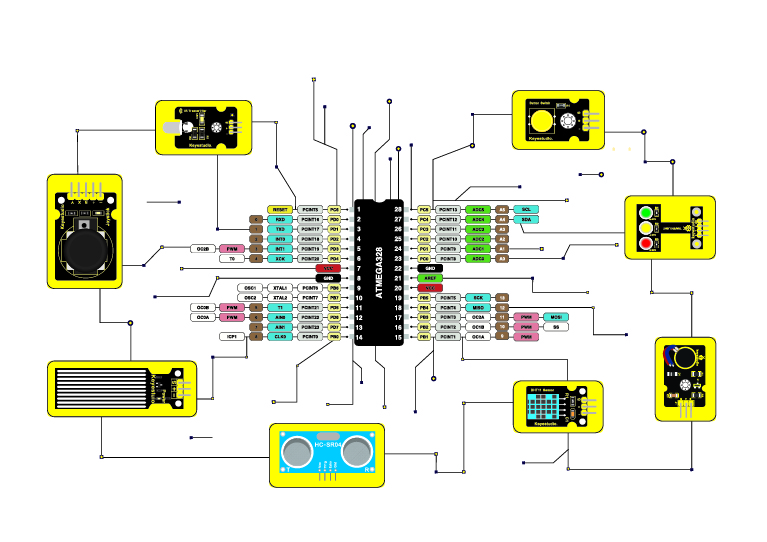
If you’re like me and you’re doing work with an Arduino or a Raspberry Pi, you are going to want to hook it up to something. Now the something might just be a simple button or an LED, or it might be more sophisticated like an infrared receiver or a heat sensor. If that’s you, then you want to consider getting this:  KEYESTUDIO 37 in 1 Sensors Starter Kit for Arduino Mega R3 Nano Raspberry Pi Projects (on amazon.ca).

It says Sensors starter kit, but it has a nice collection of LEDs and buttons, too. Each of the 37 items are easy to plug into a breadboard or you can connect them to your Pi or Arduino with wires.

Other great things:

  • the sensors are all labelled. That means you won’t be pick one up months from now and asking yourself: what does this do?
  • their documentation is really good. It’s online, here. (Note, their site is slow: I printed the long web page into a PDF that I can quickly refer to.)
  • The sensors have their own resistors built in. That way you don’t have to put your own resistors between the Pi and an LED, for example.
  • there is a wide variety of sensors in this kit. You will be able to do many a project with all these sensors.

I’ve purchased sensors in the past, and the problems I’ve had with them are gone due to this kit. I’m glad I bought it.


When was the last time you refreshed your router? It could be time to do that

How long have you had your router in your house? Is it relatively new? If so, that’s good. However you might be like me and have a router that’s 3 or 4 years old. If that’s the case, it’s time to replace your router. Contact your internet provider and ask them if they can refresh your router with a newer one. (And if they can’t or won’t, consider switching internet providers.)

You might think: I don’t want to go through the hassle of that. That’s what I thought too. It turns out it was a very easy thing to do in my case. I suspect that will hold true for you.

Hassle aside, what I also noticed is that I started getting much better upload and download speeds with the newer router without having to upgrade my plan. You might find the same thing, and that’s a good thing indeed.

So if you haven’t refreshed your router in a number of years, consider getting a newer one.

PS it doesn’t have to be a new device. In fact, the upgrade cost might be free if it’s slightly older than new but more recent than your current router.

Robots, robots and more robots.

I haven’t written about robots in awhile. That’s not for a lack of news stories about robots. We are finding them popping up all over the place.

Robots have always been used in manufacturing. Now they are moving into other businesses. Here’s a story of how robots are moving into restaurants. I’ve already seen one of these…it was less than impressive.

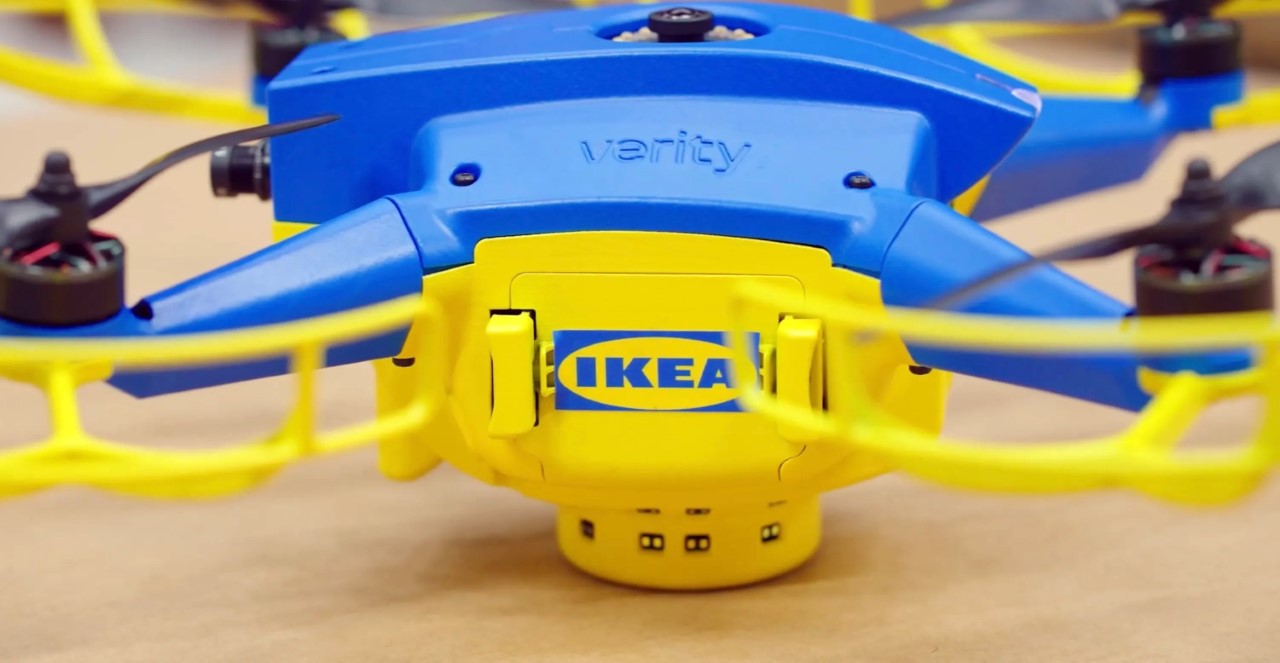
Drones are a form of robot. Here is a story on how IKEA is using drones for inventory management.

Wildlife has to be managed, too. This robot dressed up like a predator makes flights safer at airports by keeping wildlife away from runways.

The military is known for using robots. Here’s a piece on gun carrying robot dogs in the Chinese army. Not to be outdone,  the Canadian armed forces are ramping up with the use of drones.

Back at home, this unit from Samsung can vacuum and steam clean your floors. And this home robot comes with an arm. (No word on if it can unload the dishwasher.)

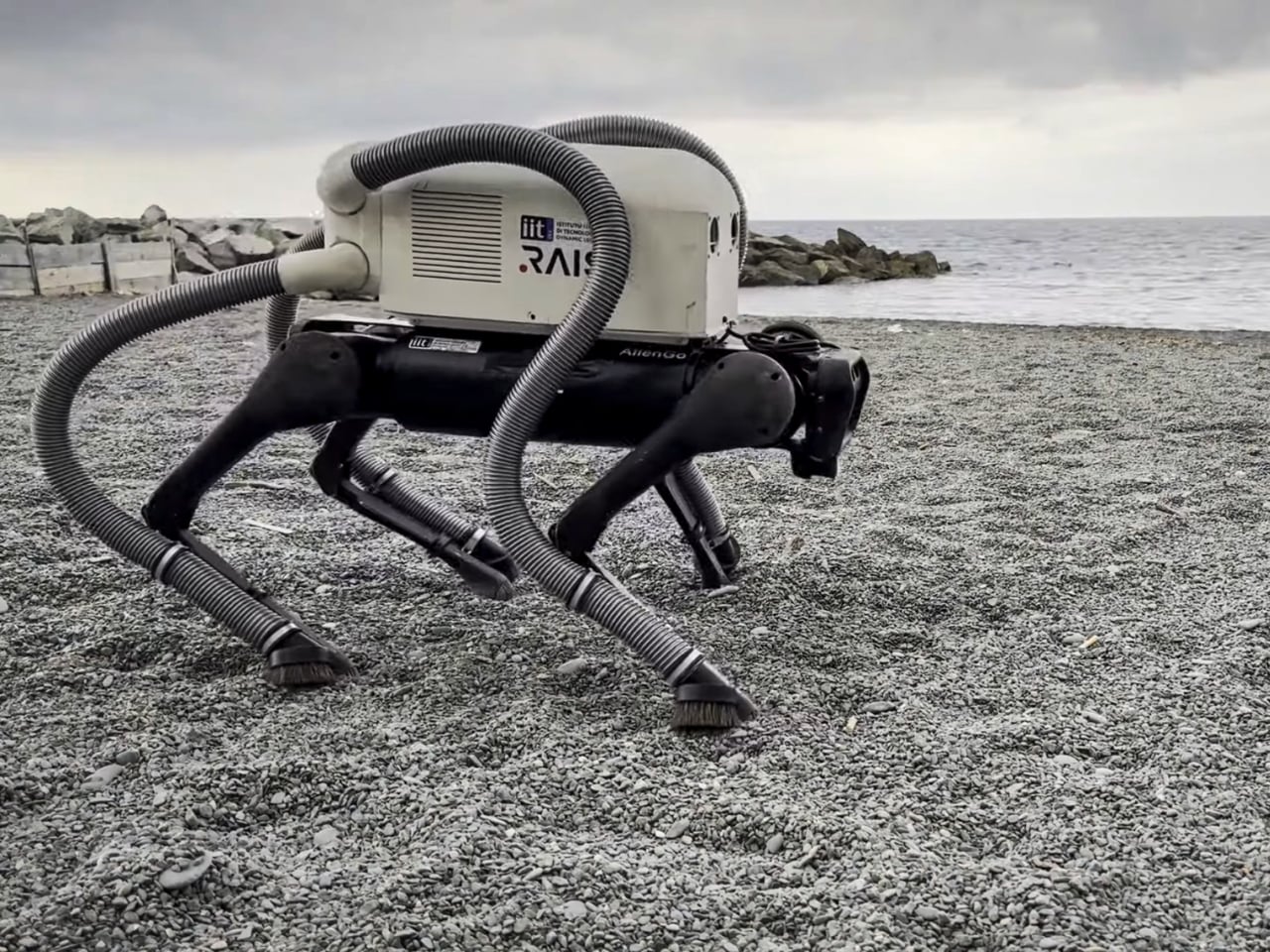
Speaking of vacuuming robots, this quadruped robot can pick up cigarette butts on beaches. That’s a good use of robots.

Back at work, these BMW robots being tested in their factories in South Carolina give off Terminator vibes. (see below.) More on them, here.

Boston Dynamics has it’s own Terminator like robots too. This dog like robot gives off Boston Dynamics vibes, but isn’t from B.D.

Here’s a robot that can become your child’s protector, teacher, and even playmate. Meanwhile, this one hangs out in your  kitchen and acts as an air purifier.

Here’s is a robot that is part of a work of art.

Finally, is the robot backlash starting? It already has in San Francisco, where a crowd vandalized a Waymo driverless taxi.

Computers and the Vietnam War: a cautionary tale

500
This piece, According to Big Data We Won the Vietnam War, should be read by everyone who  strongly believes the next new technology (e.g. gen AI) will be able to make decisive predictions to solve big problems (e.g. the Vietnam War).  The best computers and minds at the time thought they could win the war with technology. They were wrong then, and they will be wrong again.

If you think newer computers will win this time, reconsider that. If you think we learned our lesson last time, read this.

It’s summer. Time to hit the beach with a good…list of tech links :) (What I find interesting in tech August 2024)

The last time I wrote about what I find interesting in tech, it was winter. Now it’s anything but, and I have lots of things I’ve been studying in IT. Lots of material on COBOL and mainframes since I am working on mainframe modernization. But there’s stuff regarding Python, cloud, Apple computers and so much more. Let’s see what we have here….

Software: this section is so big I need to break it up! First up, COBOL:

Next, here’ some good stuff on Python:

And lastly here’s some general software links:

Mainframe


Apple…a few good links:

Some helpful cloud pieces:

  1. Getting start with the Container Registry,  here
  2. On  deploying a simple http server to ibm cloud code engine from source code using python node and go 
  3. Provisioning on ibm cloud using terraform with a sample_vpc_config 
  4. On  how set or restore remote access windows vsi 
  5. How to create a single virtual server instance (VSI) in a virtual private cloud (VPC) infrastructure on IBM Cloud, here.
  6. File Sharing through RDP from MacOS  here 

And finally, here’s a good set of Random links that were too good to pass up:

If you are using Google Fonts for your website and they are not working, check your web page for this…..

I was developing a web page for my site berniemichalik.com and I used some Google Fonts to make it look better. When I checked the page on my Mac using my browser, it worked fine. However when I uploaded it to AWS and checked it with my browser, the fonts were not working.

It turned out to be a simple error. The link statement I used looked like this:

<link href=”http://fonts.googleapis.com/css?family=Sedan” rel=”stylesheet” type=”text/css”>

Note the use of “http”. However to access my website, I used “https”. That misalignment caused the font not to work. Once I changed the link to the font to “https” like this:

<link href=”https://fonts.googleapis.com/css?family=Sedan” rel=”stylesheet” type=”text/css”>

It all worked fine.


AI: from the era of talking to the era of doing

AI a year ago was mostly talking about AI. AI today is about what to do with the technology.

There are still good things being said about AI. This in depth piece by Navneet Alang here in the Walrus was the best writing on AI that I’ve read in a long time. And this New York Times piece on the new trend of AI slop got me thinking too. But for the most part I’ve stopped reading pieces on what does AI mean, or gossip pieces on OpenAI.

Instead I’ve been focused on what I can do with AI. Most of the links that follow reflect that.

Tutorials/Introductions: for people just getting started with gen AI, I found these links useful: how generative AI works, what is generative AI, how LLMs work, best practices for prompt engineering with openai api a beginners guide to tokens, a chatGPT cheat sheet, what are generative adversarial networks gans, demystifying tokens: a beginners guide to understanding AI building block, what are tokens and how to count them, how to build an llm rag pipeline with llama 2 pgvector and llamaindex and finally this: azure search openai demo.

Software/Ollama: Ollama is a great tool for experimenting with LLMs. I recommend it to anyone wanting to do more hands on with AI. Here’s where you can get it. This will help you with how to set up and run a local llm with ollama and llama 2. Also this: how to run llms locally on your laptop using ollama. If you want to run it in Docker, read this. Read this if you want to know where Ollama stores it’s models. Read this if you want to customize a model. If you need to uninstall Ollama manually. you want this.

Software/RAG: I tried to get started with RAG fusion here and was frustrated. Fortunately my manager recommended a much better and easier way to get working with RAG by using this no-code/low-code tool, Flowise. Here’s a guide to getting started with it.

Meanwhile, if you want more pieces on RAG, go here, here, here, here, here, here, here, here, here, here, here, here, here, here, here, here, here, here, here, and here. I know: it’s a lot. But I found those all those useful, and yes, each “here” takes you to a different link.

Software/embedding: if you are interested in the above topics, you may want to learn more about vector databases and embeddings. Here are four good links on that: one  two,  three, four.

Software/models: relatedly, here’s four good links on models (mostly mixtral which I like alot): mixtral, dolphin 25 mixtral 8x7b,  dolphin 2 5 mixtral 8x7b uncensored mistral , Mistral 7B Instruct v0.2 GGUF,plus a comparison of models.

Software/OpenAI: while it is great to use Ollama for your LLM work, you may want to do work with a SaaS like OpenAI. I found that when I was doing that, these links came in handy: how OpenAI’s billing works, info on your OpenAI  api keys, how to get an OpenAI key, what are tokens and how to count them, more on tokens, and learn OpenAI on Azure.

Software/Sagemaker: here’s some useful links on AWS’s Sagemaker, including pieces on what is amazon sagemaker, a tutorial on it, how to get started with this quick Amazon SageMaker Autopilot, some amazon sagemaker examples , a number of pieces on sagemaker notebooks such as creating a sagemaker notebook, a notebooks comparison, something on distributed training notebook examples and finally this could be helpful: how to deploy llama 2 on aws sagemaker.

Software in general: these didn’t fit any specific software category, but I liked them. There’s something on python and GANs, on autogen, on FLAMLon python vector search tutorial gpt4 and finally how to use ai to build your own website!

Prompt Engineering: if you want some guidance on how best to write prompts as you work with gen AI, I recommend this, thisthis, this, this, this, this, and this.

IT Companies: companies everywhere are investing in AI. Here’s some pieces on what Apple, IBM, Microsoft and…IKEA…are doing:

Apple Microsoft copilot app is available for the iphone and ipad.

IBM: Here’s pieces on ibm databand with self learning for anomaly detection;  IBM and AI and the EI; IBM’s Granite LLM; WatsonX on AWS; installing watsonX; watsonx-code-assistant-4z; IBM Announces Availability of Open Source Mistral AI Model on watsonx; IBM’s criteria for adopting gen AI ;probable root cause accelerating incident remediation with causal AI; Watsonx on Azure; Watsonx and litellm; and conversational ai use cases for enterprises 

IKEA:  here’s something on the IKEA ai assistant using chatgpt for home design.

Microsoft from vision to value realization –  a closer look at how customers are embracing ai transformation to unlock innovation and deliver business outcomes, plus an OpenAI reference.

Hardware: I tend to think of AI in terms of software, but I found these fun hardware links too. Links such as: how to run chatgpt on raspberry pi; how this maker uses raspberry pi and ai to block noisy neighbors music by hacking nearby bluetooth speakers; raspberry pi smart fridge uses chat gpt4 to keep track of your food. Here’s something on the rabbit r1 ai assistant. Here’s the poem 1 AI poetry clock which is cool.

AI and the arts: AI continues to impact the arts for ways good and bad. For instance, here’s something on how to generate free ai music with suno. Relatedly here’s a piece on gen ai, suno music, the music industry, musicians and copyright. This is agood piece on artists and AI in the Times. Also good:  art that can be easily copied by AI is meaningless, says Ai Weiwei. Over at the Washington Post is something on AI image generation. In the battle with AI, here’s how artists can use glaze and nightshade to stop ai from stealing your art. Regarding fakes, here’s a piece on Taylor Swift and ai generated fake images. Speaking of fake, here’s something on AI and the porn industry. There’s also this  piece on generative ai and copyright violation.

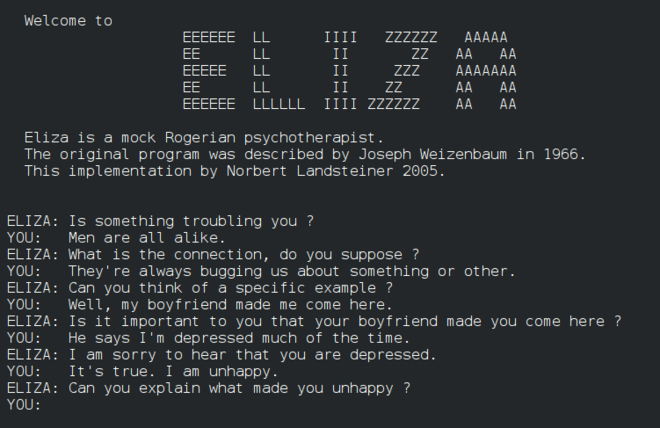
Finally: I was looking into the original Eliza recently and thought these four links on it were good: one, two, three and four. Then there’s these stories: on AI to help seniors with loneliness, the new york times / openai/  microsoft lawsuit, another AI lawsuit involving air canada’s chatbot. stunt AI (bot develop software in 7minutes instead of 4 weeks) and a really good AI hub: chathub.gg.

Whew! That’s a tremendous amount of research I’ve done on AI in the last year. I hope you find some of it useful.

On futzing around with code

An example of a Prolog program

I was futzing around with code the other day. I wrote some html/css/javascript and then I wrote some unrelated prolog code. None of it had any value. The code didn’t solve some important problem. Some might consider it a waste of time.

But it wasn’t a waste. In both cases, I learned skills I didn’t have until I wrote the code. Those skills have value for the next time I do have to solve an important problem. Besides that, I enjoyed myself while coding. I was proud of myself for getting the code to work. That enjoyment and pride have value too.

Futzing around is a form of play, and any form of play is good for us as humans. Remember that the next time you consider taking on seemingly useless activities.


If you are using python packages like xmltodict or yaml, here is something to be aware of

If you are using python packages like xmltodict or yaml to write and read your own XML and yaml files, you probably don’t need to know this. But if you are reading someone else’s files, here is something to be aware of.


This week I had to process an XML files in python. No problem, I thought, I’ll use a python package like xmltodict to translate the XML into a dictionary variable. Then I could edit it and print out a new file with the changes. Sounds easy!

Well, first off, it wasn’t too easy: the nesting was horrendous. However, with some help from VS Code, I was able to power through and get the value I want.

Here’s where I got burned. I wanted to change the text in the XML file, so I had a statement like this to read it


mytext = python_dict["graphml"]["graph"]["node"][nodecount]["graph"]["node"][i]["data"]["y:ShapeNode"]["y:NodeLabel"]["#text"]

and then a simple statement like this to change it to lower text:


python_dict["graphml"]["graph"]["node"][nodecount]["graph"]["node"][i]["data"]["y:ShapeNode"]["y:NodeLabel"]["#text"] = mytext.lower()

Very basic.

Now this particular file is an XML file that has a graphml extension, which allows an editor like YED to read it. YED can read the original file, but it turns out xmltodict writes the file in such a way that the YED editor can no longer see the text. I don’t know why.

I spent hours working on it until I finally gave up. I wrote a much dumber program that read through the graphml file a line at a time and changed it the way I wanted to. No fancy packages involved. Dumb but it worked.

This is the second time this year a package has given me problems. In late January I wrote some code to parse yaml files for a client to extract information for them and to produce a report. Again, there is a package to do that: yaml. Which is….good…except when the yaml it is processing it is poorly written. Which this yaml was.

Again, I spent hours linting the yaml and in some cases having to forgo certain files because they were poorly constructed. What should have been easy — read the yaml file, transform it, write a new yaml file — was instead very difficult.

And that’s often the problem with yaml files and XML and JSON files: they are often handcrafted and inconsistent. They MAY be good enough for whatever tool is ingesting them, but not good enough for the packages you want to use to process them.

I think those packages are great if you are making the input files. But if you are processing someone elses, caveat emptor (caveat programmer?).

Things better on the iPad than my iPhone

Apple released it’s latest iPad (Pro) recently and whenever this happens people debate the value of the iPad in general and ask questions like: is the iPad worth it? 

I used to ask myself that question too. After all, between my iPhone and my Macbook, I thought I had all the computing technology I needed. But in the last year I got a new iPad — not even the latest and greatest — and I have to say that the iPad just does certain things better than either one. It’s especially better than my iPhone for:

  • Streaming video: Disney, Netflix, YouTube and more are all much better than my iPhone.
  • The library app Libby is much better, especially with the magazine section
  • The news sites like the New York Times and Washington Post are great on the iPad
  • Instacart: I can see more options when I order from it
  • Shopping sites like Zara and Uniqlo are better too for the same reason
  • X and other social media sites look great on my iPad, but not threads or Instagram because of some design ideas Meta has that are wrong.

And what I like about the iPad over my Macbook is a) there is no work apps on it so I don’t get distracted by work b) I can recline with the iPad (I don’t like doing that with the Macbook…it’s just no comfortable).

That’s just a start of my list.  I’ll keep updating this list for anyone debating getting an iPad. 

Happy Birthday to Gmail, from this old Yahoo email user!

Happy birthday, Gmail! According to the Verve, you are 20 years old! The big two-oh! Sure, you had some growing pains at first. And then there was the whole period when you and your users felt snobbish about their gmail accounts and looked down on people with yahoo accounts. But that’s all water under the bridge. We’re all old now.

Google is notorious for killing off services, but it is inconceivable they’ll ever kill off you, Gmail. I expect you and your users will be around for a long long time. Heck even an old yahoo email account user like me uses Gmail from time to time. There’s no guarantees, of course, but I expect to be revisiting this post in 2034, god willing, and writing about your 30th. Until then…

The way to make your Apple Watch more useful is to change your App View

If you want to make your Apple Watch more useful, you want to change your App View. Here’s how.

On your iPhone, find the Watch app icon and click on it. Look for App View and click on it. From here you can change the view to Grid View. (Grid View looks like the watch in the photo above.) Now click on Arrangement.

Once in Arrangement, hold your finger on an icon of something you use often. Drag your finger tip and the icon to the top left. Keep doing that so all the Watch apps you will use the most are on the top rows. Once you have it the way you like it, exit the Watch app.

If you are stuck as to what to put on top, my top apps are:

  1. Stopwatch
  2. Workout
  3. IFTTT
  4. Weather
  5. Text
  6. Phone
  7. Calendar
  8. Heart rate monitor
  9. Activity
  10. Maps

I have a few dozen more Watch apps, but those are the ones I use often.

If you want to see what you can have on your Watch, go back to the Watch app on your phone and scroll down to see what apps are installed on your watch and what ones you can install.

Once you rearrange the Watch apps,  press in the crown on your Watch. You will now see the Watch apps organized the way you want. I bet you start pressing your crown more to access and use the apps you have installed.

The Apple Watch is great. Squeeze more greatness from it by taking advantage of the Watch apps you have.

Some quick thoughts on the Apple Vision Pro

Apple is a computing hardware company: if there is a market for a new form of computing hardware out there, Apple will make it. It was true of digital watches, smart speakers, and various forms of headphones. It’s now true of wearable AR/VR devices with the Apple Vision Pro.

The price doesn’t matter for now. If Apple is lucky, rich people will make it a Veblen Good like many of Apple’s Pro phones. Rich people like CEOs will want to be seen using it, even for a short time. Wannable rich pretenders like influencers will show it off too. All this buys time for Tim Cook and his COO to ramp up production for the next version. Who knows: in a few years there could be an Apple Vision SE?

The size doesn’t matter for now. IT always gets smaller in size or scales up in terms of capacity, and I suspect the Vision devices will do that too.

As long as Facebook/Meta is making these type of devices, I expect Apple will too. And once enough apps exist, expect other hardware manufacturers like Samsung and Lenovo to come out with their own version.

It’s possible that the Vision devices will be a dead end. They could end up like Apple TV. I suspect that won’t happen, but anything can happen. I suspect they will be like other wearable devices Apple makes: they won’t replace the Phone or the Mac, but they will be something in Apple’s product set for at least the next five years.

Let’s see what happens, now that Apple has committed to the device.

P.S. Two good reviews on it are in the New York Times and in the Verge .

Also, I still think spatial computing is the real story behind the new device. I wrote about that here.

It’s hard to think of an Apple device being a flop, but as I wrote here, it does happen.

It’s winter. Time to curl up with a good…list of tech links :) (What I find interesting in tech January 2024)

500Wow. I have not posted any tech links since last September. Needless to say, I’ve been doing alot of reading on the usual topics, from architecture and cloud to hardware and software. I’ve included many of them in the lists below. There’s a special shout out to COBOL of all things. Is there something on DOOM! in here? Of course there is. Let’s take a look….
Architecture: A mixed bag here, with some focus on enterprise architecture.

Cloud: a number of links on cloud object storage, plus more….

COBOL: COBOL is hot these days. Trust me.

Hardware: mostly but not exclusively on the Raspberry Pi….

Mainframe/middleware: still doing mainframe stuff, but I added on some middleware links….

Linux/Windows: mostly Linux but some of the other OS….

Software: another mixed bag of links…

Misc.:  For all the things that don’t fit anywhere else….also the most fun links….

Thanks for reading this!

Who let the (robot) dogs out? And other animated machines on the loose you should know about

A year ago I wrote: Sorry robots: no one is afraid of YOU any more. Now everyone is freaking out about AI instead. A year later and it’s still true. Despite that, robots are still advancing and moving into our lives, albeit slowly.

Drones are a form of robot in my opinion. The New York Times shows how they are shaping warfare, here. More on that, here.

Most of us know about the dog robots of Boston Dynamics. Looks like others are making them too. Still not anywhere as good as a real dog, but interesting nonetheless.

What do you get when you combine warfare and robot dogs? These here dogs being used by the US Marines.

Someone related, the NYPD has their own robot and you can get the details  here.

Not all robots are hardcore. Take the robot Turing for example (shown below). Or the ecovacs, which can mop your floors and more.

What does it all mean? Perhaps this piece on the impact of robots in our lives can shed some light.

Robots are coming: it’s just a matter of time before there are many of them everywhere.

Advent of Code: a great way for coders to celebrate this season

You’ve likely heard of Advent, but have you heard of Advent of Code? Well let the maker of the site, Advent of Code 2023, explain what it is:

Hi! I’m Eric Wastl. I make Advent of Code. I hope you like it! I also made Vanilla JS, PHP Sadness, and lots of other things. You can find me on Twitter, Mastodon, and GitHub. Advent of Code is an Advent calendar of small programming puzzles for a variety of skill sets and skill levels that can be solved in any programming language you like. People use them as interview prep, company training, university coursework, practice problems, a speed contest, or to challenge each other. You don’t need a computer science background to participate – just a little programming knowledge and some problem solving skills will get you pretty far. Nor do you need a fancy computer; every problem has a solution that completes in at most 15 seconds on ten-year-old hardware.

It seems like just the thing for coders of all kinds, from amateurs to professional devs. Check it out. And if you want to get involved from day 1 in 2024, make a note on your calendar (assuming Eric still does it.)

The benefits you get running Ubuntu/Linux on an old computer and why you should get one

I am a big fan of usable old computers. After you read this, you will be too.

Currently I have an old Lenovo M57p ThinkCentre M series that was made around 2007 that still works fine and is running Ubuntu 20.04 (the latest version is currently 22.04, so this is very current). Not only that, but it runs well. It never crashes, and I can download new software on it and it runs without a problem.

Here are some the benefits of having such a computer:

  • it can act as my backup computer if I have a problem with my main work one. I can read my email at Yahoo and Google. If I need to, I can use things like Google sheets to be productive. I can download software to do word processing on it too. I can attend online meetings. Most of my day to day work functions can be done if need be.
  • it can act as a test computer. I was writing a document on how to use a feature in IBM cloud, but I needed to test it out with a computer other than my work machine (which has special privileges). This old machine was perfect for that.
  • it can also act as a hobby computer. I like to do things with arduinos and Raspberry Pi computers and the Lenovo computer is great for that.
  • it can help me keep up my Unix skills. While I can get some of that by using my Mac, if I had a Windows machine for work I would especially want to have this machine for staying skilled up.
  • it can do batch processing for me. I wrote a Python program to run for days to scrape information from the Internet and I could just have this machine do that while I worked away. I didn’t need to do any fancy cloud programming to do this: I just ran the Python program and checked on it from time to time.
  • It has lots of old ports, including VGA and serial ports. Will I ever need them? Maybe! It also has a CD-ROM drive in case I need that.

As for the version of Linux, I tend to stay with Ubuntu. There’s lots of great Linux distros out there, but I like this one. Plus most times when I come across online Linux documentation, I will find it has explicit references to Ubuntu.

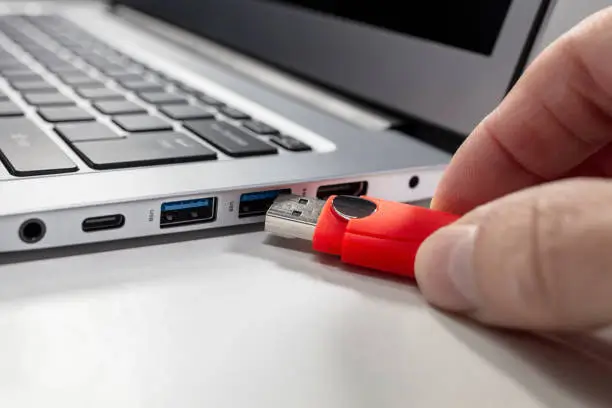
Now you can buy an old machine like this online from Amazon or eBay, but if I can do this on a 15 year old computer, you likely can ask around and get one for free. A free computer that can do all this? The only thing that should be stopping you is how to get started. For that, you will need these Ubuntu install instructions and a USB drive.

Good luck!

P.S. The software neofetch gave the output above. To install it, read this: How do I check my PC specs on Ubuntu 20.04.3 LTS?

It may be time to ditch Evernote. I went with Joplin and it’s been great

Now that Evernote is all but killing their free plan, you may be considering moving. That was me awhile ago. I loved Evernote, but the restrictions and bloated features made me want to move.

I wasn’t sure what to move to, so I did some research. These two links were especially helpful:

I nixed migrating Evernote to OneNote because I use the latter mostly for work notes. And while I use and love SimpleNote, I like it only for specific purposes. I considered Obsidian, but it seemed more than what I wanted.

In the end I went with Joplin for a few reasons:

  1. Joplin made it easy to move my Evernote material into it.
  2. Joplin can run on my Mac, iPhone and iPad for free.
  3. With Joplin my notes are stored on Dropbox, which I like.
  4. Joplin seemed closest in features to Evernote for me.
  5. With Joplin I can use Markdown if I want.

I haven’t had any problems with Joplin since I moved to it many weeks ago. I kept Evernote on my Phone in case of problems, but I have not used it in ages. After I post this, I think it will be time to delete the app from all my platforms.

I was a big fan of Evernote. It was great. But Joplin is great too, and once you start using it, you won’t turn back.

P.S. Don’t just take my word on it. Read those links, too. You might find you want to go with one of those other tools. I use OneNote and SimpleNote all the time and I highly recommend those, too.

If you can’t write to your USB drive on your Mac and you want to fix that, read this

If you are reading this, chances are you cannot write to your USB drive on your Mac.

To force a USB drive to be both read and writable, I did the following (note, I had a Kingston drive, so my Mac identified it as KINGSTON and I went with that. If you buy a USB drive that is not from Kingston, you may see something different):

  1. In Finder, go under Applications > Utilities and start Disk Utility
  2. Click on your USB disk on the left (E.g. KINGSTON) and then click on Erase (top right)
  3. You can change the name if you want (I left it at KINGSTON) and make Format: ExFAT
  4. Once you do that, click the Erase button to format the disk
  5. Click on Unmount (top right) to unmount the disk
  6. Open a terminal window (Open Finder. Go to Applications > Utilities > Terminal) Enter the following diskutil list command in the Terminal window and note the results:
    diskutil list
    /dev/disk2 (external, physical):
    #: TYPE NAME SIZE IDENTIFIER
    0: FDisk_partition_scheme *62.0 GB disk2
    1: Windows_NTFS KINGSTON 62.0 GB disk2s1

    Note it my case the KINGSTON drive is associated with disk2s1. (you see that on the line “1: Windows_NTFS KINGSTON 62.0 GB disk2s1”. It may be different for you. Regardless, you want the drive name that comes after the 62.0 GB.)
  7. While in the terminal window, make a corresponding directory in the /Volumes area of your machine that has the name of your drive (in my case, KINGSTON)
    sudo mkdir /Volumes/KINGSTON
  8. Also in the terminal window, you can  mount your disk as writable and attach it to the mount point sudo mount -w -t ExFAT /dev/disk2s1 /Volumes/KINGSTON

You should now be able to write to your drive as well as read it.

How to cast your Chrome tab to your TV in October 2023

IF you are a fan of using Chrome to cast one of your tabs to a TV, you may be surprised to find that the Cast option is missing. Worse, if you look in places like Chromecast Help on how to Cast a Chrome tab on your TV, you may not find that all that helpful.

Fear not. The Cast option is still there, just hidden. As before, go to the top right of your browser where the three dots are and click on them. Then click on Save and Share… and look for Cast…

Now you can Cast as you did before.

How to work with Java on your Mac, including having multiple versions of Java on your Mac

The easiest way to install Java on your Mac is by using homebrew. Honestly, if you don’t have homebrew on your Mac, I highly recommend you do that. Plus it’s easy to do. All you need is to enter the following:


$ /bin/bash -c “$(curl -fsSL https://raw.githubusercontent.com/Homebrew/install/HEAD/install.sh)”

Now that you have homebrew installed, you can install Java by entering:
$ brew install java

That should install the latest version of it. If you want to install an older version, you can do something like this:
$ brew install java11

If you’ve done this a few times, you may have a few different version of Java installed liked me, and if you enter the following command it may look something like this:

% ls /usr/local/opt | grep openjdk
openjdk
openjdk@11
openjdk@18
openjdk@19
openjdk@20
openjdk@21
%

As you can see, I have a few different versions installed. However, if I do this:

% java --version
openjdk 11.0.20.1 2023-08-24
OpenJDK Runtime Environment Homebrew (build 11.0.20.1+0)
OpenJDK 64-Bit Server VM Homebrew (build 11.0.20.1+0, mixed mode)
%

It shows the OS thinks I have JDK version 11 running.

Why is that? Well, it turns out if I enter this:

% ls /Library/Java/JavaVirtualMachines/
jdk1.8.0_261.jdk openjdk-11.jdk
%

I can see I have two JDKs installed there. MacOS will go with the latest JDK there when you ask what version is installed, in this case openjdk-11.

If I want the OS to use a different version like openjdk 21, I can enter this symbolic link (all one line):

sudo ln -sfn /usr/local/opt/openjdk@21/libexec/openjdk.jdk /Library/Java/JavaVirtualMachines/openjdk-21.jdk

Then when I check on things, I see the following:


% java --version
openjdk 21 2023-09-19
OpenJDK Runtime Environment Homebrew (build 21)
OpenJDK 64-Bit Server VM Homebrew (build 21, mixed mode, sharing)
% ls /Library/Java/JavaVirtualMachines/
jdk1.8.0_261.jdk openjdk-11.jdk openjdk-21.jdk
%

Now the system thinks openJDK 21 is running.

If I want to reverse this and go back to openjdk 11, I can use this unlink command and see this:

% sudo unlink /Library/Java/JavaVirtualMachines/openjdk-21.jdk
% java --version
openjdk 11.0.20.1 2023-08-24
OpenJDK Runtime Environment Homebrew (build 11.0.20.1+0)
OpenJDK 64-Bit Server VM Homebrew (build 11.0.20.1+0, mixed mode)
% ls /library/Java/JavaVirtualMachines
jdk1.8.0_261.jdk openjdk-11.jdk
berniemichalik@Bernies-MacBook-Air-4 ~ %

Normally I would recommend going with the latest and greatest version of Java on your Mac. However, you may have a situation where you have some Java code that only runs on older versions of Java. This is one way to deal with that.

For more on this, here are some good links I found:

You should set up two-factor authentication (2FA) on Instagram. And you should use an authenticator app

You might think: no one is going to hack my Instagram account. And you might be right. But here’s the thing: if someone does hack your account, you have next to no chance of getting someone at Instagram to restore it. Rather than make it easy for hackers to take over your account, spam your friends and delete years of photos, you should use 2FA. To do so, read this article: How to Turn on Two-Factor Authentication on Instagram.

While you can use SMS, I recommend using an authenticator app. That article explains how you can do it either way. Authenticator apps are more secure than SMS and are the way to go these days. For more on that, see PCMag.

IBM Cloud tip: use Multifactor authentication (MFA) also called 2-Factor Authentication (2FA) with your account

If you are using IBM Cloud technology, I recommend you consider setting up MFA for your login account. MFA makes your access more secure, and it’s easy to do. To see how easy it is, go here: IBMid – Verifying your identity and configuring MFA. It’s a well laid out description about how to do it.

You can use either a verification app or email to get a verification code. I recommend an app. While email works, it can take several minutes to get the code, while with an app you get a code instantly. As for apps, I use IBM’s verify app, but you can use Google’s and likely Microsoft’s.  They all work fine. Just go to your favorite app store and download one. (Make sure it comes from IBM or Google or Microsoft, not from some developer with a lookalike app.)


My IT Beach Reads this summer :) (What I find interesting in tech September 2023)


Yes, this is the stuff I read for fun. Not on the beach, but at least in a comfy chair out in the hot sunny weather. 🙂

Architecture links: mostly my IT architecture reading was AWS related this summer, but not all of it.

Cloud links: a mixed bag of things, all good.

Ops links: I’ve been consulting with clients on operations work, among other things, so here’s  pieces on AIOps, DevOps and more that I thought were good:

Software links: mostly dashboard related, since I was working on…dashboards.

Finally: here’s a mix bag of things, quantum and otherwise, that I enjoyed.

Will there be Doom? (What I find interesting in hardware/software in tech Jul 2023)

While my last few posts on IT have been work related, most of these are on hardware and software and tend to be more hobby and fun related.

Hardware links:

Software links:

Hope something there was useful! As always, thanks for reading!

P.S. Before I forget… here’s a piece on how a hacker brought Doom to a payment terminal. Love it!


Silicon Valley is full of not serious people and it’s time to treat them accordingly

I really like this piece by Dave Karpf on how not enough people are making fun of Balaji Srinivasan right now. While he goes on the skewer Srinivasan for a stupid bet/stunt he did recently, he touches on a broader topic:

2023 is shaping up to be a big year for recognizing that the titans of Silicon Valley actually have very little clue how the financial system works. That’s essentially what capsized Silicon Valley Bank: the venture capitalist crowd was long on self-confidence and short on basic-understanding-of-how-things-work.

At some point with characters like Balaji, you have to ask yourself whether he’s putting on a show or whether he really is a fool. There are a lot of guys at the heights of Silicon Valley who put on a similar performance. (*cough* David Sacks *coughcough* Jason Calcanis.) They have money, and they speak with such confidence. For years, they’ve been taken them seriously. This ought to be the year when that presumption of omnicompetence withers away.

I think that quote  of how 2023 is going to be “a big year for recognizing that the titans of Silicon Valley actually have very little clue how the financial system works” really can apply to anything, not just the financial system. As Karpf notes, all these leaders in Silicon Valley “have money, and they speak with such confidence” and people take them seriously.

So when Marc Andreessen bloviates on how AI will save the world and how it’s the best technology EVAH, no one says he’s full of crap. They don’t look at how he went long on crypto when others were getting out, for example, and say “yeah maybe he’s not the best guy to listen to on this stuff”.

And that’s too bad. I think we should mock these people more often. We should mock the vapidity of Bill Gates’s recent commencement speech. We should cheer when companies like Hindenburg Research go after Jack Dorsey and block for what a crappy company it is. We should recognize how fraudulent people like Tony Hsieh or Elizabeth Holmes are. We should recognize that these people do not deserve our attention. And if they get it, they should be scrutinized and at the very least, mocked. I mean Elon Musk and Mark Zuckerberg are talking about fighting in a cage match.

These are not serious people. We should stop acting like they are.

P.S. The fraudster  Elizabeth Holmes finally went to prison after trying in vain to convince people she should not. Did silicon Valley learn anything from this? Not much, if this story on how recently the company Grail told 400 patients incorrectly that  they may have cancer.

As for Tony Hsieh, you can read here how he used companies like ResultSource to make his book Delivering Happiness into a “best seller” (not to mention giving it away). Just another form of fraud. Here’s a good takedown of Tony Hsieh and the emptiness of the tech mogul.

Finally the New York Times has a rundown of the recent high tech phonies and the trouble they are in.


Reflecting on the Apple Watch while reading how the Apple VisionPro might flop

How is the Apple Watch doing, you might wonder? Well according to this piece, pretty pretty pretty good. Check out these stats:

Pretty much on every measure it is a big success, especially on the annual sales side.

Looking at those numbers, you might find it hard to believe that when the Apple Watch first came out, it was…a dud. As the same piece shows:

(The) First Apple Watch, announced on September 9th, 2014, and released on April 24th, 2015, was initially a flop, with an 85.7% drop in sales from April 2015 to July 2015. The reason was that the Apple Watch Series 0 simply wasn’t good enough. It was neither fashionable nor performed well as a fitness watch. Apple, later on, shifted to focus on fitness features instead of simply making their watch look good. By the time Apple released Watch Series 3, people were already hooked.

Yep. I was hopeful for the Watch back then, but many people were dismissive. It was too complicated, too big, too expensive, etc.

I was reminded of all this as I was reading some “nervous nellie” reaction from Yanko Design and the New York Times about the Vision Pro. They hedge their bets (and they should), but the focus is on how it could fail.

And it could fail! Or more likely, it could be a dud. It could be like the Homepod or Apple TV. Remember TVOS? I thought people would jump on that and start developing apps for it. Well other than Apple, I don’t see too much happening with that device. Both those devices are…fine, but not game changers.

That said, I think the Apple Vision devices will be game changers. I suspect Apple will play the long game, just like they did with the Apple Watch. Watch this blog as we track it’s progress. 🙂

P.S. More on the Apple Watch written by me, here. More on the history of the Apple Watch from others here and here.


On spatial computing and VisionOS

While people talked a lot about the hardware of Apple’s new Vision Pro device launched last week, I’ve thought a lot about Apple’s emphasis on spatial computing. What’s that all about, you might ask? I am going to turn to this piece at Yanko Design to explain:

“Vision Pro is a new kind of Computer,” says Tim Cook as he reveals the mixed reality headset for the very first time. “It’s the first Apple product you look through, and not at,” he adds, marking Apple’s shift to Spatial Computing. What’s Spatial Computing, you ask? Well, the desktop was touted as the world’s first Personal Computer, or PC as we so ubiquitously call it today. The laptop shrank the desktop to a portable format, and the phone shrank it further… all the way down to the watch, that put your personal computer on your wrist. Spatial Computing marks Apple’s first shift away from Personal Computing, in the sense that you’re now no longer limited by a display – big or small. “Instead, your surroundings become a canvas,” Tim summarizes, as he hands the stage to VP of Design, Alan Dye. Spatial Computing marks a new era of computing where the four corners of a traditional display don’t pose any constraints to your working environment. Instead, your real environment becomes your working environment, and just like you’ve got folders, windows, and widgets on a screen, the Vision Pro lets you create folders, windows, and widgets in your 3D space. Dye explains that in Spatial Computing, you don’t have to minimize a window to open a new one. Just simply drag one window to the side and open another one. Apple’s VisionOS turns your room and your visual periphery into an OS, letting you create multiple screens/windows wherever you want, move them around, and resize them. Think Minority Report or Tony Stark’s holographic computer… but with a better, classier interface.

Spatial computing is something bigger than the new hardware from Apple. It’s talking about changing the way we do computing.

You see, since the 1980s we’ve been stuck with the WIMP paradigm in computing: windows, icon, menus, pointer. We have it for so long we don’t even think about it anymore. Even when we went from desktop computing to smartphones and tablets, we more or less kept this paradigm.

With spatial computing, we can think out of the box. Get away from the desktop. You are no longer looking AT a computer: you are IN a computer.

Apple is still kinda stuck with the WIMP in some of the demos they have for Vision Pro. I get that: it’s going to take some time for all of us to make the shift. Even Apple. But the shift will come.

The shift may not even come primarily from Apple the software company. I believe one of the reasons Apple launched the device the way it did — limited and at WWCD — is to get developers excited about it. Already some big name software companies have signed on. And if I read this piece correctly, then there could be a rush of developers from everywhere to come out with software for the device. Perhaps much of that could be non-WIMP software.

Much of this will depend on Vision OS and what it is capable of supporting. But from everything I read, it sound like it provides spatial computing flawlessly with the Vision Pro.

And perhaps spatial computing is not just for the Vision Pro. Currently Apple allows you to do handoffs from one device to another. I could see that happening with the Vision Pro, your Mac, and your phone. You might be working on something on your Mac that you want to take a break from, so you put on your Vision Pro to play a game. Then you get an idea, so you work on it in the Vision Pro, rather than taking off your goggles. Likewise, you may need to take a break from the Vision Pro, so you do a handoff to your Mac or your Apple TV to watch the rest of a movie from that device.

I can also see bits of VisionOS creeping into MacOS and iOS and even WatchOS. If VisionOS breaks the WIMP paradigm virtually, perhaps it could do the same thing physically. All of Apple’s devices could be spatial computing devices.

Spatial computing promises to be a new big thing in computing. I’m excited for this. I hope Apple and others can bring it to fruition. (Pun intended.)

P.S. For more on how impressive the Vision Pro is, I recommend this: Every Single Sensor inside the Apple Vision Pro and What It’s Individually Designed To Do – Yanko Design

What I find interesting in Mainframes and CI/CD (tech update June 2023)

I’ve so many good pieces on IT, I’ve got to break them down into subcategories. Last month I’ve shared things on cloud tech. This month the focus is on mainframes and CI/CD (things I’ve been working on over the last year or more).

Mainframes: I’ve been doing work on mainframe modernization, which has me focusing on tools around that, among other things.

z/D&T is one of those tools. Here’s a good overview of it. Here’s a piece on deploying IBM mainframe z/OS application on AWS with IBM z/D&T. This is a good IBM zDT Guide and Reference. More on zD&T there. I like it.

DBB is another tool in use. Here’s an intro. Here’s something on using it to migrate data sets.

Not all these tools are IBM related. Endevor is another tool to study. Here’s something on how Endevor software ‘s change manager bridges enterprise git. Here’s something on mapping strategies using endevor bridge for git. How to create a package in Endevor and how to review and approve a package in Endevor review approve package. Also something on on Endevor pricing and setup.

Linux is kinda a tool (I guess?) on mainframes. This is a good explainer on Linux on IBM Z. More on IBM z linux here.

Finally, here’s a good article on mainframe modernization patterns. More on mainframe application modernization beyond banking from IBM. Still more on mainframe modernation. Also: using collaboration not migration to modernize your mainframe applications with the cloud.

CI/CD: I’ve also been focusing on work around CI/CD. So there’s been lots of work using Jenkins. Here’s a piece on how to create a ci/cd pipeline with kubernetes and jenkins. Also a tutorial for installing jenkins on IBM Cloud. Check out this tutorial on setting up a ci/cd pipeline with jenkins to deploy multi arch image on ocp on linuxone and x86. That was especially good.  Here’s something on  blue/green deployment with docker github and jenkins.

Here’s a side by side of github actions vs jenkins which should you consider. This helps if you want to know if you should use a jenkinsfile or not. Check out this good jenkins ci/cd review. More on Configuring a jenkins agent on openshift.  Here’s how to add z/OS to your jenkins build farm. This was a  good jenkins groovy tutorial.

Related to the Jenkins work is work around IBM’s Urbancode Deploy (UCD). Here’s A tutorial on ibm urbancode deploy. Another tutorial on how to build a pipeline with jenkins dependency based build on UCD. Something on how to integrate UCD with jenkins for continuous integration is here.

Lastly, here’s some things to consider re installing UCD. More on how integrate UCD and jenkins for ci/cd. Here’s what’s needed in terms of system requirements for UCD.

Finally, here’s some more on continuous testing in devops. More on ci/cd pipelines. And last, another mainframe tool for CI/CD:  Workflow.


Who’s a good robot? Who’s a good robot?? You are!


Ok, robots aren’t as good as dogs — even if they sometimes resemble them — but here are some good ones I’d like to highlight.

First up: almost everyone likes trash robot who helps with the trash. And pretty much everyone likes a good robot vacuum. There’s even a piece on which is the best robot vacuum. And robots aren’t just good due to cleaning. In Italy robots are helping take care of older people. Likewise, this spherical robot is your smart home guard and your family companion. Robots can do alot. Elsewhere around the home we have robots installing roof shingles and we even have robotic furniture.

Cars now are kinda robots, what with all the AI built into them. But take note: future Fords could repossess themselves and drive away if you miss payments. Yikes!

What else are robots up to? Well, we’ve got artistic robots. Like this robot band. And these robot dogs that were among 100 artists to be unleashed on melbourne for 2023 ngv triennial. Ok sure fine.

Of course, not all robots are harmless. Here’s a story on how war in ukraine becomes latest chapter in the rise of the killer robots.