A simple tutorial to set up an about.me site on github

I used to be a big fan of about.me: they enabled me to create a personal home page far better than what I could do. Unfortunately they stripped out some of the things that made the page look great, and when they did that, I decided to make my own about.me page, using free hosting on Github.

First off, here is what my page looks like: http://blm849.github.io

Here’s the steps I took to make it.

Before you start, here’s what you will need if you want to follow my steps. You’ll need:

  • a text editor. Notepad or Textpad or vi will all work fine.
  • some knowledge of HTML. Not too much. If you just follow the steps below, you should be fine. If you want some quick knowledge of HTML, see this: HTML Tutorial
  • some knowledge of  git and github.com. Again, not too much. If you follow the steps below, you should not need any. If you want some quick knowledge of git and github, see this: How to learn github fairly easily | Smart People I Know
  • Some words describing yourself that you want to have on the site.
  • An image file of yourself that you would want to serve as the background of the site. The one I had was a simple photograph I took with my smartphone.
  • A working file directory on your computer to hold your files.

Here are the steps:

  1. Set up your site on Github. To do this, follow the steps, here: GitHub Pages – Websites for you and your projects, hosted directly from your GitHub repository. Just edit, push, and your changes are live. Check it out. Use your working file directory to store the files. Once you complete the steps, and pointing your browser at http://username.github.io works, you are going to want to personalize the site. (Note: username = the name of your userid. e.g. my userid on github is blm849)
  2. Use a repository from someone else to make the job simpler. To create my site, http://blm849.github.io, I used a repository from here: https://github.com/weightshift/The-Personal-Page. It’s great. I simply downloaded the ZIP file, unzipped the files, and copied and replaced the files in the working file directory. In your case, I would recommend you take my repository and my files and modify them. I’ll explain in a bit. My repository and my files are here: https://github.com/blm849/blm849.github.io. Click on the “Clone or Download” button and then click “Download ZIP” to do this. Like I said, download the zip file, unzip the files, put them in your working file directory.
  3. Also, copy your background image (e.g. background.jpg) into the working file directory.
  4. Now edit the index.html file in the working file directory. Make the following changes and then file index.html:
    1. On line 5, change the text between <title> and </title>. This text will appear on the browser tab when someone opens your site.
    2. For lines 41-51, replace the lines I have in here with the words describing yourself. The only HTML I used here is:
      • the <br> tag to add some blank lines before the line “My name is….”. I found it looked better when I did this.
      • the <p></p> tag to format the words into paragraphs. Again, it makes it more presentable.
      • the <b></b> tag to make my name bold. I wanted it to stand out. If you don’t, remove those tags.
      • the <a></a>tag to have links to other web pages about me. If you don’t have links elsewhere, you can remove those.
    3. On line 58, replace “blm.jpg” with “background.jpg” (assuming that the file name of your background image is called background.jpg. If it is called something else, use that file name instead.)
  5. Once you have made the changes and saved index.html,  open it with your favourite browser. (To do this, right click on the file and select “open with…” and pick your browser.) Check to see if the words are correct and the background image is correct and the formatting is correct. If not, you will have to go back and edit the file and fix your errors.
  6. Once you are happy with it, do the following:
    1. Delete any background image files in the working file directory that are not yours (blm.jpg and nh_bg.jpg)
    2. Enter: git add –all
    3. Enter: git commit -m “secondary commit with my own information”
    4. Enter: git push -u origin master
    5. Point your browser at http://username.github.io and make sure it works.

That’s it!

One final note: I recommended using my repository and not the original one I worked on. I did that because I had some problems with displaying my page on my iPhone 6s plus. I added some files and tweaked the index.html file to get it to work. By using my package and my index.html file, there are less changes for you to make, I believe. That said, I am grateful for the code from the original repository and I am making sure I credit the owner of that repository (as should you).

Developers and IT people: you need to have more than a good resume/CV

If you are a software developer or someone working in IT, you need to consider having more than a good resume or CV. You should consider having:

  1. an up to date profile in LinkedIn
  2. a professional web site (at least a one pager). It could be a blog, or an about.me page…something that provides information about yourself in a summary form.
  3. some repositories on github showing your work or an example of what you can do.

If you use github.io to host your professional web site, you get to cross off #2 and #3 with one effort.

I was reminded of this when I went to check out this page: DevProgress Tech Volunteer Questionnaire. You can see them asking for this information. It makes sense: if you are looking to hire a developer, it would be great to see not just what people are saying about them on LinkedIn, but what their code looks like too.

For some employees, putting code on github may not be an option. In that case focus on the first two and have a page somewhere on the web that discusses why you can’t host code there.


A great primer on self driving trucks that everyone should read. (Really!)

This piece, 1.8 million American truck drivers could lose their jobs to robots. What then? (Vox) is a great primer on self driving trucks and how they are going to have a major impact sooner than later.

If you are interested in IT, AI or robots, it really shows one of the places where this technology is going to have a significant impact.

If you are interested in economics, politics, or sociology, then the effect of robots replacing all these truck drivers is definitely something you want to be aware of.

If you drive on highways, you definitely want to know about it.

In any case, it’s a good piece by David Roberts. That is his beat and I find he always does a great job of breaking down a topic like this and making it easier to understand and relevant to me. I recommend any of his pieces.

The Superbook, the decline of the Personal Computer, and the future of computing

Superbook, a $99 computer project on Kickstarter, is impressive in itself. Based on the sponsorship of this project, many agree with me.

Essentially it extends your phone like a Smart Watch does, but instead of the form factor diminishing, it’s increasing. In some ways, it does what the Chromebooks do, but with the use of your phone. If it works well, it is one more nail in the coffin of the personal computer. Already tablets and other devices have distributed computing away from the personal computer. I can only see this trend increasing as displays and memory and CPUs get better. Sooner than later, the attachment of the display to the keyboard will dissolve, and people will assemble “personal computers” from a variety of tablets and other displays, keyboards, and whatever smart phones they have. The next step is better designed and detachable keyboards, along with more powerful phones. (The phone isn’t a phone anyway: it’s a handheld computer with built in telephony capability).

Networks are going become more pervasive, faster and cheaper. Displays are going to become cheaper. Phone makers are going to need to give you more reasons to buy phones. All of these things point to computing devices like this becoming more prevalent and personal computers getting further and further displaced.

You can find out more about the project, here here.

Want to understand what artificial intelligence and machine learning is?

If you want a better understanding of artificial intelligence or if you want to gain some insight into the future of machine learning, I recommend these two free reports, found here: Free AI Reports from  O’Reilly Media. There’s so much hype and speculation about AI: these reports cut through all that noise and they will give you a better understanding of what A.I. really is and where it is going.

P.S. If you like them, check out the many great non-A.I. related reports as well. You don’t have to be a technologist to be able to read them.

More thoughts on Waze

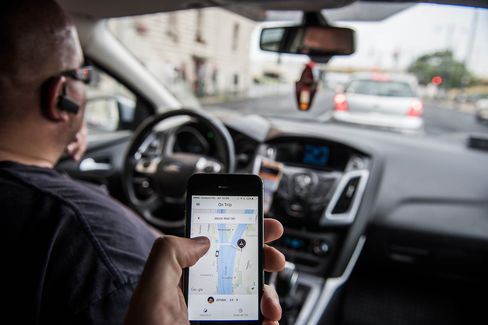
I have thought a lot about Waze since I started using it. Without a doubt, it has improved my life substantially. Here are some other thoughts I had as I used it.

  1. Waze is an example of how software will eat the world. In this case, the world of gPS devices. Waze is a GPS on steroids. Not only will Waze do all the things that a GPS will do, but it does so much more, as you can see from this other Waze post I wrote. If you have a GPS, after you use Waze for a bit, you’ll likely stop using it.
  2. Waze will change the way cities work. Cities are inefficient when it comes to transportation. Our work habits contribute to that, in that so many people commute at the same time, in the same direction, on the same routes, each work day. Waze and other new forms of adding intelligence to commuting will shape our work habits over time. Drivers being able to take advantage of unbusy streets to reduce congestion on major thoroughfares is just the start. City planners could work with Waze to better understand travel patterns and travel behaviour and incorporate changes into the city  so that traffic flows better. It’s not that city planners don’t have such data, it’s that Waze likely has more data and better data than they currently have.
  3. Waze is a great example of how A.I. could work. I have no idea how much A.I. is built into Waze. It could be none, it could be alot. It does make intelligent recommendations to me, and that is all I care about. How it makes those intelligent recommendations is a black box. Developers of A.I. technologies should look at Waze as an example of how best to deploy A.I. Those A.I. developers should look at how best A.I. can solve a problem for the user and spend less time trying to make the A.I. seem human or overly intelligent. People don’t care about that. They care about practical applications of A.I. that make their lives better. Waze does that.

Why I love Waze. 13 good reasons why it is my favourite app


Inspired, in a way, by this article, Why I hate Waze in LA Times, I’d like to share some of the ways that Waze has made my life a lot better. 13 ways, in fact. There are more, but if this doesn’t convince drivers to use Waze, I don’t know what will.

  1. It saves me a lot of time: I used to take my son to hockey practice every week on a trip that took me 50 minutes. After talking to some other parents, I downloaded Waze. The result: my hockey commute went from 50 minutes to 25 minutes! Before Waze, I was stuck taking the major roads that were severely congested because I didn’t know what else to do. Waze recommended roads close to the roads I was on but that had no traffic problems. Over one year, I have saved hours of unnecessary commuting and saved on gas as well.
  2. It gets me to places on time: not only will Waze give you a fast route to travel, but it will tell you to the minute when you will get there. At first I didn’t think this was possible, but I was and continue to be amazed at how accurate it is. Now, before I am going somewhere, I will put the destination in Waze and know when I will arrive. No more being too early or late.
  3. It gives me options on how to get to a place: What I love about Waze is that it gives me 3 different routes to get to a place. It always recommends the fastest, but I like having the options. Sometimes it will recommend a road or a highway and I will think: I prefer to spend a bit more time and go a more scenic route.
  4. It gives me better times to travel if that is an option: Waze will also show me how long over the course of a day the route I want will take.  a 40 minute route at 4 p.m. might be a 24 minute route at 7:30 p.m. If you can shift your travel time, you can save yourself some time on the commute, according to Waze. This is a great feature.
  5. It has made me a calmer driver: I used to get anxious when I would get stuck in traffic. I’d think: God! I am never getting out of this jam! With Waze, not only do I know how long it will take to get to a place, traffic jam or not, but Waze will tell me things like: you will be stuck in traffic for 6 minutes. Now I feel much more in control of my commutes. Plus, I always know the route I am going is the best way to get to a place.
  6. It’s made me a more confident driver: one thing I didn’t like about Waze at first but now I do is that it often tells you to make left turns. Sometimes on busy streets. I used to avoid this on my own and I would go and turn at an intersection with lights. However, left hand turns save time, and the more I do them, even on busy streets, the more I realize they are no big deal. You just have to be patient and wait for an opening in traffic. It will come, often in a few seconds.
  7. It has helped me know the city better: when traffic is busy, Waze will have you going down streets you might normally skip. As I have done this, I have been amazed at how many new streets in the city I have discovered. Now, even when I don’t use Waze, I know about these streets and that knowledge helps me get around my city better.
  8. It helps you with cities you have no clue in: if you are driving into a city that you don’t know well, Waze is essential. I was driving into Montreal which has busy streets that go all different ways. With Waze I could just type in my hotel’s name and it gave me the route to get there. I had done this before Waze and it was a nightmare for me. With Waze it was easy.
  9. You don’t need to know addresses: that’s the other great thing about Waze. You can type in a name of a place and it will do a search and give you a list you can choose from. It’s perfect for when you are out with people and they say: let’s meet up at restaurant XYZ. You can enter that in Waze and off you go.
  10. It is the perfect navigator for solo drivers: I used to write down maps to help me get to places. It was ok, but not easy. It was especially difficult in new cities or driving on highways. Waze is constantly telling you how long you have to travel on a road, when you can expect to turn, and then telling you exactly where to turn. And if you miss a turn, it will recalibrate on the fly and tell you have to get back to where you need to go.
  11. It is great at night: I travel to a lot of rinks at night in the winter. Many of them are down small roads and poorly marked. I would have a heck of a time without Waze. With Waze, it is dead simple to get to the rinks. Can’t see a road sign? Can’t see the rink set far away frm the street? No problem: just follow the directions that Waze is giving you and you’ll get there.
  12. It gives you lots of time to turn: with Waze, you get lots of warning about when you have to turn. It will say: “in 1.2 kilometers, turn left….in 300 kilometers turn left….turn left at street X. ” You never have to worry about being told to turn left at the last minute.
  13. You can be flexible: Waze will suggest the fastest route. However, sometimes I will be tired or not in a rush and I will stick to a road I prefer driving down. Waze will quickly recalibrate and make additional recommendations, right to the point I arrive at my destination.

What drives A.I. development? Better data

This article, Datasets Over Algorithms — Space Machine, makes a good point, namely

…perhaps many major AI breakthroughs have actually been constrained by the availability of high-quality training datasets, and not by algorithmic advances.

Looking at this chart they provide illustrates the point:

I’d argue that it isn’t solely datasets that drive A.I. breakthroughs. Better CPUs, improved storage technology, and of course new ideas can also propel A.I. forward. But if you ask me now, I think A.I. in the future will need better data to make big advances.

29 IT links to things I am working on or interested in: AI, Python, Netscaler, automation and more

Things I am interested in or working on these days: AI, WebSphere setup, Python, Twitter programming, development in general, configuring Netscalers, cool things IBM is doing, automation, among other things.

  1. If you have the AI bug and think you want to do some Prolog programming, you need this: What Prolog implementation to choose? What’s fastest? Compatibility?
  2. Deep Learning is hot in AI. If you want more info, this is good: Deep Learning Tutorials — DeepLearning 0.1 documentation
  3. Sigh. This debate never goes away in AI: Why AlphaGo Is Not AI – IEEE Spectrum
  4. More on the hysteria that AI brings: The founder of Evernote made a great point about why AI (probably) won’t kill us all – Vox
  5. Ignore most AI hysteria, but do read this: What does it mean for an algorithm to be fair? | Math ∩ Programming
  6. Want to whip up a quick mobile app? Consider: Mobile App Builder – new service now available – Bluemix Blog
  7. For power users, there’s: How to create an insane multiple monitor setup with three, four, or more displays | PCWorld
  8. Need virtual images? Take a look at this: Images | VirtualBoxes – Free VirtualBox® Images
  9. For hardcore WAS users, this is helpful: Installing optional Java 7.x on WebSphere Application Server 8.5 (Application Integration Middleware Support Blog)
  10. A classic. Anyone tuning WAS needs this: Case study: Tuning WebSphere Application Server V7 and V8 for performance
  11. Want to learn Python? Write your own Twitter client? Or do both? Then there’s this: How To Build a Twitter “Hello World” Web App in Python | ProgrammableWeb
  12. More on programming Twitter: How To Use The Twitter API To Find Events | ProgrammableWeb
  13. Nice little project to try, here: Create a mobile-friendly to-do list app with PHP, jQuery Mobile, and Google Tasks
  14. Creating Simple Responsive HTML5 and PHP Contact Form | Future Tutorials
  15. Setting up a Linux system? Then you want to read this: Most secure way to partition linux? – Information Security Stack Exchange
  16. Want to learn Linux? This is essential! IBM developerWorks : Technical library concerning Learning Linux
  17. If you are doing performance work on Unix, you will likely use vmstat. Even if you know vmstat, this is good to review: What to look for in vmstat – UNIX vmstat command
  18. Wow! OS/2 is still alive! OS/2: Blue Lion to be the next distro of the 28-year-old – Yahoo Finance
  19. Talk about old tech! This makes OS/2 seem fresh! It’s Insane that New York’s Subway Still Runs on This 80-Year-Old Switchboard | Motherboard
  20. I was doing some work on Netscaler and found this useful in comparing the set up of one Netscaler config with another: Export Netscaler Config – NetScaler Application Delivery – Discussions. This is also useful:  Netscaler 9 Cheat Sheet.doc – netscaler9cheatsheet.pdf
  21. I thought this was a good development for everyone interested in Node: IBM Buys StrongLoop To Add Node.js API Development To Its Cloud Platform | TechCrunch
  22. Alot has changed with IBM’s OpenPOWER. Forbes gets you up to date, here: IBM’s OpenPOWER: A Lot Has Changed In Two Years – Forbes
  23. Cool stuff here: Access your Docker-based Raspberry Pi at home from the internet · Docker Pirates ARMed with explosive stuff
  24. I was using Perl scripts on Linux to send me messages to my mobile device via Pushover. This was good for that: pushover Archives – Perl Hacks
  25. I was also using WinSCP for that and this helped: Scripting and Task Automation :: WinSCP
  26. For all those trying to succeed in IT but feeling you are running into ceiling, you should read this: Tech’s Enduring Great-Man Myth or this When It Comes to Age Bias, Tech Companies Don’t Even Bother to Lie | Dan Lyons | LinkedIn
  27. Linus Torvalds is always interesting, and this is especially good: Linux at 25: Q&A With Linus Torvalds – IEEE Spectrum
  28. Very cool! Particle | Build your Internet of Things
  29. And finally some links to good stuff on UML online: Multi-layered web architecture UML package diagram example, web layer depends on business layer, which depends on data access layer and data transfer objects.

A good list of resources on passwords and PC security in general

I collected a list of all the links I had concerning passwords and PC security and general on this blog. It’s not exhaustive, but it is useful, especially if your knowledge on the topic is limited.

With the new announcements, Apple reinforces their affordable line of products


Apple took a turn towards something I was hoping they would do: (relative) affordability. You can see it in this piece from  Business Insider:

Apple introduced an iPhone with a smaller screen on Monday called the iPhone SE. The best way to think about it is as Apple’s current top-of-the-line iPhone specs in a smaller body. It costs $399 without a contract — a surprisingly low price for a new iPhone. …the older iPad Air 2 got a price cut to $399…. While the Apple Watch didn’t get a hardware update, Apple did unveil new nylon bands and cut its starting price from $350 to $299.

I was wondering if Apple was going to try and offer some affordable products or reposition itself as a luxury brand. I am glad to see they went with affordable. There are now lots of products from Apple at a wide range of price points, starting with the iPod (at $59). I have always been a fan of the lower priced iPods, and I am glad to see Apple still offers them. Likewise, the iPad Mini 2 is an excellent tablet and the iMac mini is an excellent computer. Relative to the market, they are priced competitively and yet superior technology. Now the new Watch and the new SE phone join them.

For people who want to spend lots of money, Apple has a product for them. By offering the lower end products, they both force their competitors to offer better products as well as allow more people to have access to their excellent technology.

P.S. I realize for some people, even these relatively low prices are not affordable. In the context of this post, affordable is in context to the rest of the marketplace an Apple product competes within.

The problem with AI, Bots and social networks

Bots combined with AI and social networks are going to become an increasing problem. I thought of this when reading about the relatively recent Ashley Madison fiasco. Even if you wouldn’t be caught dead using such a service, this applies to you in other ways.

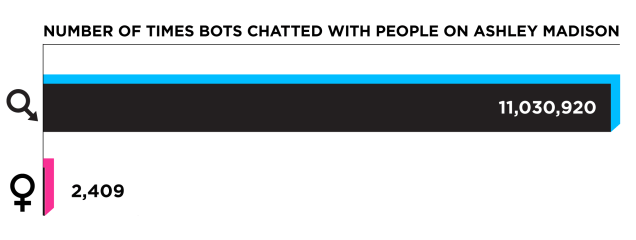
One of the fascinating aspects of Ashley Madison was just how many bots were employed by the company, at least according to this article: Ashley Madison Code Shows More Women, and More Bots. 

How many? Alot! From the article:

After searching through the Ashley Madison database and private email last week, I reported that there might be roughly 12,000 real women active on Ashley Madison. Now, after looking at the company’s source code, it’s clear that I arrived at that low number based in part on a misunderstanding of the evidence. Equally clear is new evidence that Ashley Madison created more than 70,000 female bots to send male users millions of fake messages, hoping to create the illusion of a vast playland of available women.

Here’s some examples:

This matters to you because chances are you will be interacting more and more with bots. Bots are cheap, and companies and organizations are going to go with them to meet their needs and yours.  Maybe the bots will be harmless, like customer service reps that are actually just software programs. However it is also possible, just like it was at Ashley Madison, that these bots will be customized to con you into thinking you are dealing with a real person so that you will give them more money in some form or another. Bots may be obvious now, but as AI improves, so will the ability of bots to fool you. It’s not inconceivable that we will spend more and more time interacting with software that we think is human. It is something we need to think about and talk to fellow humans — and not AI driven bots — about how it will affect us and if it is negative, what we are going to do about it.

Robots in the real world may not realistically resemble humans for a very long time. Online bots that realistically resemble humans will get there much sooner.  We need to quickly anticipate what positive and negative effects that will have and prepare for that.

How to Create Tarball & Compress to GZip Under Windows (.tar.gz) and why you should

If you are not familiar with Unix, then you might wonder why you would want to create tarballs and then gzip them. Recently I had a directory that was over 12 GB in size and I wanted to zip it up and send it to someone. By creating a tarball from it and then gzipping it, I was able to shrink it down to under 5 GB. That made it alot easier to send to the person.

Another reason to do this is you want to send a file from Windows to Unix. By compressing the file this way, you can be sure that the Unix user can uncompress it in a straightforward way.

For more on this, see:  How to Create Tarball & Compress to GZip Under Windows (.tar.gz) | Gettin’ Geek

Why Python programs often have this: `if __name__ == “__main__”:`

If you were wondering why Python programs often have this: `if __name__ == “__main__”:` and then a call to a function, a good explanation is here.

In short, if your program is used as input to other programs, then you want to have that snippet of code in them. If your programs are standalone, you can get by without it.

It’s not A.I. or robots that are taking away jobs. It’s you.

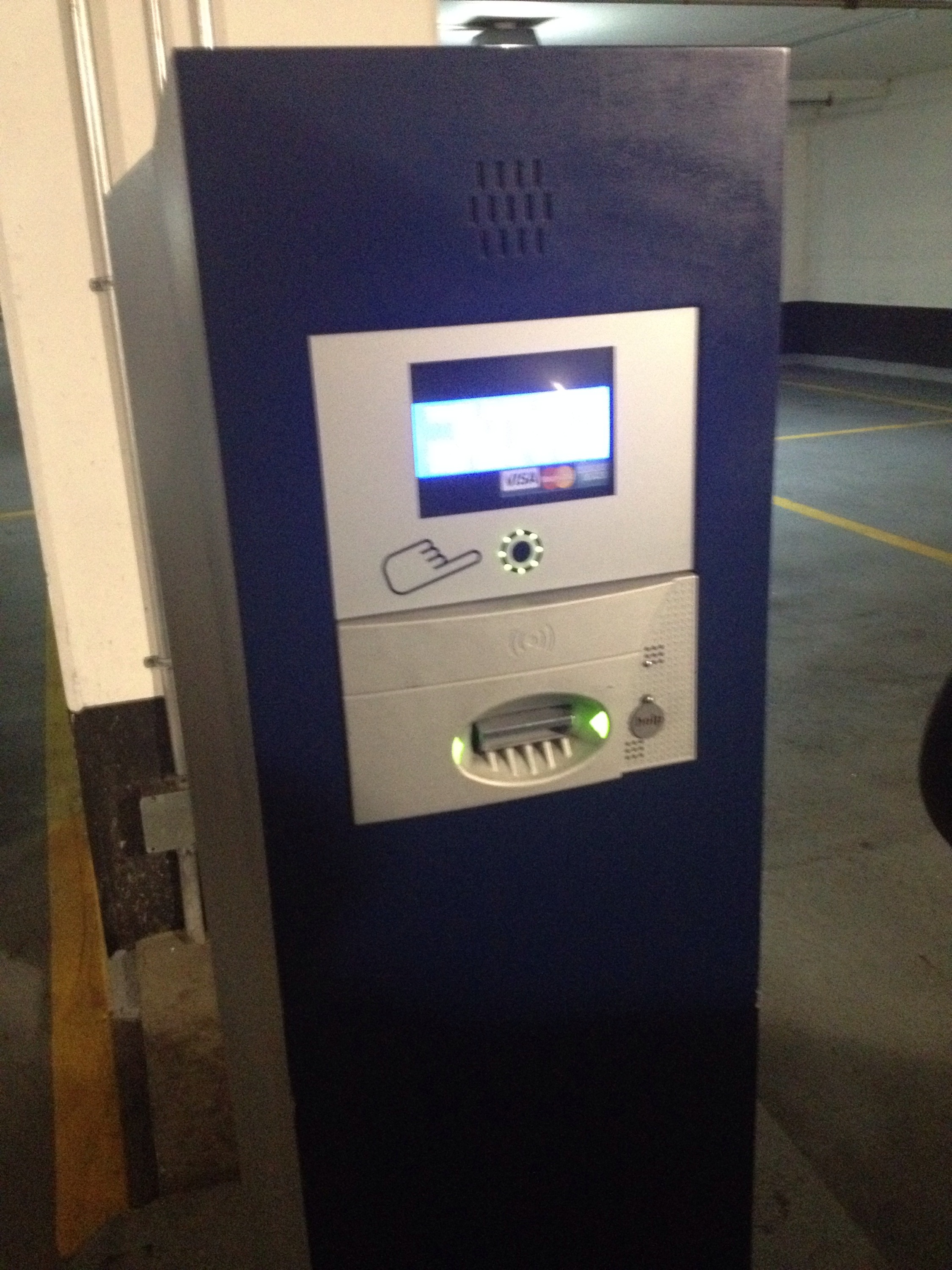
A year or so ago, a parking lot I use had a human in a booth to take tickets and provide other  services. That human booth was replaced by the thing in the photo above.

It’s not a robot and it’s not A.I., but it is replacing humans.

Stories about A.I. or robots taking over work makes them interesting. It’s also secondary to the real story. What is really taking people’s jobs is a willingness of others to use technology, and a willingness of companies to replace people with technology. People are not afraid to use technology. If anything, sometimes they prefer to deal with technology. This makes it easier for companies to go with technology as compared to using people, and if companies can save money or make money, so much the better.

It is happening in all sorts of industries, from food to sportswriting. The technology isn’t the driver of this: it’s the willingness of people to prefer technology that is the driver.

Thinking critically about robots. (Hint: think vending machines)

The following is anuncritical and hyped-up analysis of robots, from Wired (On Cyber Monday, Friendly Robots Are Helping Smaller Stores Chase Amazon). A key quote from it is this (highlighting by me):

… (Amazon) is relying on more than 100,000 temp workers this holiday season to supplement its already massive warehouse workforce, the advantages of offloading more of that work onto machines are easy to see. Robots don’t slow. They don’t tire. They don’t get injured or distracted or sick. They don’t require paychecks or try to unionize.

Now check out this robot:

Once you get over the word “robot”, you can see it resembles alot of the other machines you see in workplaces. Machines like high speed printers, scanners and even vending machines.  All of those things don’t slow, don’t tire and don’t unionize. They don’t get sick, but they break down alot, which is just the same. They don’t require a paycheck, but they do cost the organizations that use them. Sometimes they perform their function so poorly that people bypass them altogether.  As well, robots need others to take care of them. An army of robots just doesn’t show up: there is an entire process of testing, deploying, fixing and replacing them that is costly and non-trivial. There is a process for deploying human resources, too, but to say that that is costly and the process of deploying robot resources is not costly is wrong.

Robots will take over some functionality in workplaces, be that function blue collar or white collar. But that is no different from alot of other machinery already in place. The difference with robots will be that they are mobile. That’s it. We should get over the notion of robot as some magical creature and just accept them as another machine.

This article about body cameras is asking the wrong questions, which is not surprising, since everyone is.

This article,  Will Body Cameras Work? – The Atlantic, is asking the wrong questions. The wrong questions are occurring because the initial answer to the question of “how do we deal with bad policing?” was often, “body cameras”. The better question to repeatedly ask: “how can we make police more accountable?” because if “body cameras” is the first answer to that question, the next question should be concerning the information captured by those body camera. How are police accountable for that? Which should then lead to another question: how are police accountable for information they capture generally? Because with new technology, police will soon be able to capture alot more information about you than just images. It will soon be possible for police to look at you or your vehicle and have that information feed back to centralized computer systems, essentially collecting information about you without you even knowing it. How will police be accountable for that?

Police accountability will come, likely through the courts. In the meantime, we will likely struggle with the fallout of police forces capturing more information.

On the future of Apple and the case for an Apple car

Well-respected Apple analyst Gene Munster of Piper Jaffray gave a presentation on the company’s future at Business Insider’s Ignition conference and it’s really good. The entire presentation is here and worthwhile: Future of Apple presentation by analyst Gene Munster at Business Insider Ignition – Business Insider.

Earlier I wrote about how I don’t think Apple will get into the car business. However, after reading what Munster said, I can see how others think Apple will get into cars. Specifically, here’s are the pro-car points he makes:

  • Apple could align with and compete in the BMW market: BMW sold 1.8M cars in CY14.
  • If Apple priced them at $75K, 1.8M cars is $135B in revenue
  • Apple could start small: sell 30K in first year (similar to Tesla’s 35K in CY14)
  • In a market of 88M cars in CY15, 1.8M cars is nothing

The approach laid out in those points is a similar game plan that Apple followed in the smart phone market.

The more I thought about it, the more I am leaning towards Apple getting into the car business, at least in a limited way. The bulk of the market would not be Apple and there likely would still be lots of car manufacturers after Apple jumps in, just like there are many smartphone makers. But Apple would take over the most profitable part of the car manufacturing marketplace.

Read the analyst report: you will get great insight into where Apple is heading.

On Facebook, the company

Facebook is a company. It’s not Mark Zuckerberg. It’s not an app you use on your phone. It’s a collection of services that is growing rapidly and it may be poised to grow at even crazier rates than it has now, if you believe what is in this piece, Inside Mark Zuckerberg’s Bold Plan For The Future Of Facebook. Key point it raises:

The Facebook of today—and tomorrow—is far more expansive than it was just a few years ago. It’s easy to forget that when the company filed to go public on February 1, 2012, it was just a single website and an app that the experts weren’t sure could ever be profitable. Now, “a billion and a half people use the main, core Facebook service, and that’s growing. But 900 million people use WhatsApp, and that’s an important part of the whole ecosystem now,” Zuckerberg says. “Four hundred million people use Instagram, 700 million people use Messen­ger, and 700 million people use Groups. Increasingly, we’re just going to go more and more in this direction.”

Reading this, you get the sense of a company that is going to bigger in a few years than it is now, which seems incredible to me. Note this article: it will be worth revisiting in a few years.

That said,  there are a few points I’d like to add:

  1. I actually think that Facebook the app/website is declining in active usage. It is very clever showing you things people like, even if people you know aren’t posting things. You get a sense of activity on Facebook the app/website whenever you log in. You never get the sense that it is not being used by people, even if many of the people you follow aren’t actively contributing at all. I suspect if you dropped your Facebook friends down to next to none it would still show you the same amount of information. If Facebook the company is going to remain successful, it needs to diversify from it’s main service.
  2. It is interesting that people continue to compare Twitter to Facebook. To me, there is little to compare. Facebook seems to have a better growth plan and even have a better app. If Facebook the service declines, the diversification into places like WhatsApp and Instagram is strong in a way that is unlikely to be matched by services like Vine or Periscope. While there is some commonality between the two companies, I think the story of their divergence will become a bigger one over time. Contributing to that big difference is Facebook remains a stable company with a stable leadership while Twitter’s leadership remains chaotic and unstable.
  3. The narrative in that story is very optimistic. If the numbers for any of those organizations start to slip, I could see the narrative changing, just like it has for so many IT companies. Right now the narrative is: Facebook is a very successful company and it is going to become more successful with all these promising ideas. The narrative can easily become: Facebook is a very troubled company and it is going to become more troubled with all these ideas doomed to fail. (See Yahoo! for an example of such a narrative.)

Apple will not be getting into the car business, no matter what you read, because…

…it makes no business sense. A key take away from the article linked to below:

Ford’s revenue and operating income: $134 billion, 3.9%. Apple’s corresponding numbers: $234 billion, 40%! Or consider the world’s two largest car companies, Toyota and Volkswagen, both of which hover around $200 billion in revenue. Toyota just reported a higher than usual 10% net profit versus Apple’s 22.8%. The Financial Times recently pegged the VW brand’s operating margin at about 2%. (We’ll see how the German auto giant, which was ever so close to taking the industry’s Ichiban ranking from Toyota, extracts itself from its current engine management software troubles.) Yes, the car industry is large (around $2 trillion—that’s two thousand billions), but it grows slowly. In 2015 it saw 2% annual growth—and that was considered a good year.

There are so many other lines of business that could bring more revenue and profit to Apple. Unless the car business changes dramatically — and that is possible — then I can’t see how it makes any business sense for them to become car makers.

For more details on this, see: Why should Apple even bother building a car? – Quartz

Why do Apple’s Macbook chargers cost so much?

Simple: they are a complex piece of technology. The photo above shows a Macbook charger from Apple on the left: the charger on the right is from another company. You can clearly see that the one from Apple has a lot more technology packed in there. And for good reasons. To understand what those reasons are, see this piece:  Macbook charger teardown: The surprising complexity inside Apple’s power adapter. It was surprisingly interesting, from an engineering and design perspective.

Thanks to Tom Plaskon for sharing this on Twitter!

A good article: Why I Am Not a Maker. With one comment by me.

If you hang around with or are involved in some way with IT people, you will come across individuals extolling the virtues of being a “Maker”. Making things (typically software or IT systems) is seen as a virtue, in some case one of the highest virtues, and the implication is that makers are virtuous people.

A well written critique of that is here: Why I Am Not a Maker – The Atlantic. If you consider yourself  a maker or aspire to be considered one, you should read it. A key point is this:

When tech culture only celebrates creation, it risks ignoring those who teach, criticize, and take care of others.

This is true: tech culture sometimes places little or no value on other activities, such as the ones that the article mentions.

My main criticism of the article is that it has a blind spot for the middle ground. I know plenty of creative people whom I consider makers that also take care of others, teach, manage, administer…you name it. Often time the things they make are superior to those of people who devote themselves to being makers.

Being a maker is a virtuous thing, for the most part. But so is teaching, providing care, managing, cleaning, coaching and many other positive activities. Find the thing you are good at and contribute positively in your own way.  If you can make some things along the way, all the better.

Blackberry has a new Android phone coming

And I think it could be successful. First off, it looks good, and it has the famous BlackBerry keyboard. Plus it will work with BlackBerry Enterprise Servers. For some users, this is the best of both worlds. For BlackBerry fans who also want to tap into the benefits of Android devices, this could be for you. More details, here:  BlackBerry Priv — the Android phone formerly known as Venice — is on the way | IT Business.

How to run Minecraft on a mainframe and other cool things

Here are two interesting pieces of innovative things people have done with Minecraft. The first one, New Minecraft Mod Teaches You Code as You Play, is a novel way to learn how to code. If you have a young one who loves Minecraft and whom you want to learn how to code, this may be a good way to do this. The second one is an amazing story found on Reddit: My experiences with running a Minecraft Server on an IBM Mainframe.

I was amazed he managed to get it to run, albeit slowly. Needless to say, a Mainframe is not an ideal platform for this software. Still, that he did get it to run is a testament to his ingenuity and also the flexibility of Minecraft and the IBM Mainframe.

Pebble and their smart watches are not going away yet

After the Apple Watch came out, I wondered how this would affect Pebble, the company. Turns out, instead of folding, they have plans to evolve and grow. For evidence of this, check out their latest watch (in the photo, as well as here: Pebble Smartwatch | Smartwatch for iPhone & Android). They seem to be aiming to finding a market for those wanting some of the features of the Apple Watch without all the functionality (or cost).

With the watch above, you can see them adopting higher end materials and also getting thinner (and round). It is more expensive than the original Pebble, but likely better quality. And still much cheaper than Apple Watch.

I have a Pebble and I really like it. It does what I want, which is send me notifications without having to get out my phone, which is great in meetings, at events, or driving (carefully). And you can even easily write code for it. Finally, it is a great watch that needs to be rarely charged.

Needless to say, the Apple Watch is a great product. Depending on your needs, it could be a better choice than the Pebble. But the Pebble is a good product too, and I think there is a place in the market for a range of watch makers. Get one that suits your needs. With the Pebble, now you have more choice.

Some thoughts on recently teaching myself Python

I have jumped on the Python bandwagon lately. I did because I was finding that more and more of the examples provided for integrating with APIs and for working with new technologies were often in Python. So I decided, why not? At first I tried teaching myself by way of various web sites, but I didn’t find this a satisfactory way to ramp up my skills as well as I wanted. It wasn’t until I came across this book in my local bookstore, Python in 24 Hours by Katie Cunningham and started learning from it did I find my skills increased at the level I wanted. By the time I was through it, I found I was writing good (not great) Python code at the level I was happy with. Furthermore, I felt I had a pretty good handle on the language, its features, and what it can do.

I highly recommend this book, and Python too. If you are new to programming, or are thinking of picking up a new language, read this piece: Why Python Makes A Great First Programming Language – ReadWrite.

On rose gold, white gold, and gold generally

There was a lot of scoffing when Apple recently released this

and claimed the colour was rose gold. It’s pink, was the common reply.  But as this piece shows ( The Semiotics of “Rose Gold” – The New Yorker), rose gold is a specific material. It refers to an alloy of gold to which copper has been added. For that matter, white gold, which is an alloy with nickel or manganese, is also a specific material. Jewelers know this, of course, and Apple is smart to associate with the metal (gold) vs the colour.

The New Yorker piece is fascinating. Worth reading, especially if you are skeptical about the colour.


Where Twitter the company may be going

This piece: Startups and Shit, Twitter’s Product is F—– Fine by @startupljackson on Twitter, is the best analysis I have seen of what twitter can and should be doing over the next time.

Read the piece, but in a nutshell, Twitter should not look to grow Twitter the Service so much as Twitter the company, that company being a collection of services, from Twitter to Vine to Periscope to…well, we will see. The Twitter service itself provides a foundation for the company to grow on. Over time, if Twitter the service shrinks, Twitter the company could still grow based on the other services.

Smart take on the company.

What programming language should you learn? (2015 edition)

It depends on a number of factors, but if you want to decide solely on popularity, then you need to see this: The Most Popular Programming Languages of 2015 | ProgrammableWeb.


At the top you have some consistency, with Java at the top, and C, C++ and C# in the top five. Python, a language that I am becoming fond of and using to replace Perl, is up there at #4.

Following that are what you’d expect: PHP, Ruby, and Javascript, as well as some data oriented languages.

What is interesting, and not shown, are new and up and coming languages, such as Swift. I expect that to inch into the top 10 in the next few years.

If you want to focus on learning a programming language, and you have no other criteria, pick something from this list.

This may just be the stupidest defense of Amazon’s workplace practices

This piece may be the stupidest defence of Amazon’s workplace practices: Replace Just 2 Words in the New York Times Amazon Article and Something Amazing Happens | Inc.com.

Amazon employees are not entrepreneurs. There is nothing in the NYTimes.com article that gives any inkling that they are. If anything, they have all the downside of being an entrepreneurs with little if any of the upside.  If someone can point out an article showing how Amazon consistently rewards employees as if they are true entrepreneurs, I’d love to read it.

There’s nothing wrong with being an entrepreneur. In fact, for some people, being an entrepreneur is the best type of work there is. Everything about it appeals to them, and working for a large corporation would kill them.

The Amazon employees are not entrepreneurs.  If you want to be an entrepreneur, be one. Don’t try to be one working at a large corporation. That is antithetical to what being an entrepreneur is.

Forget self driving cars – the first big thing will be self driving trucks

While there is lots of discussion about self driving cars, it’s much more likely that self driving trucks will become standard and accepted first. Here are two stories that support that. First this: How Canada’s oilsands are paving the way for driverless trucks — and the threat of big layoffs. Second, over at Vox, is:  This is the first licensed self-driving truck. There will be many more. Key quote from Vox:

Last night at the Hoover Dam, the Freightliner company unveiled its Inspiration Truck: the first semi-autonomous truck to get a license to operate on public roads.

The Inspiration is now licensed to drive autonomously on highways in Nevada. It works a bit like a plane’s autopilot system: a driver will get the rig on the highway, and can take control at any time once it’s there. But the truck will be able to drive itself at high speeds, using cameras to make sure it stays within its lane and doesn’t get too close to the vehicle in front of it.

Self driving trucks are already up and operational. Additionally, the business case and the hurdles to overcome with self driving trucks will be easier to achieve than that of self driving cars in urban areas. Sooner than you think, you will commonly see self driving trucks on highways, especially during the hours when most highways are 80-90% trucks.

Transportation is changing. Self driving trucks are going to be leading that change. Self driving cars will be a distant second.


ICYMI: What is code, by Paul Ford

Happy Monday! Are you affected by code at work? Of course you are! Do you code at work yourself? Very likely, even if it is to use formulae in a spreadsheet program like Excel (which, years ago, would have required been considered coding). However code affects you, I highly recommend you read this:
Code. It’s a very rich piece on code (i.e. software) and what it means to you (and everyone else).

Among other things, it is brilliantly designed. Lots of hard work went into this piece. If you can’t get started yet this week at work, read this as a research project.

Two initiatives IBM is promoting for women of all ages

On this page IBM & Open Source for the Enterprise Developer, there is alot happening, but I want to highlight two things that IBM is doing.

First, IBM is

…partnering with Girls Who Code to promote gender diversity in software development. This summer, we’re hosting a seven-week immersion program for dozens of female high school students in New York City. In 2016, we’re taking it across the country.

And second:

We’re also working with GSVlabs to help women return to work in greater numbers than ever before by offering mentorship and placement programs after multi-year sabbaticals. In focusing on cloud development, IBM hopes to attract women back to the workforce with a new set of skills.

Two worthwhile initiatives, I believe.

Why aren’t we becoming more productive with all this new technology?

Vox raises that question here: All this digital technology isn’t making us more productive – Vox, and it implies that because people are slacking off on the Internet. I think that is incorrect, and here’s why.

The chart that Vox piece has shows big producitivity gains from 1998-2003 and smaller gains after that.

From 1998-2003 was the peak adoption of the Internet by companies. In the early 1990s, companies started to adopt email. In the later 1990s companies started adopting the Web. To me it is not surprising that companies would become more productive and they shifted away from snail mail and faxes to email. And then companies shifted further and started offering services over the Web, I imagine they became much more productive.

Slacking off on the Internet has been a problem since the Web came along. I know, because I used to monitor web server traffic.  I don’t think that is the issue.

I think it is more likely that companies grabbed the big productivity gains from the Internet at the beginning, and then those gains slowed down after.

So what about smartphones? Have they made people more productive? I think they have, but I also think that the gains in being able to access information remotely may have been overtaken by the sheer amount of information to deal with. Being able to deal with email remotely makes you productive. Having to deal with way more email than you ever had to in the 1990s because now everyone has it makes you unproductive.

Furthermore, many of the features on smartphones are aimed at personal use, not professional use. I think smartphones make us more productive personally,  but less so professionall.y