On DevOps, or the important of a good reference architecture when doing IT Architecture

Update: as of July 2024, this reference architecture is no longer available.

If you are designing an IT system, you can greatly benefit from a good reference architecture. A good reference architecture can be:

  • a superset of whatever architecture you design
  • a guide to what is possible in your design
  • a reminder of what is essential and what you may have left out
  • an explainer of all the potentially relevant parts to your design
  • a supporter of whatever architecture you do decide on
  • like a mentor providing you thought leadership and guidance on what works and why you need it

IBM has long put together such good reference architectures. Of all I have seen, this is one of the better ones I have seen: DevOps architecture: Reference diagram – IBM Cloud Architecture Center. It covers all the stages of DevOps, from Planning to  Deployment to Learning. It shows the logical parts of the DevOps Architecture and what tools support that. It reveals the relationships between the parts, both static and dynamic. It reminds you of the things you need that you might not be aware of. I think it’s fantastic.

I think it is great for another reason. Implicit in the architecture is the definition —  at least for IBM and I — of what DevOps should be. It’s not just CI and CD. It’s not just a toolchain/pipeline from Dev to Ops. DevOps is really this entire cycle:

Each stage is important. Too often the focus is on Development and Deployment. But stages like Planning and Learning are an essential part of the DevOps cycle  that are essential not just for code quality but testing quality and ops quality.  It all ends up with better results for all the stakeholders of an IT system, from the business sponsors to the users.

Anyone involved with IT architecture, system design, IT testing, system operations or DevOps in general would benefit from studying that reference architecture.

What are NFRs (non-functional requirements) and why should you care?


If you have any role in the design of an IT system, you should care about NFRs.  As this piece (Nonfunctional requirements: A checklist – IBM Cloud Architecture Center), states:

Defining and addressing the nonfunctional requirements (NFRs) for a system are among the most important of a software architect’s responsibilities. NFRs are the system quality attributes for a system, as distinct from the functional requirements, which detail a system’s business features and capabilities.

Examples of NFRs include key concepts such as reliability, performance, scalability, and security. NFRs are cross-cutting in nature and affect multiple aspects of a system’s architecture. It’s important to articulate and address the NFRs early in the project lifecycle and to keep them under review as the system is produced. To help with that task, you can use the following checklist of key NFRs. The checklist designed to be consulted when you define and evolve a system’s architecture.

The bold text is key. NFRs describe the qualities your system should have. You have functional requirements and you have quality requirements (i.e. , NFRs). Any system design needs to address both.

The number of specified NFRs your system can have are endless. Three of the key ones found at the top of that list are:

Those three are typically covered in any system design I work on. The piece goes on with a great rundown on the various NFRs you’d expect to address in most system architectures.

Three NFRs missing from that list that I think are important and that I would ask you to consider are:

  • Accuracy
  • Maintainability (related to complexity)
  • Cost

There is often a tradeoff with accuracy and other NFRs, such as performance. To gain better performance, data will often be cached and served up even when it is out of date (i.e., inaccurate). That may be fine. But accuracy should always be taken into account and not just assumed.

Maintainability is often ignored, but it is key for the long term success of a system. Two examples of this. One, developers will sometimes not externalize values in their code; changes to the code require a fix and an outage. That is less maintainable than code with external values in a simple text file that can be changed on the fly. Two, code that is not well documented and not peer reviewed will be harder to maintain. Externalization, code reviews and documentation are examples of maintainability requirements you may have and should have for your IT system.

Cost is an important NFR because it causes tradeoffs with most other NFRs. For example, without cost considerations, stakeholders might have availability requirements that are for 99.99999….. It’s only when cost (and complexity and maintainability) become factors do we see often see availability (and other NFRs) scale back.

Finally, NFRs are not just for software architects: they are for everyone. In fact, I wish the term “non-functional requirement” was replaced with “quality requirement”. However I suspect software architects — for whom functional requirements are key — came up with that term, so we all have to live with it. When you think of NFRs, think Quality Requirements. Everyone involved in the design of an IT system wants it to have good quality. Understanding the NFRs/QRs are key to this.


On the Amazon Astro robot, or servants old and new

Amazon has a new robot coming out, and there’s been a number of reviews. Here’s a list of just a few of them:

If those reviews have convinced you to get one, you can apply to get into the queue for them over here (they aren’t generally available): Amazon.com: Introducing Amazon Astro, Household Robot for Home Monitoring, with Alexa, Includes 6-month Free Trial of Ring Protect Pro : Everything Else

My thoughts:

  • It’s smart Amazon is rolling them out this way. (No pun intended.) There are going to be many missteps* : a gradual rollout will minimize problems and bad press. (* Also not a pun. :))
  • A robot is the next iteration in home devices. People may have a number of Amazon home devices around. Robots are like Alexa on wheels. And if anyone can mass produce them, Amazon can.
  • I can see Google and others getting into the game. I have a number of Google Home devices around my house. Having a Google Robot (Gizmo?) would be a benefit to me. For one thing, I might consolidate my Home devices and just have one robot / floor.
  • I wonder if Apple will get into the game? I’d love to see an Apple Home robot. Maybe it will look like Eve from Wall-E? 🙂
  • Perhaps at some point this thing can do many things. Or maybe there will be just a series of robots: one to vacuum, one to move small things around and watch the house and provide information, maybe even one to tend to plants or keep the cat busy. Robot technology has a way to go before it is humanlike and can do everything.

Anyway, a home robot for under a grand is an exciting development.

P.S. While I was reading that I was reminded of this piece: Finding the servant call buttons in New York City’s Gilded Age mansions | Ephemeral New York. In some ways saying “Hey Siri/Alexa/Google” is the equivalent of pressing servant buttons.  One day we will have a household of robot servants working for us at the press of a button.

(Image linked to from the Ephemeral New York article. Those buttons are in the Frick museum in New York: check them out if you go there.)

What I learned writing web scrapers last week


I started writing web scrapers last week. If you don’t know, web scraper code can read web pages on the Internet and pull information from them.

I have to thank the Ontario Minister of Health for prompting me to do this. The Minister used to share COVID-19 information on twitter, but then chose recently to no longer do that. You can come to your own conclusions as to why she stopped. As for me, I was irritated by the move. Enough so that I decided to get the information and publish it myself.

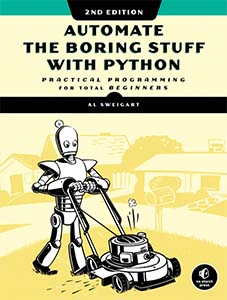
Fortunately I had two things to start with. One, this great book: Automate the Boring Stuff with Python. There is a chapter in there on how to scrape web pages using Python and something called Beautiful Soup. Two, I had the minister’s own web site: https://covid-19.ontario.ca/. It had the data I wanted right there! I wrote a little program called covid.py to scrape the data from the page and put it all on one line of output which I share on twitter every day.

Emboldened by my success, I decided to write more code like this. The challenge is finding a web page where the data is clearly marked by some standard HTML. For example, the COVID data I wanted is associated with paragraph HTML tag and it has a class label of  covid-data-block__title and covid-data-block__data. Easy.

My next bit of code was obit.py: this program scrapes the SaltWire web site (Cape Breton Post) for obituaries listed there, and writes it out into HTML. Hey, it’s weird, but again the web pages are easy to scrape. And  it’s an easy way to read my hometown’s obits to see if any of my family or friends have died. Like the Covid data, the obit’s were associated with some html, this time it was a div statement of class sw-obit-list__item. Bingo, I had my ID to get the data.

My last bit of code was somewhat different. The web page I was scraping was on the web but instead of HTML it was a CSV file. In this case I wrote a program called icu.sh to get the latest ICU information on the province of Ontario. (I am concerned Covid is going to come roaring back and the ICUs will fill up again.) ICU.sh runs a curl command and in conjunction with the tail command gets the latest ICU data from an online CSV file. ICU.sh then calls a python program to parse that CSV data and get the ICU information I want.

I learned several lessons from writing this code. First, when it comes to scraping HTML, it’s necessary that the page is well formed and consistent. In the past I tried scraping complex web pages that were not and I failed. With the COVID data and the obituary data,  those pages were that way and I succeeded. Second, not all scraping is going to be from HTML pages: sometimes there will be CSV or other files. Be prepared to deal with the format you are given. Third, once you have the data, decide how you want to publish / present it. For the COVID and ICU data, I present them in a simple manner on twitter. Just the facts, but facts I want to share. For the obit data, that is just fun and for myself. For that, I spit it into a temporary HTML file and open it in a browser to review.

If you want to see the code I wrote, you can go to my repo in Github. Feel free to fork the code and make something of your own. If you want to see some data you might want to play with, Toronto has an open data site, here. Good luck!


On moving off Google for Search

Have you ever thought of giving up on Google as a search tool? I have, and so did Clive Thompson. He wrote about switching here. As for me, I have changed my default search engine to DuckDuckGo and I am preferring the experience.

I still use technology from Google. It’s pretty hard not to. But you have choices when it comes to Search, try using something else..

New robots just dropped (in your pool and your…toilet?)

Pool cleaning robot
Whenever new robots are released, I like to feature them. Robots are still pretty limited in the home, but there has been some attempts to get past the Roomba and have them in other parts of the house. Cases in point, this Toilet cleaning robot and this Pool cleaning robot .

Check them out. The robots are coming.eventually.

(Image via Yanko).

It’s spring. You should freshen up your web site too.

Is your website looking old and tired? Maybe you just need to freshen it up and clean it up. I wrote about how you can do that in around 30 minutes, here: Ok, you have a web page or a web site. Here’s how can you make it look better in no time. I used the guidelines there to refresh one of my sites: berniemichalik.com.

Part of that advice is freshening up your web site’s fonts. If you have no idea how to do that, then you need this: top 50 Google Font Pairings [Handpicked by Pro Designers]. One of the examples is displayed above.

On the new iPhone SE

iPhone SE, 2022 edition, RED

One of my favorite phones from Apple is the SE, and in 2022 there is a new version of it. From what I read, the new version is a combination of physical features, old and new, combined with new software. I like it.

I read some complaints that argued the iPhone SE should have the same shape as the previous SE phones (think “flat edges”). Those complaining miss the point: there is no ONE form factor for the SE. The form factor is based on recycling once was what was new recently.

If you like an older form factor — home button, anyone? — and you like a great low cost iPhone, then the SE may be for you. Check out this list of reviews:

Convinced? Then head over to Apple and buy one. I am a fan of the (PRODUCT) RED one: iPhone SE 64GB (PRODUCT)RED – Apple

(Image from the Apple web site)

P.S. If you are looking for a bargain smart phone that isn’t the SE, there  I recommend this.

The two problems with home robots

This is a cool story about a concept robot for homes:  A BB-8 Droid for your home – Yanko Design.

I used to have problems with such concepts, because  they provide an opportunity to have a device wandering around your home, recording data and selling it to others. That’s why I was never keen on such devices coming from Amazon or Google. I was very pro-privacy when it came to such technology.

For better and worse, I have since adopted quite a few Google Home devices in my house. If I was worried about them recording all the time, I appear to have gotten over it. As often is the case, the convenience they provide trumped privacy concerns.

Given that, I would love to have a robot like the one above. Instead of having multiple Google Home devices, I could just have one Google Home Robot that followed me around.

That brings me to the second problem. While it is cute that they illustrate this one rolling and bouncing around a home, mobility for robots is a huge challenge. Especially homes with stairs.

I see two ways around that. Such a robot would not be good for me, but people living in one level condos and apartments might find some combination of a vaccuum robot + Google Home device just the thing. And for people with stairs, maybe a robot above with wheels and a handle you can use to bring it with you up and down stairs might be the best alternative.

Robots are coming to most homes eventually. Maybe they will look like the one above. Maybe not. But soon we will see them everywhere.

Tiny DOOM! And other things I find interesting in tech, February 2022


I’ve been doing work in a number of areas recently: IT architecture, Azure, Kubernetes and more. As I do that, I collect a number of links, which I have below. As well, I put together some Raspberrry Pi links, because I love my Pi. Also DOOM because I will always click on a DOOM link. Lots of good material. Let’s review!

IT architecture: I’ve been thinking much about IT architecture these days, and I’ve been writing about it here: BLM on IT. One thing that helped me think about it was this: 5 diagrams you need to document your solution architecture. This is also helpful: Editable architecture diagram resources: IBM IT Architect Assistant. In addition, something on DDD:  Apply Domain-Driven Design to microservices architecture.

Devices: These two pieces are on new trends in devices:  Dell envisions a sustainable laptop allowing you to replace parts creating a design you could grow old with and Lenovo ThinkBook Plus Gen 3 Laptop.

On the other hand, we have this: BlackBerry phone with keyboard is not dead. Remember netbooks? They were great little devices. Here’s a piece on them: Netbooks: The Form Factor Time Forgot.

Cool: Here’s something fun: The Best of 404PageFound and Other Primitive ’90s Websites That Still Exist. I love DOOM, so: Is this one of the smallest playable DOOM devices? and Pocket-Sized Doom Is Actually Playable. Speaking of small things, we have this, A VM in your browser,  this Writing a simple 16 bit VM in less than 125 lines of C and this System/360 simulator. Also this: CHUNGUS 2 – A very powerful 1Hz Minecraft CPU.

Raspberry Pi: for Pi fans, here’s some good links:

Cloud and DevOps: here’s some things I found worthwhile in that space

IBM: Here are two good initiatives my employer is providing: Good probono program from IBM to help environmental groups  and A good initiative from IBM to help on the matter of Racial Justice.

Azure: I have been doing tons of research of Microsoft’s Azure and so I have many links on it here. Enjoy!

Kubernetes:  I have been doing some Kubernetes work too which lead to these links in

Finally, here’s some other useful links I didn’t want to lose:

Penk Chen is making computers cool again

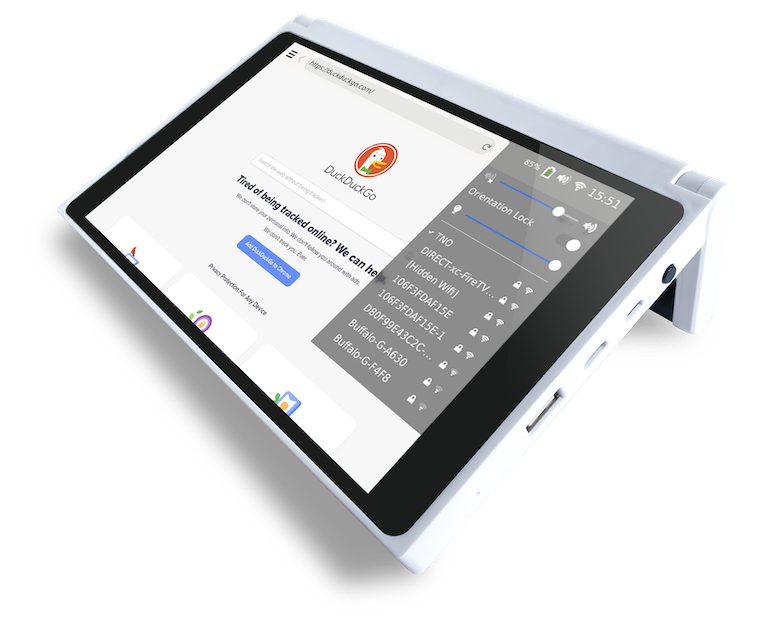
And to me he is doing it with these two machines: the CutiePi tablet above, and the Penkesu Computer below…

I think both of these machines are fabulous. I love the different designs of both of them. The handle for the CutiePi is great: you can carry it and then use it to stand up the computer. As for the Penkesu, I love how it reminds me of the old netbooks I used to love.

Well done, Penk Chen and team. For more on the bottom device, see: The Penkesu is a DIY retro handheld PC with a mechanical keyboard – The Verge.

P.S. Hat tip to Clive Thompson for pointing this out.


Chrome OS Flex could be just the thing you need to make your old hardware useful again

I wrote some time ago about how I turned an old Windows laptop into a Chromebook for my son’s virtual school . At the time I did this I used software from an organization called Neverware. It all worked well and I was recommending it to many.

Not long after that Google bought Neverware. I thought: oh no perhaps we will lose this ability to recycle old machines in this way. What a shame.

Turns out I had nothing to worry about. Google is coming out with Chrome OS Flex, and I presume it will provide similar capabilities that Neverware’s software provided. If so, I recommend it. It’s a great way to recycle old computers.

For more on it, here’s two more pieces worth taking a peak at:

Hacking North Korea


This is a fascinating story in WIRED: North Korea Hacked Him. So He Took Down Its Internet

It may seem far fetched, but if you read it you can see there were plenty of opportunities for him to exploit weaknesses in North Korea’s networks. He’s also modest about what he was able to accomplish.

Among other things, it reminded me that the Internet is full of fragile technology that can be brought down. Even if that technology is owned by government agencies.

Some good links on how to learn Python

A friend asked me for some help when it comes to learning Python. I put together this list for him, but it’s good for anyone wanting to learn the computer language.

  1. Why Learn Python
  2. Automate the boring stuff with python. A great book!
  3. Learn python in 24 hours. Another book. Also great.
  4. Learn python in 10 minutes
  5. Good doc on python
  6. Learn Python the hard way
  7. How to make a web app using Flask and Python
  8. How to build a twitter app in python
  9. Become a More Efficient Python Programmer

There are so many great resources on the Internet concerning Python. I could easily triple the size of this list. Start with these: you’ll find the rest soon enough.

(Image from Free Code Camp, which also has good links worth reviewing.)

On the sorry state of printers, 2021

What does the Verge think of printers?

Printers are the worst. They’re unreliable, they guzzle reportedly $12,000-a-gallon ink, and their manufacturers have been known to use dirty tricks, scare tactics, and DRM to strongly encourage you to buy cartridges exclusively from them.

Whoa! Strong but true. What prompted this? Well it seems…

Some of Canon’s own toner cartridges are now being detected as fakes — and they’re forcing the company to teach customers how to bypass its own DRM (via Techdirt).

Wild. You can read more about that here: Canon printers now think Canon’s own toner is fake – The Verge.

I have always wondered why printers are in the sorry state they are. While they are common, they are almost seen as a dead end technology. People don’t write about new printers the way the write about new smartphones. They are seen as a necessary evil in many cases. No one in Silicon Valley is coming along to disrupt the printer business.

I remember when IBM spun off their printer division into a company called Lexmark. And I can remember over a decade ago Kodak made printers with cheap ink. Now when I go into a computer store, those brands aren’t there. It’s the Canon’s and HP’s of the world that are making printers and presumably making money from them. Perhaps the only way to make a go of printers is to make them poorly. Which is sad.

What programming language should you learn? (2022 edition)

The best programming languages to learn in 2022, according to TechRepublic are these:

It’s interesting to see how things have changed. Back in 2015 when I wrote about this, Java was 1st and Python was in 4th. Javascript was 8th! I am not surprised by this.

Java and the C languages will always be good to know. But if you want to be marketable, learn some Python and Javascript.

It’s Friday. A good day to tidy up, workwise. Start with your inbox


It’s Friday, a good day to tidy up, workwise. That way it’ll be easier to start things fresh on Monday.

Sure you can tidy up your Downloads folder, your desktop, maybe delete some really big files that have been hanging around forever. Those are all good, but I recommend you clean up your inbox.

If you need a tool to do this, I know some really smart people who have recommended this: Mailstrom: Clean Up Your Inbox Now.

Your Monday self will thank you.

Why beach robots are good

While I am not a fan of most popular robots these days, I will make an exception for this one: This Microsoft-powered AI-enabled robot cleans up cigarette butts littered on the beach! – Yanko Design

It’s sad we need such a robot, but if this problem is going to exist, I am all for such technology. It’s a great project and not unlike a Roomba for the beach. Nice.

Something to consider if you are gaming this holiday season (never mind the metaverse)

If you are planning to do some gaming this holiday season, especially Halo, then read this: Cheaters are already ruining Halo Infinite multiplayer games – The Verge. And it’s not just Halo, but lots of big online games.

As an aside, when I read about Mark Z’s Metaverse, I imagine them not even considering things like this.

(Image from article).

On Toronto, tiny robots and the media

So the city of Toronto has put a hold on this company that has dumped their robots on city sidewalks for now. Good. It has been an epic struggle for advocates to get proper bike lanes and other form of transportation (other than cars) in place. The last thing we need is to have sidewalks swarming with robots. My take is that these robots make life in the city worse. Let’s see them put onto the streets.

What has been the take of our Canadian media? Basically that robots are cute and people are mean. See this piece in blogTO, People in Toronto are fighting to keep these adorable delivery robots on city sidewalks, and also McLeans.

I guess it was too much trouble to think and report on what other disruptive  “innovations” have done to cities, from Uber to Lime.

Innovation is contextual. In the right context, new applications of technology are great. I remain unconvinced that deploying swarms of robots to our sidewalks and waiting to see what happens is one of these examples.


IT and society (or what I find interesting in tech, December 2021)

This list is different than most, in that there is more of a focus on IT and society vs how to use tech.  For example, here is a recommendation of 14 tactics to use during a ransomware negotiation. I can’t vouch for those, though I can say ransomware continues to be a big problem. On the flip side of IT and crime, the Toronto’s police board is seeking the public’s input on using artificial intelligence for policing. Input is good: I hope they act on it.

Getting back to (alleged) crime, here’s two good pieces on Theranos: Theranos drained $96 million from an experienced investor ‚ plus some blood and How Elizabeth Holmes Soured the Media on Silicon Valley. To be fair to Holmes, she wasn’t alone on the souring of SV.

Big changes at this place recently: Twitter makes big changes for devs as it eyes decentralized future. Plus Jack is gone. It’s an odd company.

Two things on will.i.am: Q&A: will.i.am Talks Masks  and the worst gadgets. He gets a mention in the second piece because he seems to be associated with some of the worst IT. He is successful in music: in technology, less so.

As someone who has given serverless a go from time to time, I agree with this:  The Unfulfilled Promise of Serverless.

Here’s a good piece on K8S:  Introduction Getting started with scalable web application on Kubernetes. Here’s why you should use IBM Cloud: Why IBM Hybrid Cloud for Your Journey to the Cloud?. Here’s why you should use Terraform to Define Custom Views for Your Log Analysis and Activity Tracker Instances.

This is one of the best things I’ve read on COBOL:  Why and how COBOL is still used.

Finally, this is good:  Logitech’s latest device is an all-in-one dock that turns your table full of gadgets into the best WFH setup ever.


What is a cloud architect and how to become one


What is a cloud architect? Well, for one, it is me! But for a more general description, I thought this piece was really helpful: What is a cloud architect? A vital role for success in the cloud | CIO

The piece covers:

  • what they do
  • the various types of cloud architect
  • what they get paid
  • what skills they need
  • how to become one

Very thorough.

I’d like to add:

  • as a cloud architect, you are an architect first. By that I mean you need to know the cloud well, but clients and members of your team will look to you to bring your IT architect abilities first and foremost
  • relatedly, there will be times when the architecture decisions you produce and the architectural thinking you do will fall outside cloud technology. This is especially true of hybrid cloud, but true of other things as well (integration, networking, operations, application). A good architect has 2-3 areas they have depth in. Cloud can be one of them, but you should be able to go deep in other areas.

That piece is good for cloud architects, but also for people who want to become cloud architects. It’s also great for people wanting to hire cloud architects. Worth taking a few minutes to go over.

(Image via Pixabay)

If you are writing a bash script to call a curl command and you want to pass variable values to it, read this…

CodingImage
If you are writing a bash script to call a curl command and you want to pass variable values to it, you may find a hard time determining how to go about it. I did!! I consulting with lots of pages, and nothing seemed to tell me what I want.

Here’s what I eventually did.

Take this example. I am using curl to call the sendgrid API, as you can see below. (I don’t have all the variables, but they were all strings like THESUBJECT and THECONTENT.).

The trick is in the use of single and double quotes. For the variables, they are in double quotes. But notice the use of single and double quotes in the curl command:


TOYOU="noone@gmail.com"
THESUBJECT="once again!"
THECONTENT="Looks good!"
curl --request POST --url https://api.sendgrid.com/v3/mail/send \
--header 'Authorization: Bearer '$AUTH_TOKEN \
-H 'Content-Type: application/json' \
--data '{"personalizations": [{"to": [{"email": '\"$TOYOU\"'}]}],"from": {"email": '\"$FROMME\"'}, "subject": '\""$THESUBJECT"\"', "content": [{"type": "text/plain", "value": '\""$THECONTENT"\"' }]}'

Let’s look at the variables in that curl command.

$AUTH_TOKEN has no quotes around it. In fact, it is up against a single quote on its left. That single quote ends the string Authorization: Bearer and let’s the script fill in the value of $AUTH_TOKEN.

Now look at $TOYOU AND $FROMME. Both of those variables have no blanks in them. So there is a single quote-slash-double quote on the left and a slash-double quote-single quote to the right.

that is different than $THESUBJECT and $THECONTENT. Those strings have blanks in them. For them, there is a single quote-slash-double quote-double quote to the left of them and a double quote-slash-double quote-single quote to the right.

It’s crazy but true. Good luck with it!

(Photo by Shahadat Rahman on Unsplash )

IBM Cloud, Terraform and DB2 (or some of what I find interesting in tech, nov 2021)

Wow! I haven’t done one of these posts on things I have found interesting in tech since July! So of course there is a lot here! I need to do these more often.

For this one it is mostly on the cloud and IBM cloud especially. Not so much Kubernetes this time, but lots on Terraform and DB2 in the cloud. A bit of IoT. Some software. I have a section on IT history which I like too.

Grab a coffee or tea or what have you and dig in. Take what you can use.

IBM Cloud: As usual, I’ve been doing work on cloud…mainly IBM Cloud. Here’s some IBM Cloud Docs on using their API. This on the IBM CLI is  a good reference. Here’s a good Alerts Overview on LOGDNA. This is massively helpful: the API Reference for  https : //sldn.softlayer.com/ … it’s very useful on how to use the API to work with IBM cloud. Here’s something on Alerts using sysdig. More on tracking:  IBM Cloud Monitoring Logging and Activity Tracker with Teams ( a good repo).

Other clouds: While I support IBM Cloud, if you are leaning otherwise, this could be helpful: Accelerating your Migration to AWS. Speaking of  AWS: Augmenting VMware Cloud on AWS Workloads with Native AWS services. Here are some pieces on Azure: Microsoft Azure cloud vulnerability is the worst you can imagine. I have no comment. Hey, maybe it’s time to get off Windows and SQL Server 2012 (or run them on Azure). If that’s you, read that.

On cloud in general, in case you were wondering, the answer to this question: Resiliency Is Automatic When I Move to the Cloud Right? is No. Here’s an interesting piece: The love/hate relationship the cloud has with Linux

Time flies! Happy 15th Birthday Amazon EC2. Lastly, here are the 5 Biggest Cloud Computing Trends In 2022 

Terraform: in working on cloud recently, I’ve been using Terraform and gathering links on using it. Lots of them. Here they are in somewhat random order. For example, discover best-practice VPC configuration for application deployment. Another piece on   IBM and Terraform.  Here’s more on it. Need a terraform Template for Monitoring with Sysdig Teams? If you need to plan create and update deployment environments using TF and IBM Cloud. This is a good blog post on Provisioning IBM Cloud Services With Terraform. If you need to deploy a n-Tier Web App in a Virtual Private Cloud using Terraform & Ansible. This piece is essential if you want to create services in IBM Cloud using Terraform IBM Cloud Services Info. Here’s how to give a .tf file as input in Terraform Apply command.  A page on data sources in Terraform resources explained with example. How about how to create Multiple Instances in a VPC Using Terraform. Or how to create reusable infrastructure with Terraform modules. Or a VPC. Or an n-Tier Web App in a Virtual Private Cloud using Terraform & Ansible .Here’s a piece on IBM Cloud Toolchain- Managed Devops for Schematics/Terraform. If you want to create Virtual servers in IBM cloud Terraform with for loop. A good intro: Getting started with IBM Terraform provider.

Still more on getting started with Terraform. Something harder: How to deploy high-availability web app using Terraform.

DB2: I have been doing lots of work on using DB2 on IBM Cloud. Here’s something on querying the IBM Cloud Databases API from the Command Line. Here’s something on using RESTful APIs and Microservices to Work With Db2. Here’s some examples of using the DB2 API: DB2 get about info,  and  Db2 get overall stuff, and Using the DB2 API.

Kubernetes: doing less stuff on Kubernetes this month, but I thought these were good: OpenShift vs. Kubernetes: What is the Difference? Helpful: Enable Rolling updates in Kubernetes with Zero downtime. Also helpful: Configure Liveness Readiness and Startup Probes.

Software (plus AI): for my DB2 work, I was calling the APIs using bash scripts. Here’s the answer to the question: What is the simplest way to dockerize a bash script? from Quora . Here’s something on executing a SHELL script in a docker container. Relatedly, here’s how to run a Bash script in an Alpine Docker container? 

Here’s some Unix pieces: Canonical extends Ubuntu 14.04 and 16.04 life cycle to 10 years. Good! Here’s how to do this on Debian 9:upgrade python 3.5 to python 3.7. Relatedly, here’s how to Install Python 3 on Mac – Brew Install Update Tutorial. Also related: Python on MacOS (Big Sur) . More related stuff on this:  How to fix “macOS: xcrun: error: invalid active developer path missing xcrun” error? 

I used to love the language APL. Here are two things on it: Is APL Dead? and Dyalog APL Tutor. I am curious to see how this plays out: Microsoft announces Windows 11 SE a new Chrome OS competitor.

Here’s two random AI links: The Secret Bias Hidden in Mortgage-Approval Algorithms (bad) and Motorist fined after CCTV confuses his number plate with woman’s T-shirt (funny bad).

IOT: Need to build front panels for your IOT projects? This is good for them. Relatedly the Ultratroninator3000.

Speaking of IOT projects, here’s some worth checking out: Top project ideas for the Raspberry Pi Zero. Then there is this: Simple Raspberry Pi Weather Station. Related: E-Ink Tide and Weather Tracker. This is a cool project for finance folks:  This tiny IoT ticker-meter turns your tabletop into a miniature stock forex and crypto market! Nice: Kobowriter transforms the Kobo Glo HD into an E Ink typewriter. I loved this: The Simpsons TV Made IRL with Raspberry Pi @Raspberry_Pi #PiDay #RaspberryPi.

IT History: here are a few good pieces on IT history. This was a great piece on how the iPod was developed: A Prototype Original iPod. Going back in time, here’s a good article on Sinclair’s amazing 1974 calculator hack. There was lots of talk about Sinclair computers after the great Home computing pioneer Sir Clive Sinclair dies aged recently at 81. Meanwhile in ancient history, IT wise: 50 years ago today the first UNIX Programmers Manual is released.

IBM History: I was reading this piece on  How IBM “lost the cloud” and it got me thinking. First, I don’t think IBM has lost the cloud business. I also think that IBM’s history is never straightforward and it is risky to count it out. For example, after e-business, IBM tried to promote the idea of autonomous computing. Here’s two pieces on it: Autonomic computing and Q&A: IBM sticks to autonomic computing agenda. It was a good idea, and it supported the work IBM was doing in the Tivoli space, but it was not as big a success as e-business IMHO. From there IBM did work on their Smarter Planet campaign and I believe it was more successful. I did some work in this area myself. From there IBM went into cloud. First there was a homegrown service, and then IBM bought Softlayer and went with that to compete with Amazon and then later Microsoft and Azure. For now the history is still being written. No one has won or lost until cloud is over or someone exits the field. Again, my opinion only.

Cool stuff: here’s something on a A LOST 1981 TRS-80 ADVENTURE GAME (SLIGHTLY REMASTERED FOR THIS CENTURY). Do you want to Turn your Android phone into a pocket Mac Plus? .Of course you do! Here’s a cool tool:  Doodle Ipsum. Check this out: This tiny Simpsons TV lets you watch tiny Simpsons TV. Very fun!

Here’s some cool Microsoft stuff:  Microsoft accounts to no longer need passwords and how to use a VBA procedure that deletes the current page in a Word document. Also this: Office Editing for Docs Sheets & Slides.

Here’s some cool Mac stuff: 12 Clever Apple TV 4K Settings Everyone Should Know About and macOS Terminal commands every Mac user should know

Very cool:  Need a new monitor for your computer? You can wear one on your face.

Generally:  here’s how to How to Mass Delete Emails in Gmail. Here’s a PrinCube Mobile Printer. I like it. Another cool device is this gloriously Fixable Laptop.

Speaking of laptops, here is the  Best cheap laptop of 2021. And here is something else cheap: The HP Chromebook 14 is just over $230 at Amazon right now. Relatedly, here’s 9 Reasons You Should Buy a Pixel 5a Over the iPhone SE.

These are some simple free fully responsive one-page sites for pretty much anything. And Elon Musk says Tesla is working on humanoid robots…sure…whatever edgelord.

Finally: document your code.  And remember, no matter how fast your networks get….

… never, never, never underestimate the bandwidth of a station wagon full of tapes hurtling down the highway. 🙂

As always: thanks for reading this!

(Top photo from the story on the ipod. Bottom photo by Mostafa tarek on Unsplash)

 

IBM Cloud tip: take advantage of tags to better manage your cloud environment

Last week I encouraged you to  consider your naming standards before adding services. This week I’d like to encourage you to use tags as well to help you manage your IBM Cloud environment.


As this piece from the IBM Cloud Docs on Working with tags explains, you can use tags to

organize, track usage costs, and even manage access to your resources. You can tag related resources and view them throughout your account by filtering by tags from your resource list. To see a full list of tags in your account, go to Manage > Account in the IBM Cloud® console, and select Tags. You can apply user tags to organize your resources and easily find them later or help you with identifying specific team usage or cost allocation. By creating access management tags, you can control access to your resources without requiring updates to your IAM policies.

Here’s some examples, partially taken from the same piece:

  • Use tags to identify or even manage access to your development environment, not to mention QA, UAT, Production and DR
  • Use tags to identify or even manage access to a project: project:lw-wizard, app:poc-app
  •  Use tags to define compliance requirements: dataresidency:germany, compliance:hipaa, compliance:pii
  •  Use tags to help you automate optimization: schedule:24×7, maxruntime:12days

So use tags: your IBM cloud environment will be easier to operate if you do.

For more on this, here’s a good blog post on tags, here: Characteristics of User and Access Tags on IBM Cloud | IBM

And this piece in IBM Cloud Docs is a good tutorial that will guide you:

…through the steps to centrally manage access to the resources in your account at scale (using tags). By completing this tutorial, you learn how to create an access management tag, add the tag to selected resources, and define a policy to assign access to resources based on the tags on those resources.

Good stuff. Start using tags more and you will find it much easier to manage your resources in the IBM Cloud. If you are unsure, start with a few for now (e.g. tag your production environment, tag resources belong to specific groups).  You’ll start to see the benefits soon.

IBM Cloud tip: consider your naming standards before adding services

Before adding services to your IBM Cloud environment, consider adopting a naming standard for them. By default IBM Cloud services will give them a unique name (e.g.IBM Log Analysis-4g, DB2-r0). While that may be fine, giving them a name that clearly identifies their role and service (e.g. DB2-Development, IBM Log Analysis for Production) helps the support teams do their job easier. It can also help later if you are deciding to pare back services. If you have 10 instances of DB2 or 100 devices, clear naming standards will also help you decide which ones to delete and which ones to keep.

If you use Chrome as your regular browser, read this and make it better

If you use Chrome as your main browser, you owe it to yourself to read this:  11 of the Best Free Extensions for Google Chrome.

I’ve used a number of them and continue to use Momentum and Grammarly. They make it a better tool.

P.S. And speaking of making tools work better, if you want to have better search results from Google in Chrome, read this: 20 Google Search Tips to Use Google More Efficiently

How to easily redirect your Netfirms domain to another domain/web site

Recently I wanted to take a new domain registered at Netfirms (netfirms.com) and point it to another domain, so that if people put the URL of the the Netfirms domain in their browser (e.g. berniemichalik.ca), their browser would get redirected elsewhere (e.g. blm849.github.io).

I thought: this should be easy to find out how to do in 2021. I was surprised it wasn’t easy or obvious. Much of the advice was dated and not useful.

Now that I found out how to do it, I will show you what I did to get it to work in 7 easy steps:

  1. First, login to netfirms. It should take you to a web page like this: https://www1.netfirms.com/controlpanel/foundation/
  2. Click on “Domains” on the top left of screen
  3. Look for your domain (e.g. berniemichalik.ca) Click on the “Manage” button underneath it
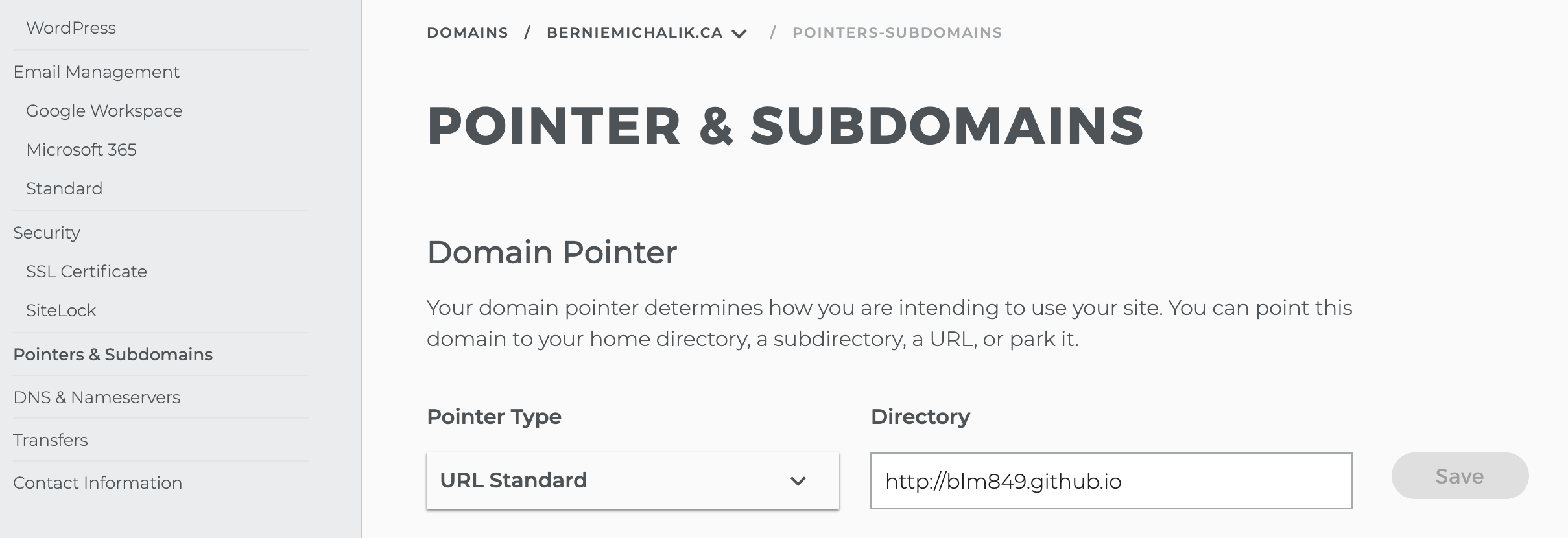
  4. On the left, look for “Pointers and Subdomains” and click on it
    The web page your browser will go to will look something like this:
    https://www1.netfirms.com/controlpanel/foundation/berniemichalik.ca/pointers-subdomains.  And the page you see should look like the image at the top of this post.
  5. Click Under “Pointer Type” and set the value to “URL Standard”.
    In the box to the right, under “Directory”, put in the URL of your web site (note, put the entire URL, including http:// or https://).
  6. Click the “Save” button.
  7. Test it. Point your browser at the Netfirms URL and see if it gets redirected. (For me, if I type in berniemichalik.ca I get redirected to blm849.github.io). It may take some time, up to a few hours. But it will work. (If it doesn’t seem to be, try different browsers or ask someone else to try.)

That’s it. I hope this helps! Good luck!


What I find interesting regarding privacy and security, fall 2021


Yesterday I wrote about the new glasses from Facebook from a design AND privacy point of view. Here are seven more links to articles on privacy I thought you might find worthwhile reading:

(Photo by Lianhao Qu on Unsplash )

Why you may not want to send smart home devices like Google Nest to university with your kids

I decided to send my son off to university with a Google Home device (a Lenovo Smart Clock). He could use it as a clock, to get the weather, to play music and to provide rain sounds. You may be thinking something similar.

The problem is that at least for some of these devices, they assume that the wifi works like a home network. Home wifi networks often only need a password to join them. However for my son’s university the wifi network needed a userid and password. There is no place in Google Home to provide the userid, so I was unable to set it up for him.

Something to keep in mind.

On connecting a Chromebook to a wifi network using LEAP like the one at Dalhousie

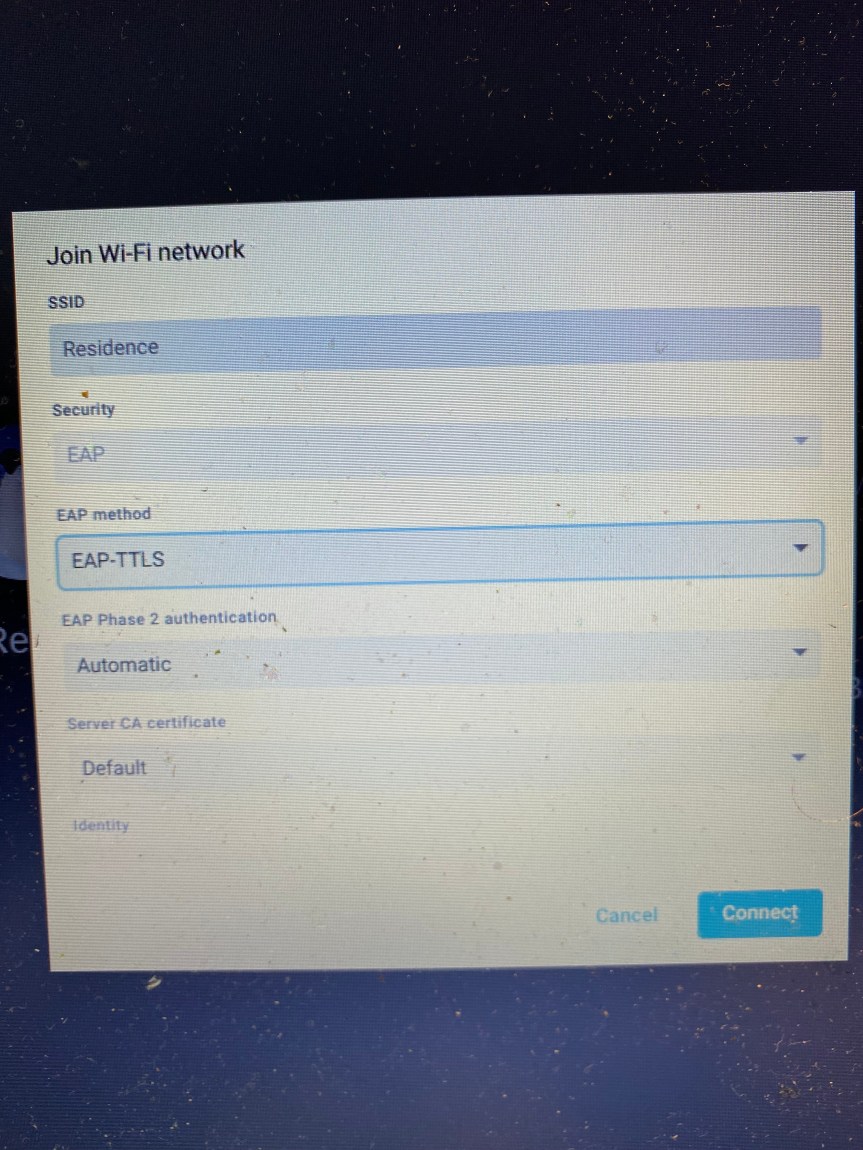
Here’s the problem: you are trying to connect your Chromebook to a wifi network like the one at Dalhousie University that uses the LEAP protocol. That protocol is likely well and good if you use an up to date Windows or MacOS computer. But as I found, it’s no good for the Chromebook I had because it did not have LEAP as an option. What to do?

Well if you get into the network settings and you go with the EAP-TTLS with the settings above, you can get your device to connect. (The above does not show the user I’d and password fields, but you will need those).

Good luck!

What I find interesting in tech, August 2021

Here’s a cornucopia of things I have found interesting in tech in the last month. As usual, lots of cloud, some Kubernetes, DevOps and software of course, as well as IOT. Grab a drink and read!

Cloud: 

Devops:

Software:

Kubernetes:

Security:

IOT:

Cool stuff:

General

(Photo by Sam Albury on Unsplash )

What I found interesting in tech, July 2021

Here’s 59 links (!) of things I have found interesting in tech in the last while.

It ‘s heavily skewed towards Kubernetes because that’s mostly what I have been involved with. Some stuff on Helm, since I was working on a tricky situation with Helm charts. There’s some docker and Open Shift of course, since it’s related. There’s a few general pieces on cloud. And finally at the end there’s links to a bunch of worthwhile repos.

Almost all of these links are self explanatory. The ones that aren’t…well…few if anyone but me reads these posts anyway. 🙂 Just treat it like a collection of potentially good resources.

Raspberry Pi / Pico: I have been interested in doing work with the Raspberry Pi Pico, so here are some links I liked:
Raspberry Pi Pico: Programming with the Affordable Microcontroller and Getting started with Raspberry Pi Pico – Control LED brightness with PWM | Raspberry Pi Projects and How to Use an OLED Display With Raspberry Pi Pico | Tom’s Hardware.

I am interested in getting bluetooth working with my Raspberry Pi Pico, so I am reading things like Bluetooth serial communication with Mac, JY-MCU Bluetooth and Arduino | Cy-View and How to: Setup a bluetooth connection between Arduino and a PC/Mac | ./notes and Cheap BlueTooth Buttons and Linux – Terence Eden’s Blog

Not a Pico, but I am also interested in doing work with the ATTTiny 85 chip, so I saved this: How to Program an ATtiny 85 Digispark : 8 Steps – Instructables

Here’s two projects I am interested in. Using a Pico to press a key on the Mac using bluetooth: How to run an AppleScript with a keyboard shortcut on macOS while here is a fun project – Making an Email-Powered E-Paper Picture Frame

Here’s some cool MIDI projects with a Pico: this one, NEW GUIDE: Modal MIDI Keyboard @adafruit @johnedgarpark #adafruit #midi « Adafruit Industries – Makers, hackers, artists, designers and engineers, this Code the Modal MIDI Controller | Modal MIDI Keyboard | Adafruit Learning System, and this Build smart, custom mechanical keyboards for MIDI – or really tiny Ableton Live control – CDM Create Digital Music

Kubernetes/OpenShift / Containers: I’ve been doing more and more work on K8S and OpenShift and found these useful…

Cloud: some advanced cloud knowledge here:

Software Development: here’s some random dev links:


General: finally here are some interesting links on IT in general:

(Image: via NYT piece on mesh)

The Internet has always had its bad parts. You just didn’t know about it


Every so often someone will highlight Something Bad on the Internet and remark that once the Internet was a Good Place but now because of Something Bad, it no longer is.

I am sure they believe that, but they are wrong. The Internet has been a place for Something Bad for as long as it has been around. Case it point, Usenet groups. Before the Web, Usenet was a popular way to read about sports and the news and IT and pretty much anything else. Most of it was pretty mainstream, but some of it, especially the “alt” Usenet groups, was not.

To give you a taste of what I mean, read this: alt.binaries.images.underwater.non-violent.moderated: a deep dive – Waxy.org

There has always been Something Bad on the Internet since forever.  (To see what I mean, read about ASCII porn.) There was never a golden era.

(Photo by Leon Seibert on Unsplash )

On Pepper and Watson


If you have even a passing knowledge of IT, you likely have heard of Pepper and Watson. Pepper was a robot and Watson was an AI system that won at Jeopardy. Last week the Verge and the New York Times had articles on them both:

  1. Go read how Pepper was a very bad robot – The Verge
  2. What Ever Happened to IBM’s Watson? – The New York Times

I don’t have any specific insights or conclusions into either technology, other than trite summations like “cutting edge technology is hard” and “don’t believe the hype”. AI and robotics are especially hard, so the risks are high and the chances of failure are high. That comes across in these two pieces.

Companies from Tesla to Boston Dynamics and more are making grand claims about their AI and their robotics. I suspect much of it will suffer the same fate as Pepper and Watson. Like all failure, none of it is final or fatal. People learn from their mistakes and move on to make better things. AI and robotics will continue to advance…just not at the pace many would like it too.

In the meantime, go read those articles.  Especially if you are finding yourself falling for the hype.

(Image: link of image on The Verge)

On using Tumblr again because of my DD


When Tumblr and Posterous came out over a decade ago, I started using them a fair bit. Sadly Posterous died. Tumblr kept going, but I stopped using it. It’s not that Tumblr is a bad technology platform: it’s just that I didn’t have a need for it. But now I do.

I wanted a platform to do knowledge transfer of IT concepts for my daughter who is also currently in IT. I could email them directly, but they are not personal and others might benefit from them too. I could use WordPress or even just a straight up website. I decided to mix it up a bit and use an old Tumble log I’ve had since 2009 called BLMonIT . It has a great old school theme that looks like an old Mac OS background. It originally was meant for sharing IT knowledge. It has been hardly used. It was just the thing I needed.

I’m going to be posting IT knowledge and opinion there, I hope. If you find it might benefit you, head over to BLMonIT.tumblr.com.

Zoho and other companies that hum along

When I first started following Web 2.0 companies over 15 years, Zoho was an early player. Since then, some companies became very successful and many failed. I used to joke with a friend every time a story of Zoho came up I was surprised it still existed. Not only does it still exist, but it is rolling out new features: Zoho’s pipeline-centric CRM solution built for small businesses gets new features

I’m happy to see it is a going concern. It’s easy to think companies should “go big or go home”. It’s better to think that there is another path to success. Zoho seems to have found that path.

More on them here.

What I find interesting in tech, May/June 2021

Here’s what I found interesting lately in tech, from cloud to coding and lots more.

Cloud: I’ve been doing lots of work on Azure recently. Some things I found useful were this listing of Virtual machine sizes Also disk types. This piece on how to expand your virtual hard disks on a Linux VM was good. If you want to run Websphere on Azure, read this: Run WebSphere Application Server on Azure Virtual Machines.  If you want to learn more about deploying applications in Red Hat, read this. Finally here’s some good stuff from IBM on
Cloud Architectures.

Coding: If you want to print coloured text in Python — and who wouldn’t? — this is good. If you want to turn your HTML into an RSS feed, read this.  This will help you set up VS Code to do PHP Development. For people wanting to learn more about machine learning, IBM can help you. If you love Prolog or Javascript — or both! — check out: Tau-Prolog

Raspberry Pi/IOT: This is a great guide on how to troubleshoot problems with a Pi. This is a cool project using an OLED to make a clicker counter. If you need to load an OS or anything else on a Flash card, check out balenaEtcher. Here’s some advice on getting started with Bluetooth Low Energy. If you want to connect a raw serial terminal to a bluetooth connection, read that. If you want to do a cool Raspberry Pi Pico project with a MIDI, see this.

Fun and cool: Not a real Captcha, but a real fun one! DOOM Captcha – Captchas don’t have to be boring. Also fun: Crappy robots, ranked!. As an old user of 3270s, this downloadable version of 3270 fonts is awesome. Speaking of cool, here’s kinda the source code for Eliza! Check it out.

Other: Here’s some help on how to control smart home devices using speakers and displays. Here’s a good reminder that robots have a way to go yet: Peanut the Waiter Robot Is Proof That Your Job Is Safe. Developers! Here’s What’s Hot/What’s Not in terms of skills. Finally, have you considered how to
write software that lasts 50 years?

(Image via Raspberry Pi)

You can now have your own PDP/11 to play with!

If you ever wanted to get your (virtual) hands on a PDP 11, now you can, by going here: Javascript PDP 11/70 Emulator. 

They seem terribly small and limited now, but when I started in IT they were a real workhorse computer and for a time they threatened IBM’s dominance in the IT space. (Then the PC and DOS and Windows came along and did even more to challenge IBM.)

(Image from here.)

How to get more from your smart speakers


I am a fan of smart speakers, despite the privacy concerns around them. If you are ok with that and you have one or are planning to get one, read these two links to see how you can get more out of them:

  1. How to control Sonos with Google Assistant
  2. Alexa Skills That Are Actually Fun and Useful | WIRED

I use Google Assistant on my Sonos and they make a great device even better. And while I do have Google Home devices in other parts of the house, I tend to be around the Sonos most, so having it there to do more than just play music is a nice thing indeed.