The iPod Touch lives!


And as someone who is a fan of it since a long time, I was glad to hear about it here:  There’s a New iPod Touch. Yes, in 2019, and Yes, It’s Worth Looking at. – The New York Times

Back in the day when Blackberries were the rage and I needed one for work, the iPod Touch was my way of tapping into the world of Apple. Today if I had to use Android for whatever reason, I’d be inclined to get a Touch again, just so I could do things the Apple way. It’s a great device still, and if you read the article, you’ll see it is not obsolete.

Now if Apple would only bring back the Nano! 🙂

A love story of a different kind: love of the small phone


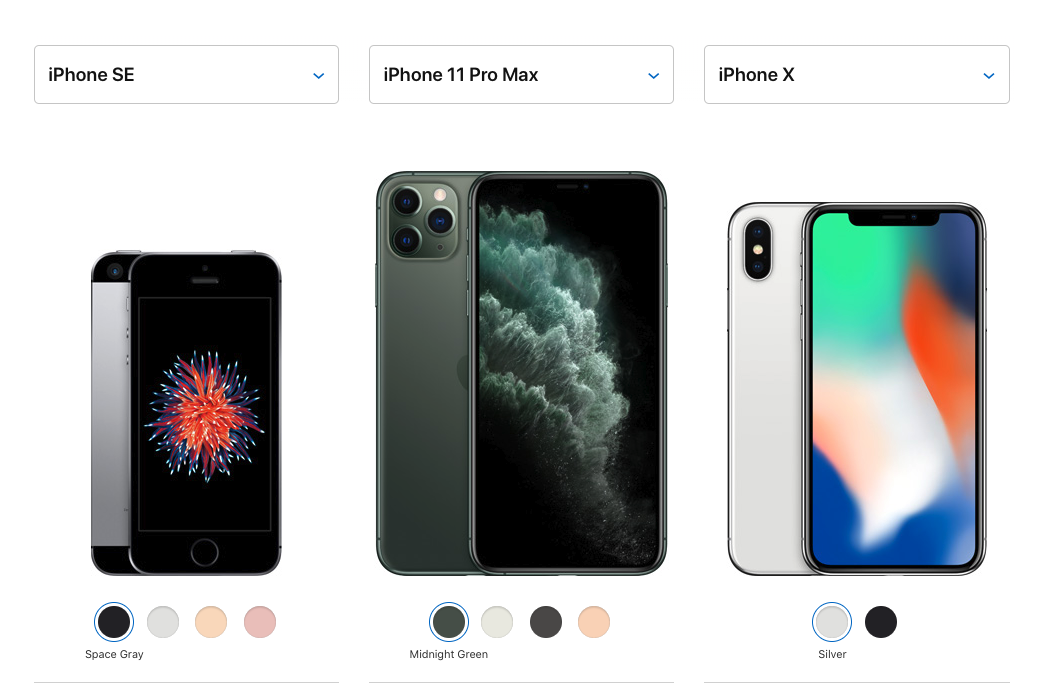
This is a love story in a way, although it’s a love affair with a device: Tim Cook Will Have To Pry My iPhone SE From My Cold, Tiny Hands.

It brings up an interesting thought: that for all the seeming abundance of smart phones, they really have narrowed into a specific style and range. They are all large, glass devices with fancy cameras. That’s what sells, and manufactures have no desire to make anything else. Or maybe they are fearful of trying to make something else.

Some event will occur and innovation and diversity will come to the personal device market. But for now, expect more of less.

(Image linked to in the article)


Mechanical Kiwis, or how the Kiwi’s food delivery bots are only semi-autonomous


Looks like autonomous robots have a way to go. So while Kiwi’s food delivery bots are rolling out to 12 more colleges (TechCrunch), they aren’t exactly autonomous robots. Instead…

The robots are what Kiwi calls “semi-autonomous.” This means that although they can navigate most sidewalks and avoid pedestrians, each has a human monitoring it and setting waypoints for it to follow, on average every five seconds. Iatsenia told me that they’d tried going full autonomous and that it worked… most of the time. But most of the time isn’t good enough for a commercial service, so they’ve got humans in the loop. They’re working on improving autonomy, but for now this is how it is.

The future is weird. Also, good luck with those in places with hostile weather, architecture, or people.

Humanless stores: a bad idea that refuses to die


It’s funny how certain tech ideas are bad and yet keep coming back, like zombies. Micropayments is one. Another is stores or establishments run without people: automats, in a sense. It’s a terrible idea in my opinion, and yet people keep trying them. Case in point, here’s some in China that came and went: China’s unmanned store boom ends as quickly as it began – Nikkei Asian Review. 

I am sure these will pop up from time to time. Robots are becoming more prevalent, and the urge to keep putting more and more of them in establishments will continue. But like the old automats, I think they will only get so far before they fail.

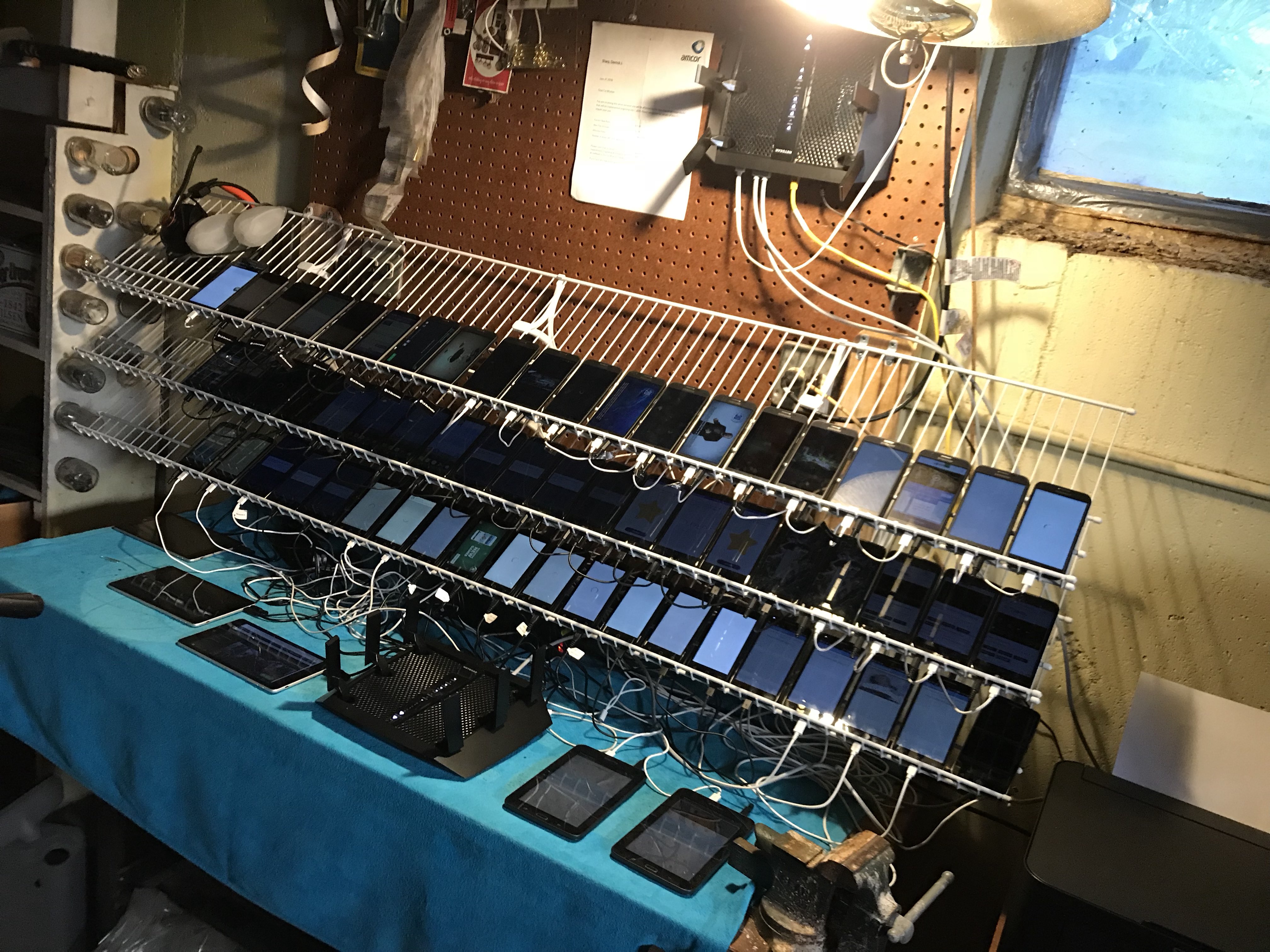
So you want to make a phone farm…

Then read this Vice piece: How to Make a Phone Farm

I’ve seen pictures of Phone Farms in China, but I thought you needed some advanced tech to run them. Turns out, you just need a bit of work and some old phones, and…well for the rest, read the article.

For those who don’t know, Phone Farms are banks of cell phones automated to do the things you do manually with your phone.

P.S. I expect marketers will read this and start to come up with ways to defeat this, if they haven’t already started. This provides a threat to them, and a ramp up of this can be seriously deterimental.

Moodnotes: an app to document your thoughts and moods


If you are using CBT to deal with your mood, consider this app:  Moodnotes: a  Thought Journal, Mood Diary, CBT App.

It helps you quickly capture your mood, but it also help you deal with distorted thinking that contributes to poor moods or worse.

I am cautious about recommending such apps, because I worry what the app developers will do with the data. I have looked at their privacy policy and it is easy to understand and it says they won’t keep specific data. So I am cautiously recommending it.

In praise of the three monitor setup


As someone who is in the maximalist camp (as opposed to the minimalist camp) I love this idea: Why I Use 3 Monitors to Boost Productivity (And You Should, Too) | Inc.com. It’s hard to pull off at home, but I have such a set up at home and it really does work. I have a monitor off to the side for messaging systems and email, I have a second monitor attached to my laptop which I use for what I am focused on, and I have my laptop screen I use for supporting my focus work.

True, if you have a Mac, you can have multiple Desktops and easily swipe from one to the other. I do that in workspaces where I can’t have multiple physical monitors. When I can have them, I like the multiple physical monitor approach. Frankly, I would like to have even more!

The Raspberry Pi 4 is out


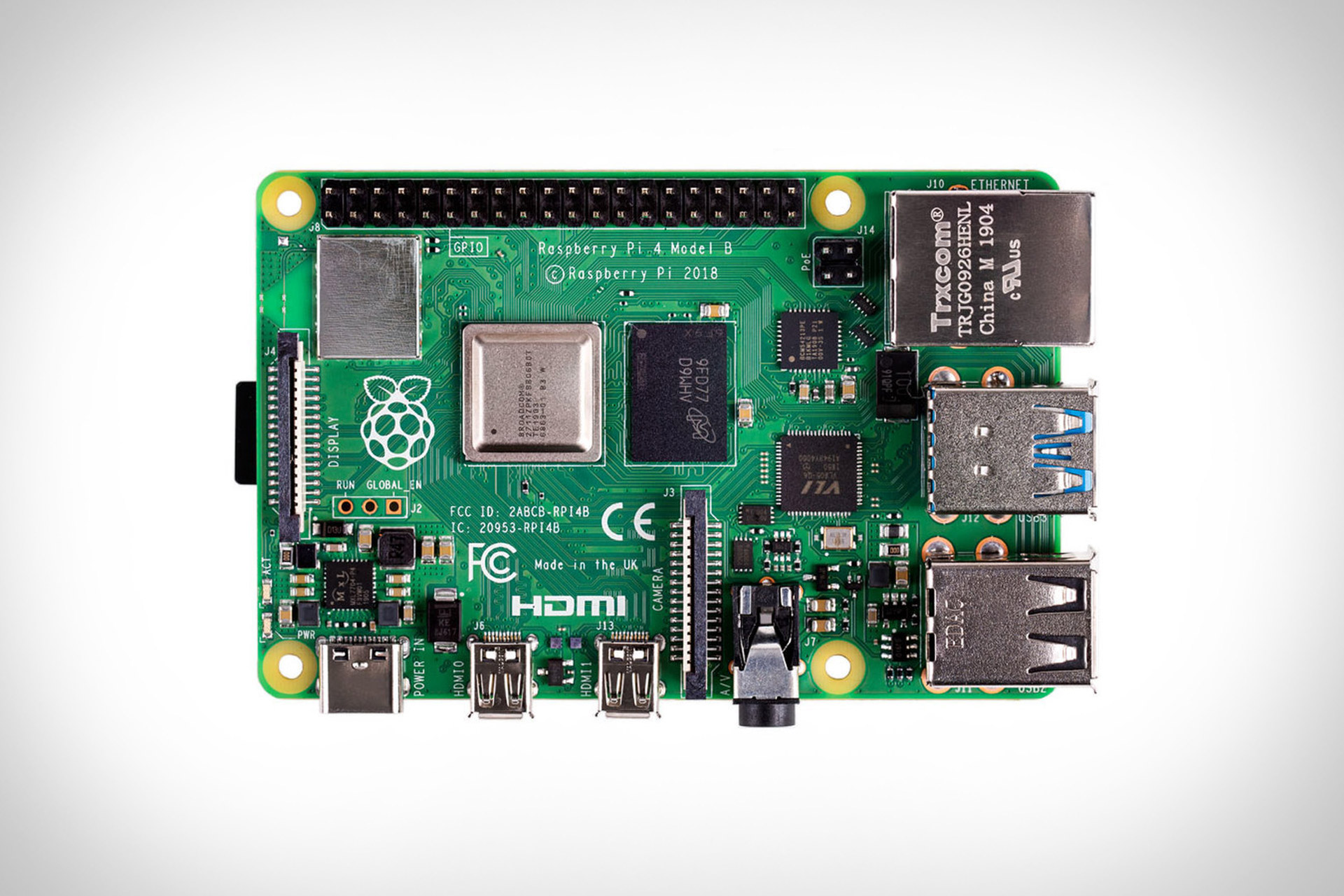
I love Raspberry Pis. They are great for playing around and learning about technology.  But until recently I would not recommend them as an every day computer, if anything because they are just too slow. Or they were before the Raspberry Pi 4. With the capabilities of the new Pi 4, they may be ready to become your main or at least backup computer.

If you are interested, you can Google them and get alot more information on them. Here’s two sources more:  Raspberry Pi 4 Computer | Uncrate and Engadget.

How to set up a static website for about $1 a month

Finally got around to doing this, so I have update this page. Here’s your options. Option 3 worked for me.

Note, you will need some technical knowledge, an Amazon account, and one of these guides:

  1.   Simple site hosting with Amazon S3 and HTTPS. This is good if you plan to host your DNS at AWS. I didn’t, so I ran into trouble.
  2. . This piece is similar and helped too but the SSL certificate was hosted elsewhere, so it only helped so much.
  3. This page finally helped me because I host with namecheap.com. I followed it and it worked great! It has more detail than some of the others.

You don’t have to use AWS. Other cloud providers offers something similar:

So, lots of options.

Apple Watch 101

I continue to be a big fan of the Apple Watch. For one, it allows me to put away my phone and still not miss notifications. It’s the remote control for your phone you didn’t think you need. Still I am glad for this, because I need to get more out of my watch: 20 Most-Wanted Apple Watch Tips and Tricks – Hongkiat. 

If you are maxing out all the features of your watch, that’s great. Otherwise, take a peak at that link and get more out of it.

The $999 monitor stand, or how Apple takes its eye off the ball sometimes

Reading this piece about how  a $999 monitor stand is everything wrong with Apple today, and while my judgement isn’t that harsh, I agree that Apple has missed a step with such a stand. There is a premium that Apple can and does command for its products, but when they are so far outside the range of the market, they start looking ridiculous.

Is this iMac great? No doubt. Is the stand price ridiculous? Also no doubt. Do better, Apple.

A dozen good pieces on Kubernetes


Here’s twelve articles on Kubernetes, from introductory to advanced.

Some introductory pieces on getting started with Kubernetes:

  1. Getting Started with Kubernetes: Deploy a Docker Container with Kubernetes in 5 minutes
  2. Deploy a Python Flask application in Kubernetes – IBM Developer
  3. Play with Kubernetes Classroom
  4. Three quick ways to start with Kubernetes – Katsuhi
  5. How to deploy a NodeJS app to Kubernetes | Sean McGary
  6. A Kubernetes quick start for people who know just enough about Docker to get by

Some good tutorials from IBM:

  1. Kubernetes Tutorials: 5 Ways to Get You Building Fast | IBM
  2. Learning Path: Kubernetes – IBM Developer

Some harder pieces for if you are already well versed with Kubernetes:

  1. Kubernetes 202 — Making It Fully Operational – uptime 99 – Medium
  2. Kubernetes NodePort vs LoadBalancer vs Ingress? When should I use what?
  3. Kubernetes On Bare Metal

(Image from pexels.com)

How I came up with the web page: All the books I have read since 2017 (somewhat technical. Involves python, S3 buckets)


I used to be a haphazard reader and my reading had slacked off. In 2017 I decided to have a goal of reading more and recording the books I had read. For the record, I had a simple Excel spreadsheet. This was good, but not easy to share.


To build this page, All the books I have read since 2017 | Smart People I Know, I wrote a Python program to convert the Excel spreadsheet to HTML. After that, it make it look modestly better, I stole some ideas from here. I was going to put the HTML directly into WordPress, but there were formatting issues. I instead put the page in an S3 bucket at AWS. And voila! Done!


How machine learning (ML) is different from artificial intelligence (AI)

I am glad to see more articles highlighting the difference between ML and AI. For example, this one: How machine learning is different from artificial intelligence – IBM Developer.

There is still lots to be done in the field of machine learning, but I think technologists and scientists need to break out of that tight circle and explore AI in general.

(Image: from the article)

How to get up to speed really quickly on Kubernetes and Docker if you are an infrastructure specialist

If you are an infrastructure person and you are trying to ramp up really quickly on Docker and Kubernetes, here are some good links to get you started:

I also have this repo on github that can help.

Is this the last word? Good lord, no. But it can help you stay in the conversation and helps you map all this stuff to networks and processes and files and VMs and services and other tech you are used to.

Twenty good IT links to make you smarter

Here are some good links I have been collecting over time on IT that are still worth reading. They cover AI, the IOT, containers, and more. Enjoy!

  1. How to build a supercomputer with Raspberry Pis: Fun!
  2. 6 things I’ve learned in my first 6 months using serverless: Good stuff for serverless fans
  3. Building a serverless website in AWS: More good serverless stuff
  4. The Strange Birth and Long Life of Unix: A really good history of Unix. Well written.
  5. Spring Boot Memory Performance: If you use springboot, this is worth your while
  6. The end of windows: Anything that stratechery puts out is good, including this
  7. Dockerize a Spring Boot application: Speaking of springboot, this is useful
  8. Building a Deep Neural Network to play FIFA 18: A fascinating example of using AI to play games
  9. ThinkPad 25th Anniversary Edition : A great commemoration of a fine computer
  10. GitHub Is Microsoft’s $7.5 Billion Undo Button: A good piece on the story behind this investment by Microsoft
  11. Circuito.io: Want to build circuits, but don’t know how. This killer site is for you.
  12. Effie robot claims to do all your ironing: If you like robots and hate ironing, this could be for you.
  13. How To Install and Use TensorFlow on Ubuntu 16.04: For AI fans
  14. Set up a firewall on Ubuntu: Another good tutorial from Digital Ocean
  15. Not even IBM is sure where its quantum computer experiments will lead: For IBM Quantum fans
  16. In an Era of ‘Smart’ Things, Sometimes Dumb Stuff Is Better: Why analog is sometimes better.
  17. A simple neural network with Python and Keras: A good way to dabble with NNs
  18. The Talk: A comic which wonderfully explains quantum computing
  19. Use case diagrams: For those who like UML
  20. Eating disorder and social media: Wired has a good piece on how people avoid controls

The problem with carpentry and how it differs from IT

It is near impossible to learn how to do carpentry from either books or the Internet. I know because I’ve tried really hard.

Let’s say you decide you no longer want to buy bookcases from Ikea but you want to make you own. You decide a book case is simply a box and decide you want to learn how to make a box with a few tools and some simple instructions.

If you go search for help with your box, you may very likely come across instructions like this: www.popularmechanics.com/home/how-to-plans/how-to/g1591/how-to-make-a-box/

It makes assumptions that you have lots of tools and you can do hard things like cut joints. After a few hours of searches, you will find most sites are like this: tailored to woodworkers making wood pieces that are hard to do and not anything near modern looking.

IT is different. For any technology out there, you can search for the name of the technology and “tutorial” and find something. You can be up and running using the technology in the time it takes you to give up looking for carpentry skills.

I am not sure why that is. Maybe there is more interest in IT so there are more tutorials on it. You could argue carpentry is harder but I have done both and I disagree.

I especially disagree because there is one site I could that actually does make it easy to make furniture and that is Ana White’s. Because of her I have made a wide range of furniture with basically a hammer, a jigsaw and a drill. The furniture isn’t fancy but it was cheaper and better and as modern looking as Ikea.

I think that is a problem with a lot of woodworking sites. They assume you want to do fine woodworking. Find woodworking is fine, but for people starting out, they likely want to make a simple table, a bookcase or set of shelves, perhaps a storage chest. A good joint may be best, but most Ikea furniture is held together with dowels and screws. If you make a book case with dowels and screws and glue, it will last and hold lots of books.

I wish there were more introductory sites on the internet that help people who wanted to learn how to make furniture and do carpentry, like there is with IT. Right now all I have found is Ana White’s site. I highly recommend it.

Are the new iPhones more expensive than ever?

That’s been a question I have been asking myself for some time. I felt like the price just keeps going up. And if you read articles like this, it’s easy to conclude it’s true.

But here’s some numbers on the least expensive models over time, taken from this:

iPhone (4GB): $499
iPhone 3G (8GB): $599
iPhone 3GS (16GB): $599
iPhone 4 (16GB): $599
iPhone 4S (16GB): $649
iPhone 5 (16GB): $649
iPhone 5s (16GB): $649
iPhone 6 (16GB): $649
iPhone 6 Plus (16GB): $749
iPhone 6s (16GB): $649
iPhone 6s Plus (16GB): $749
iPhone 7 (32GB): $649
iPhone 7 Plus (32GB): $769
iPhone 8 (64GB): $699
iPhone 8 Plus (64GB): $799
iPhone X (64GB): $999

Looking at that, I have to think that the phones are getting more expensive, but likely they have always been that way. (And note, this doesn’t account for inflation or the improved quality of the phones, including greater storage.)

Occasionally Apple will make a cheaper phone like the 5C or the SE that are essentially remixes of older models. Or they will continue to support a wider range of phones, like continuing to sell the 7, the 8, and now the X. But it seems the high end was never inexpensive and likely never will be.

Stratechery: a great site you should read

First off, what is it? It’s this, via the About section of the site:

Stratechery provides analysis of the strategy and business side of technology and media, and the impact of technology on society. Weekly Articles are free, while three Daily Updates a week are for subscribers only.

Recommended by The New York Times as “one of the most interesting sources of analysis on any subject”, Stratechery has subscribers from over 85 different countries, including executives in both technology and industries impacted by technology, venture capitalists and investors, and thousands of other people interested in understanding how and why the Internet is changing everything.

Everything I’ve read on it has been insightful and in depth, including this piece on IBM and the acquisition of Red Hat.

OpenShift vs OpenStack: what’s the difference?

From OpenShift Origin vs OpenStack – Red Hat OpenShift Blog:

OpenStack provides “Infrastructure-as-a-Service”, or “IaaS”….

The OpenShift hosted service provides “Platform-as-a-Service” or “PaaS”. It provides the necessary parts to quickly deploy and run a LAMP application:

Concisely:

  • OpenStack = IaaS
  • OpenShift = PaaS

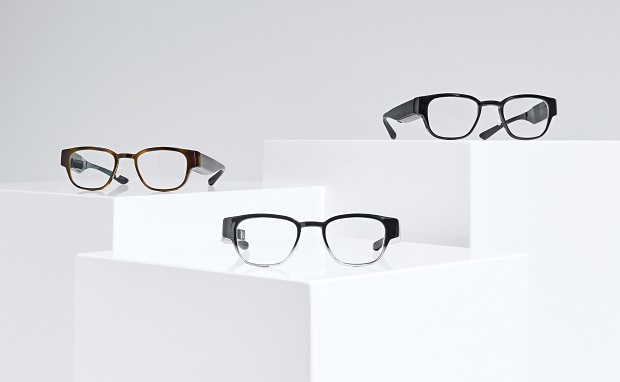
North, or advances in smart glasses since Google Glass.

Companies keep trying to make smart eyewear happen. First Google. Then Snapchat. Now there’s another company making a go at it. IT Business magazine has details on North, the company trying to make it happen here.

I think these are a big improvement on Google Glass. Is it enough? I don’t believe so. I think greater miniaturization needs to occur, such that there is very little difference between the shape of “dumb” eyewear and the shape of “smart” eyewear.

Meanwhile, we are getting closer to that time when there is very little difference. Stay tuned.

What the Internet is (and what it is not)

This is what the Internet is:

The internet is the wider network that allows computer networks around the world run by companies, governments, universities and other organisations to talk to one another. The result is a mass of cables, computers, data centres, routers, servers, repeaters, satellites and wifi towers that allows digital information to travel around the world.

The Internet is a network of networks. Much of what people believe the Internet is actually runs on top of it: the Web, social media, email, gopher, what have you.People often say “I liked the Internet when..”. They are talking about the platforms they use on the Internet. Things popular on the Internet now — hello Facebook! — will be a relic in the future.  Technologies running on the Internet come and often go,  but the Internet itself is relatively constant and changes slowly.

The quote highlighted above is from this article: What is the internet? 13 key questions answered | Technology | The Guardian. It’s a good introduction to the Internet at a basic level.

Some thoughts on my new Amazon Fire 7 8GB FireOS 7″ Tablet for $59 at Bestbuy.ca


I saw this in Best Buy the other day, Amazon Fire 7 8GB FireOS 7″ Tablet With MediaTek MT8127 Quad-Core Processor – Black : Android Tablets – Best Buy Canada, and after reading some reviews and other articles (see below), I decided to get one. The $59 price tag had a lot to do with this.

My first thought was to try to use it as much as I could out of the box without making modifications to it. I set it up according to instructions, which were simple. I think you really want to have an Amazon account/userid to do this. I did and so things went smoothly.

The Amazon Fire has a modified version of the Android OS, which means it’s like an Android tablet, but not exactly. Likewise, Amazon has an App store, which is a limited version of the Google Play App store. You can get a number of apps from the Amazon App store, but not everything you can get on the Google Play store.

I wanted this device mainly as a place to consume media. Good news is it runs Netflix, Twitter, Instagram, Facebook, Mail, Texture and a modified version of YouTube.  I was especially interested in Texture, which allows me to read magazines like New Yorker, Bon Appetit, Wired and others. I have been trying to read them on my phone and the experience was poor. On the tablet, the experience was much better, and the resolution was good. Likewise, YouTube videos are better on the tablet than the phone.

Downsides?  First the device is slow compared to my iPhone 6. You notice it with things like Twitter and Instagram. You don’t notice it for things like Texture because there is more reading time and less scrolling.  It’s not terrible, but it is noticeable if you have a newer device. If you have an up to date phone or tablet, you will notice this.

Another downside is the limited number of apps, especially media apps. I could not get the New York Times, Guardian or CBC app for it. It comes with the Washington Post, not surprisingly.

The browser that comes with it is slow. You cannot download other browsers without hacking the device.

One upside is you can get quite a few apps working for it. I downloaded Remember the Milk (for todos), Simplenote (for notetaking), WordPress (for blogging), Dropbox and more. I mainly want to use it for media consumption, but those things make it better.

To summarize: for $59, I think it is a great device for media consumption and basic functionality. If that’s all you want, I think you’d be happy with it. I’m glad I got it. Some reviewers said it is better to get the Fire 8 or 10, but for the money, I think the Fire 7 is surprisingly good.

P.S.Originally I was going to hack it to make it more like an Android tablet, but for now I think I’ll leave it as it is. If you did want to hack it, here’s some links to articles along that line:

P.S.S. This is not sponsored content.

How to take your git skills to the next level

One way is to read this: How to become a Git expert – freeCodeCamp.org. There’s a lot of good pages on how to get started on git, but if you are joining a software project, you may be expected to know more than the basics. You may be required to know the kind of things that piece talks about. Of course you can ask people on your team for help, but why not get as much skill as you can first and then ask better questions? There’s always something new to learn when it comes to git and software management: learn as much as you can by yourself and increase your skill set and your value to the team.

Do you know someone who wants to learn how to code? (Maybe it is you!)

Then this is a good page for them to go to: How I Learned How To Code Using Free Resources | Home | Bri Limitless. 

There’s plenty of good links to information, and they are all free. I can vouch for a number of them, such as Codecademy and Coursera.

One problem people run into is: why should I learn to code? One obvious answer is to learn a set of skills to help them gain employment. Two other reasons I have:

  1. build a website to promote yourself or any future business you might have.
  2. automate things you do on your computer

For #1, being able to build a website is a great way to promote yourself and show yourself to the world. As for #2, that’s the main reason I still keep coding. There’s lots of information I want to process, personally and professionally, and coding is the best way to do that.

Regardless of your reason, if you want to learn to code, check out Bri Limitless’s web page.

Some thoughts on insurance companies and the use of wearable technology

When it comes to insurance and wearables, I think the effect of these devices will be limited. I think this because:

  1. I don’t believe people are consistent about using wearables. I have been using wearables and fitbits for some time. I believe most people are prone to not wearing them constantly. Inconsistent use will make it harder for insurers to guarantee you a  better rate or for you to achieve one.
  2. You are more likely to wear it and use it when you are trying to keep in shape. If you are not, you will likely not wear it. The insurer can’t know if you are getting out of shape or just no longer wearing it. (I used to use a Nike+ device for running, and I ran consistently, but I did not use the device consistently. Many days and weeks I just didn’t feel like it.) The use of wearables is mostly an upside for you, and of limited value to the insurer.
  3. One reason I gave up on using wearables consistently is that they don’t give you much new information. I walk and exercise consistently and so they often give me the same information consistently. Which means I tend to not wear them often. I don’t need the fitbit to tell me I walked 10,000 steps. I know I did because my commute to and from work plus my lunchtime walk consistently gives me that.
  4. My fitbit scale is great for tracking my weight over time, but an insurer could also just ask me my weight, height and waistline and get a sense of my eligibility for insurance, just like how they ask if I smoke. A very low tech way to measure things. Men with a waist over 40 inches are more prone to heart disease then men with much smaller waists, regardless of what a high tech scale says. A insurer needs a limited number of data points to assess your health risks.
  5. I believe there is limited return for insurers to get this much data. I base this on my current life insurer. I can get life insurance from 1-6X my salary (assuming I pay the corresponding rise in premiums) without providing medical data. They only ask for medical data if I ask for more than 6X. It likely isn’t of benefit for them to process the data for lower amounts, so they proceed without it.
  6. Insurers are data driven, for sure, but I think they are good at picking out a limited number of good numbers to determine what to charge you for insurance. I don’t think the numbers coming back from wearable tech is all that good.

So in short, I don’t believe people or insurers will get much benefit from wearable tech. People will not get breaks on their insurance, and insurers will not be able to reduce their risk substantially with the use of wearables.

MindMup 2: a good web based mindmapping too

I’m a fan of mindmapping tools in general. One I’ve been using and enjoying lately is MindMup 2. 

Two things I like about it:

  1. It’s simple to modify your mindmaps on the go. You don’t need to do much to add or modify your map.
  2. It’s also simple to export your mindmap into a number of different formats. If you occasionally use mindmaps or you want to start with a mindmap to generate ideas but then you want to do the majority of the work in Word or some other tool, this is a good feature.

Mindmup_2 is a good tool. Go map your thoughts.