Some thoughts on the 10th Anniversary of the App Store

  1. I remember what a big deal it was that Apple was going to support third party software developers. That was by no means a given: Apple could have restricted the iPhone to only their apps and a handful of third party software vendors. By being much more open, they made the iPhone so much more than it could have been if they had not.
  2. I believe iTunes had a big influence on this. It was a model, in a sense, for what the App Store could be. And as iTunes helped make the iPod a success, so would the App Store help make the iPhone (and the iPod Touch) a success.
  3. One influence iTunes had on the App Store was software pricing. Before the App Store software was either free or pricey. Suddenly the App Store came along and software was the price of a song. The few vendors that wanted to charge more could not compete with those who were fine with the low cost. The App Store changed the way people thought about what they should pay for software.
  4. Another effect the App Store had on software was time to market. With mobile apps, people expected updates regularly and bugs to be fixed right away. Companies that used to ship annually now were shipping weekly or daily. This had a huge effect on how software teams developed software. Everyone had to have a mobile app, and every mobile app had to keep up with the new pace. This effect rippled through companies. Software developers adopted the pace for mobile apps to other software being created and released that frequently as well.
  5. The App Store also improved software quality. If you released bad software, you would hear from users immediately via the ratings. There was no hiding bad apps. As well, if your app sucked, other people would come out with better apps and steal whatever market share you had.  Software development teams were on tighter leashes because of the App Store.
  6. The App Store allowed software developers to make money in ways they could not before. You had a direct channel to consumers of software via the App Store. And lots of developers made a good amount of money as a result.
  7. Apps  became part of our culture. Games like Angry Birds found an audience because of the App Store.
  8. We downloaded so many apps we lost track of them. And some of them turned out not to be good for us. Speaking of that, if you want to do a bit of spring cleaning on your apps and make sure that the ones remain are good, I recommend you read this: On the 10th anniversary of the App store, it’s time to delete most of your apps (Popular Science)

How chromebooks can be a means of avoiding being IT support for your family

Chromebook image
This piece explains the logic behind getting certain relatives a Chromebook so as to relieve you of being tech support:  I bought my mom a Chromebook Pixel and everything is so much better now – The Verge.

Now your mom may be tech savvy and not need a Chromebook (my mom was). But for some people’s moms or dads or children, it can be a very good solution. Especially for people who don’t travel much with their computer and who have a stable IT environment (e.g. the networking set up doesn’t change, the printer is good).

Chromebooks may not seem good value. You might compare what you get from a Chromebooks vs a Windows laptop and think: I get more from the Windows laptop. If you are good with computers, that true. But that’s not how to look at it. Factor in the cost of the relative’s computer plus the time you spend solving problems with it. When you factor that in, the benefit of the Chromebook jumps out.

iPhone 6s: still a great phone in the era of iPhone X

If you are skeptical about the greatness of the iPhone 6s, this piece makes a good argument for it: Reasons you should buy an iPhone 6S instead of an iPhone 8 or iPhone X – Business Insider. If money is a prime concern, you can find refurbished 6s phones for a fraction of the cost of a new iPhone 8 or X.

If you want an iPhone and you are fine with refurbished — and some places give good warrantees on such phones — then consider making an iPhone 6s your next phone. Or get a new one from your mobile phone carrier or buy one outright from Apple.


How to better understand Kubernetes networking

Kubernetes networking is a non-trivial thing to understand, but if you are going to get into the use of Kubernetes, then you need to understand it. This trio of posts is a good way to do that. Highly recommended.

  1. Understanding kubernetes networking: pods – Google Cloud Platform — Community – Medium
  2. Understanding kubernetes networking: services – Google Cloud Platform — Community – Medium
  3. Understanding kubernetes networking: ingress – Google Cloud Platform — Community – Medium

What happens when you fill your house with smart devices?

Just how bad is it to have your house filled with smart devices? Kash Hill attempted to find out by connecting many of them up in her house and then track all the data that they sent out. The results are fascinating. Some of them send the data out in the clear, which is terrible. But even the ones that encrypt your data and leaking things about you via metadata.

Essentially whatever value smart devices provide — and some of that value is doubtful — they are monitoring equipment that you set up yourself. Just how much they monitor can be seen here in her study: The House That Spied on Me.

It’s a great read, and for some, it will be a great revelation.

Image via Home Depot’s web site.

On Bitcoin rivals


While all the hype might make you think that Bitcoin is  the only cryptocurrency, there are a number of alternatives out there and this piece in Fortune outlines what they are: 5 Bitcoin Rivals That Are Rapidly on the Rise.

While this piece lists a handful, I expect that there will be a flood of such things in the future as financial markets look to capitalize on this mixture of money and technology.

The Fortune piece is also not bad in summarizing some key facts about Bitcoin if you still find it hard to get your head around it.

I expect Bitcoin to crash to a much lower level, but I don’t see cryptocurrencies going away. Knowing more about them, especially because they could have a major impact on global economies, is worthwhile.

San Francisco puts delivery robots on a lease. Good.

According to CNET: Delivery robots face strict rules in San Francisco.

I like that picture above. Often when I see delivery robots in photos, they are by themselves on an uncrowded street. In the photo above, you can get a better sense of how it will be a problem if swarms of these things start taking over the sidewalk. The idea of sidewalks becoming more crowded by these tiny vehicles is a maddening one.

I’d be fine with them if city planners can come up with a way these robots can roll around and not impede better uses of the streets such as walking and cycling and public transit. Until then, the less robots crowding the sidewalks, the better.

Like drones in the air and autonomous cars on the roads, robots are coming to the sidewalks. City planners need to start planning for that now.

Why I think this review of the Tesla Semi is really good.

I thought this piece was great: This ex-trucker has some questions about the Tesla Semi – Autoblog.

It punctures the hype behind Tesla’s new truck in the best possible way, by carefully and methodically asking questions and bringing up real life experiences that show the limitations of the truck.

Too few tech reviews come with this type of analysis. I’d like to see more of it. Most tech reviews are positive summaries of features. Or there are a small number of pieces that say such and such will never work because I say so. In either case, the person reviewing it comes from a technology background. I’d like to see more non-technical reviews of technology.

If you are interested in Tesla or the direction of automotives, it is well worth a read.

In an alternative universe this is the next hot smartphone


I am unexcited about the direction in Smartphone design. The key design idea that less is more in a phone is becoming Less is a Bore. Perhaps that’s why this design of a Blackberry got me thinking about it. While it still has a gorgeous screen, the phone itself is worthy of looking at and touching. It strikes the right balance. The phone as a design object is worthwhile.

It would have been good if Apple had struck out in a new design direction with the iPhone X. Instead they went with Less is More. Instead we have a phone with the Notch and a camera on the back that sticks out. It’s as if Apple would have preferred not to have these cameras and sensors,  so rather than design the phone to incorporate them into the design, they stick out, figuratively and literally. In a few years from now when Apple has gone in a different direction, Apple fans will look back and exclaim how poor that aspect of the phone design is.

As for now, we live in an age where the screen dominates design, from TVs to smartphones. In the future that may change and the technology that we interact with will be contained in objects that have noteworthy design in them.
For more on this beautifully designed phone, see If BlackBerry Ditched the Keyboard | Yanko Design.

The further decline of Peter Thiel

The man who threw his lot in with Donald Trump continues to sink in the world. Case in point: Y Combinator Quietly Ends Relationship With Peter Thiel.

July, 2021: Here is a piece on how he exploited Roth IRAs to make a fortune and pay no taxes. Just a bad guy.

February, 2022: Further news on Thiel: he’s stepping down from Facebook’s board and going full time MAGA. He’d be tragic if he wasn’t so malicious.

July, 2022: this piece is on the “enigma” of Peter Thiel, but it’s becoming clearer the guy is a fascist.


I create a super simple set of tools to secure your Ubuntu server

And you can get it here: blm849/supersimplehardening: A super simple way to harden your server.

I create a lot of Ubuntu test servers, and I find that as soon as I create a Ubuntu server on a cloud environment, it gets immediately attacked by automated software. This is obviously a concern. A bigger concern is that when I went  searching for recommendations on how to harden such a server, I found  a wide variety of recommendations! It can be hard to know what to do. Still, I needed something. As a result, I created this package of scripts. The scripts do a number of things:

  • prevent direct root login to your server via ssh. This was one of the things I saw consistently happen and once someone cracks the root access on your machine, it’s game over.
  • stop some basic security holes, like IP spoofing
  • download some useful software, like logwatch, ufw and others
  • upgrade all software on the server

This is just a very very limited number of things to prevent attacks. But it is better than nothing.

If you install Apache, PHP, MySQL or other software on your machine, there are even more attacks that will be launched against it. I recommend you get a firewall up and running and at least run logwatch on a regular basis to look for potential attacks being launched against you.

Finally, if it is important for you to secure your server, don’t stop with my scripts. Go out and consult with IT security specialists right away.

Good luck!

What I find interesting in tech, November 2017


Here’s an assortment of 42 links covering everything from Kubernetes to GCP and other cloud platforms to IoT to Machine Learning and AI to all sorts of other things. Enjoy! (Image from the last link)

  1. Prometheus Kubernetes | Up and Running with CoreOS , Prometheus and Kubernetes: DeployingKubernetes monitoring with Prometheus in 15 minutes – some good links on using Prometheus here
  2. Deploying a containerized web application  |  Container Engine Documentation  |  Google Cloud Platform – a good intro to using GCP
  3. How to classify workloads for cloud migration and decide on a deployment model – Cloud computing news – great insights for any IT Architects
  4. IP Address Locator – Where is this IP Address? – a handy tool, especially if you are browsing firewall logs
  5. Find a Google Glass and kick it from the networkDetect and disconnect WiFi cameras in that AirBnB you’re staying in– Good examples of how to catch spying devices
  6. The sad graph of software death – a great study on technical deby
  7. OpenTechSchool – Websites with Python Flask – get started building simple web sites using Python
  8. Build Your Own “Smart Mirror” with a Two-Way Mirror and an Android Device – this was something I wanted to do at some point
  9. Agile for Everybody: Why, How, Prototype, Iterate – On Human-Centric Systems – Medium – Helpful for those new or confused by Agile
  10. iOS App Development with Swift | Coursera – For Swift newbies
  11. Why A Cloud Guru Runs Serverless on AWS | ProgrammableWeb – If you are interested in serverless, this is helpful
  12. Moving tech forward with Gomix, Express, and Google Spreadsheets | MattStauffer.com – using spreadsheets as a database. Good for some
  13. A Docker Tutorial for Beginners – More Docker 101.
  14. What is DevOps? Think, Code, Deploy, Run, Manage, Learn – IBM Cloud Blog – DevOps 101
  15. Learning Machine Learning | Tutorials and resources for machine learning and data analysis enthusiasts – Lots of good ML links
  16. Importing Data into Maps  |  Google Maps JavaScript API  |  Google Developers – A fine introduction into doing this
  17. Machine learning online course: I just coded my first AI algorithm, and oh boy, it felt good — Quartz – More ML
  18. New Wireless Tech Will Free Us From the Tyranny of Carriers | WIRED – This is typical Wired hype, but interesting
  19. How a DIY Network Plans to Subvert Time Warner Cable’s NYC Internet Monopoly – Motherboard – related to the link above
  20. Building MirrorMirror – more on IT mirrors
  21. Minecraft and Bluemix, Part 1: Running Minecraft servers within Docker – fun!
  22. The 5 Most Infamous Software Bugs in History – OpenMind – also fun!
  23. The code that took America to the moon was just published to GitHub, and it’s like a 1960s time capsule — Quartz – more fun stuff. Don’t submit pull requests 🙂
  24. The 10 Algorithms Machine Learning Engineers Need to Know – More helpful ML articles
  25. User Authentication with the MEAN Stack — SitePoint – if you need authentication, read this…
  26. Easy Node Authentication: Setup and Local ― Scotch – .. or this
  27. 3 Small Tweaks to make Apache fly | Jeff Geerling – Apache users, take note
  28. A Small Collection of NodeMCU Lua Scripts – Limpkin’s blog – Good for ESP users
  29. Facebook OCP project caused Apple networking team to quit – Business Insider – Interesting, though I doubt Cisco is worried
  30. Hacked Cameras, DVRs Powered Today’s Massive Internet Outage — Krebs on Security – more on how IoT is bad
  31. Learn to Code and Help Nonprofits | freeCodeCamp – I want to do this
  32. A Simple and Cheap Dark-Detecting LED Circuit | Evil Mad Scientist Laboratories – a fun hack
  33. Hackers compromised free CCleaner software, Avast’s Piriform says | Article [AMP] | Reuters – this is sad, since CCleaner is a great tool
  34. Is AI Riding a One-Trick Pony? – MIT Technology Review – I believe it is and if AI proponents are not smart they will run into another AI winter.
  35. I built a serverless Telegram bot over the weekend. Here’s what I learned. – Bot developers might like this.
  36. Google’s compelling smartphone pitch – Pixel 2 first impressions | IT World Canada News – The Pixel 2 looks good. If you are interested, check this out
  37. Neural networks and deep learning – more ML
  38. These 60 dumb passwords can hijack over 500,000 IoT devices into the Mirai botnet – more bad IoT
  39. If AWS is serious about Kubernetes, here’s what it must do | InfoWorld – good read
  40. 5 Ways to Troll Your Neural Network | Math with Bad Drawings – interesting
  41. IBM, Docker grow partnership to drive container adoption across public cloud – TechRepublic – makes sense
  42.  Modern JavaScript Explained For Dinosaurs – fun

YouTube’s fight with its most extreme creators highlights the problem big IT has on it’s hands

Here’s a really good piece highlighting a big problem the Frightful Five / Big IT have right now with user generated content: YouTube’s messy fight with its most extreme creators – Vox.

Some background is in order. For years, content creators on Youtube (part of Google/Alphabet) have been jacking up the extremism in their videos to get more views. Extremism in all senses of the word, including political extremism. Some do it for Fame, but many do it for Fortune. This was going well for them until….

In March this year, 250 advertisers pulled back from YouTube after reports that ads were appearing on extremist content, including white supremacist videos. As a result, YouTube demonetized a wide range of political content, including videos that didn’t include hate speech but might still be considered controversial by advertisers. Creators called it “the adpocalypse” — they saw their incomes from YouTube evaporate without fully understanding what they’d done wrong or how to avoid demonetization in the future.

And this is the problem for Youtube and other platforms…how to maximize both traffic and profit. For a long time the formula was simple: more extreme videos = more traffic = more profit. Now they are hitting a wall, and advertisers and consumers are fed up.

The question big IT will be struggling with is: how to draw the line? In case you think the line is easy to draw, I recommend you watch the video by Carlos Maza of Vox. He makes a case that it is very difficult, even if at first glance it should be obvious what should be removed.

I don’t think there is a simple answer to this. If anything, it is going to be one of the major political debates of the first part of the 21st century, as global IT companies deal with national laws and policies.

The home speaker / AI market heats up as Sonos makes advances

Sonos One

WIRED has a good review of the latest product from Sonos, here: Sonos One Review: Amazon’s Alexa Is Here, But It Still Has Some Growing Up to Do

What makes this development significant to me is that it signals that Sonos is concerned with Apple and others coming and taking away market share. Sonos has a great line of products already, but Apple is threatening to take a piece of that with their new home speaker with Siri/AI capability. Sonos has beefed up their AI capability to meet the challenge.

I expect that the next big thing in IT will be the vocal interface tied in with a speaker system in some form. I expect we will see them everywhere. Perhaps not for extended communication, but for brief and frequent requests.

If you are an IT person, I recommend you learn more about chatbot technology and how it will integrate with the work you are doing. More and more users will want to be able to communicate with your systems using voice. You need to provide a vocal interface for them to get information and send information.

Most homes will have one device acting as an aural hub. Sonos wants to make sure it is one they make, and not Apple.

The iPhone 8 is really the iCamera 8

iphone
Great review of the latest iPhone*, here: The iPhone 8 is a look into the augmented future of photography | TechCrunch. I had heard that the iPhone 8 had a great new camera, but this article really drives that home.

If you are thinking of getting an “8”, this could be the reason you need. On the other hand, if you rarely take photos or don’t care too much about the quality, I think the case for an upgrade gets weaker.

*  I don’t consider the iPhone X the latest phone so much as a promise of where the iPhone is going. To be honest, I think the iPhone X is as much an attempt to celebrate the 10 years of the iPhone and Steve Jobs’s legacy, not unlike the Twentieth Anniversary Macintosh. Not that there is anything wrong with that.


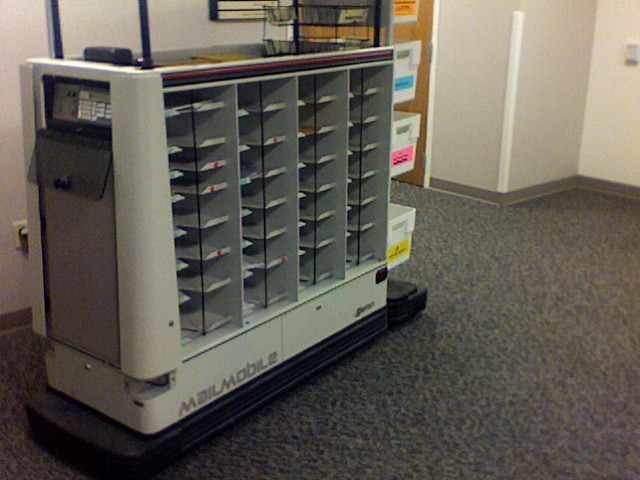
Some thoughts on the end of the CBC mail robots

mail robot
According to Haydn Waters, a writer at CBC, the mail robots at the corporation are being discontinued. Instead:

Mail will be delivered twice a week (Tuesday and Thursday) to central mail delivery/pickup locations on each floor.”

What gets lost in alot of discussions of robots, AI, etc., taking all the jobs is that the drivers for the decisions is not technology but economics. If there is no economical need for robots and other technology, then that technology will not just appear. There is nothing inevitable about technology, and any specific technology is temporary.

Of course there will be more use of robots and AI and other technology to replace the work people may currently do. The key to finding work will be to continually improvise and improve on the tasks one has to do to remain employed. That’s something humans do well, and technology will struggle with for some time in the future, AI hype not withstanding.

The comeuppance of Silicon Valley

It’s not in full decline, but Silicon Valley is on its heels these days, whether due to the practices at Uber or Facebook or Google or …well, the companies that belong there as a whole. Here’s three pieces that all touch on the some of the problems there, but really I could have put three dozen recent articles instead of just these three:

  1. There’s Blood In The Water In Silicon Valley
  2. Privilege and inequality in Silicon Valley – Tech Diversity Files – Medium
  3. Silicon Valley is confusing pseudo-science with innovation – The Verge

Everything I see tells me that they are not equipped to deal with the challenges on their own. If this is true, then expect these high tech companies to come in for a political bruising soon.

Some thoughts on the problems Facebook and Google (and even retailers) have with people being awful on their platforms

Google, Facebook, and Twitter are platforms. So are some retail sites. What does that mean? It means that they provide the means for people to use their technology to create things for themselves. Most of the time, this is a good thing. People can communicate in ways they never could before such platforms. Likewise, people can sell things to people they never could.

Now these platforms are in a bind, as you can see in this piece and in other places: Google, Facebook, and Twitter Sell Hate Speech Targeted Ads. They are in a bind partly due to their own approach, by boasting of their ability to use AI to stop such things. They should have been much more humble. AI as it currently stands will only take you so far. Instead of relying on things like AI, they need to have better governance mechanisms in place. Governance is a cost of organizations, and often times organizations don’t insert proper governance until flaws like this start to occur.

That said, this particular piece has several weaknesses. First up, this comment: “that the companies are incapable of building their systems to reflect moral values”. It would be remarkable for global companies to build systems to reflect moral values when even within individual nations there is conflicts regarding such values. Likewise the statement: “It seems highly unlikely that these platforms knowingly allow offensive language to slip through the cracks”. Again, define offensive language at a global level. To make it harder still, trying doing it with different languages and different cultures. The same thing occurs on retail sites when people put offensive images on T shirts. For some retail systems no one from the company that own the platform takes time to review every product that comes in.

And that gets to the problem. All these platforms could be mainly content agnostic, the way the telephone system is platform agnostic. However people are expecting them to insert themselves and not be content agnostic. Once that happens, they are going to be in an exceptional bind. We don’t live in a homogenous world where everyone shares the same values. Even if they converted to non-profits and spent a lot more revenue on reviewing content, there would still be limits to what they could do.

To make things better, these platforms need to be humble and realistic about what they can do and communicate that consistently and clearly with the people that use these systems. Otherwise, they are going to find that they are going to be governed in ways they are not going to like. Additionally, they need to decide what their own values are and communicate and defend them. They may lose users and customers, but the alternative of trying to be different things in different places will only make their own internal governance impossible.


Where Apple is going next

According to this source, Apple is going into the Health Care Industry: Apple Is Going After The Health Care Industry, Starting With Personal Health Data.

I think a more general statement is that Apple is going to be looking into expanding into services, be they health care, banking, or something else.  They’ve already been successful with Apple Pay.  I expect they can find niches in health care and other industries that they can easily fit into. Plus they can work with partners to deliver tools to people and health care providers that can save everyone in terms of health care costs.

I’m looking forward to Apple bring forth innovations in health care that results in lower costs and better care. I hope they can deliver.

For more on some current health features from Apple, go here.

Very cool. Build a Google Home for Only $35

This is a pretty cool DIY project: The AIY Voice Kit Lets You Build a Google Home for Only $35.

Now, I have my qualms about letting Google have access to so much personal information. If you do not have such qualms and you want to build a cool project, click the link and head on over to Wired, where they have more information on it and how to get it.

Juicero post-mortem


Juicero
The juicero is toast. Not surprising to me: it was a terrible idea.

While the juicero was terrible, this analysis of the engineering behind the juicero is fantastic: Here’s Why Juicero’s Press is So Expensive – Bolt Blog.

Even if you aren’t interested in this device, read this analysis. You will come away with a much better appreciation of all the devices currently in your own life and some of the thinking that goes into making them.


Installing SonarQube on CentOS/RHEL

The following webpage has detailed instructions for installing and configuring SonarQube on a RHEL/CentOS 7 Linux server (real or virtual) and it was one of the best guides I’ve seen (and I’ve reviewed half a dozen):

The webpage  outlines how to update your Linux server, how to install MySQL (as a data repository) on it, and how to then install SonarQube software on the server.

Some things to note. First, this procedures has you using wget to get v6.0 of SonarQube:

Check out the page https://www.sonarqube.org/downloads/ and see the latest version of SonarQube (e.g. 6.4) and replace “sonarqube-6.0.zip” with the latest version (e.g. “sonarqub-6.4.zip”.)

One important thing to note: this procedure creates a userid and database called sonarqube.

Later in the process, the changes made to /opt/sonarqube/conf/sonar.properties needs to match this:

sonar.jdbc.username=sonarqube                                   sonar.jdbc.password=password
sonar.jdbc.url=jdbc:mysql://localhost:3306/sonarqube?useUnicode=true&characterEncoding=utf8&rewriteBatchedStatements=true&useConfigs=maxPerformance

If the userid, password and database you created in MySQL do not match what it is the sonar.properties file, you will see cannot connect to the database errors in the /opt/sonarqube/logs/web.log file and SonarQube will not come up.

Once you enter: sudo ./sonar.sh start

Get the IP address of the SonarQube server and then go to a browser and enter:

The CRTC upholds net neutrality in Canada

It may not seem obvious, but preventing ISPs from providing zero-rating is actually support for Net Neutrality.

I generally see Net Neutrality as a good thing, though the ISPs have something of a case here. That said, Net Neutrality is a good thing to stick with, especially because what the ISPs give they can also take away.

More on the CRTC ruling here: CRTC ruling against zero-rating a boon for businesses, experts say (via IT Business)

Jean-Luc Mélenchon, a candidate right out of a Philip K Dick Novel

Melenchon hologram
In France, politician Jean-Luc Mélenchon plans to be in seven places at once using  something similar to a hologram. According to Le Parisien:

Strictly speaking, these are not holograms. Jean-Luc Mélenchon will be present in seven different places thanks to … an optical illusion discovered for the first time half a century ago by an Italian physicist

Virtual Mélenchon reminds me of the politician Yance in Philip K Dick’s novel, The Penultimate Truth. We may not be far off where we get virtual candidate that look like people but behind the scenes we have AI or some combination of AI and people.

For more on the technology, see the article in Le Parisien. For more on Dick’s novel, see Wikipedia. Read up now: I think we can expect to see more of this technology in use soon.

How to get a Raspberry Pi working with a TV with composite/component input (as opposed to HDMI)

RaspberryPiTV
I had an old Raspberry Pi 1 Model A, with an HDMI port and a standard RCA composite video port for older displays and I also had an old Toshiba TV (pictured above) and I wanted to get them working together. Here’s what I did and here’s some things I learned.

First things first, I had to get a the Raspberry Pi functional. To do that, I mostly followed the steps here: http://www.pcworld.com/article/2598363/how-to-set-up-raspberry-pi-the-little-computer-you-can-cook-into-diy-tech-projects.html. I say mostly because I was using a Mac, so I used SDFormatter to format the SD card. If you have a Mac, you can get SDFormatter here.

Basic steps to set up the Pi were:

  1. Download Raspbian
  2. Download SDFormatter
  3. Put the SD Card in my Mac (you want at least an 8 GB SD card).
  4. Format the SD Card using SDFormatter
  5. Unzip Raspbian
  6. Take the files in the unzipped Raspbian folder and copy them onto the SD Card (which should appear on your desktop)

All that is pretty straightforward in terms of setting up the Pi. If you don’t care for the instructions from PCWorld, Google “Raspberry Pi setup Mac” (or Windows or whatever your operating system) and you will likely find a site that is helpful.

Now, once the files are copied on to the SD Card, modify the config.txt file on the SD card. This is a key thing I had to do. Before I did it, I could plug my Pi into the TV but nothing appeared on the screen. After modifying the config.txt file (and it took some hacking around), I was able to get it to work.

Why do you have to do this? It seems that Raspbian assume you will be using HDMI and will not recognize a non-HDMI output device unless you modify the file. So modify it you must.

Note! Before I edited the file and replaced the text in it, I selected all of the text in that file and copied and pasted it into a file on my Mac as a backup. I recommend you do the same. Then I made the changes to the file, saved it, then ejected the SD card and put it in my Raspberry Pi. If you want to see my version of the file, you can see it here.

It was a process of trial and error to figure out which lines in the the config.txt to change. I was fortunate that I could start with this page which had details on how he got it working. Unfortunately his config.txt and the one I needed were slightly different, so I kept at it until I figured out how it should work. (With his file, the text was unstable: it kept rolling up the screen. With my file, the text did not roll.)

In my config.txt, I have colour burst disabled, rendering everything in black and white. Enable it if you want colour. I disabled it because I thought it would improve resolution but it did not.

Other things to note:

  • I had trouble determining which part of the composite cable should go into the TV. I had one end plugged into the Raspberry Pi, but it took me trial and error until I figured out where to plug the other end into the TV.
  • It will take up to a minute or longer before the Raspberry Pi sends video to my TV. If you don’t see output right away, be patient.
  • Most newer TVs also have composite/component ports. I used them for some testing.
  • Is it worth doing this if you can hook up to HDMI? I’d say no. I wanted to make use of the old Toshiba TV but if I had an old monitor with an HDMI port, I’d get an HDMI cable from the dollar store and connect up the Raspberry Pi that way.
  • When is it worth doing? I’d say if you had simple output to display, and the only ports available on your TV were the component ports, than give it a shot. I actually wrote a simple Twitter client in Python that polls Twitter every 5 minutes and displays my feed in text form. For simple text output like that, this set up is perfect. (You can see the output above: it looks weird due to the refresh rate and my phone: to the eye, it looks ok.)
  • Is it component or composite? I see the words “component” and “composite” used  and I am not sure which is correct.  In my case, all I know is I have one cable to connect the Pi’s video output to the TV’s input port. The Pi has only one video port to plug into, so that’s easy. Most TVs will have more than one port to accept video input: you need to experiment to get the right one.

I hope you found this useful.

P.S. The other thing I like about doing this is: my TV now  looks like the TV between Leon and Holden in Blade Runner. 🙂

Thoughts on automation, from the WSJ (and me, someone who specialized in automation)

Robots
Christopher Mims has a good piece here that touches on many of the recent arguments concerning automation, here: Automation Can Actually Create More Jobs (WSJ). Well worth reading.

For my own perspective, early in my career my job was automating many of the systems operations tasks in my part of IBM. In one year I automated essentially the work of 10 people. No one lost their job as result, because while it was good to have these activities automated, the activities were not valuable enough to justify hiring people to do the work. Essentially the automation improved the quality of our work. Automation using IT to improve the quality of work is a good use of automation, be that automation be a lowly shell script or very expensive robot with A.I. Quality aside, how the automation affects staff depends on the culture and the makeup of an organization.

There is talk of places like McDonald’s replacing workers with kiosks as a result of a drive by some for a higher minimum wage. First off, McDonald’s are rolling out those kiosks in Canada, too, which makes me think they are going to deploy them regardless of what the minimum wage is. Second, I have used the kiosks a number of times, and they are of a limited benefit to a McDonald’s customer. The kiosks are good if there is a long line for a person to take your order: they kiosks are bad if there is a small line or no line. They are bad because it will take you many more minutes to place your order, due to the kiosk’s user interface. (Try one and you will see.) The kiosks some time will fail to print out your receipt: if you don’t remember your order number, then you have to go in line, tell them what you ordered, and then get your number. Overall the kiosks are not bad: they are especially good if you like to special order. But if the lines aren’t long and your order is standard, skip them and go in line.

Besides that, McDonald’s will still have plenty of staff and likely will for the future. Kiosks can’t cook, can’t pack your order, and can’t clean the restaurant. If you think robots can do that and do it cheaply, you need to learn more about robotics. I can see why McDonald’s and other fast food places need automation: they are constantly trying to retain people while trying to keep costs down. But the notion they are automating to spite people looking for a higher wage is ridiculous. McDonald’s is not going to become a glorified vending machine and they should not try to be. People go to restaurants and coffee shops to socialize and to come in contact with other people, and automation will provide less of that, not more.

As well, smart fast food places will learn that human contact makes for better business (see Starbucks). There are many ways to be successful as a fast food business, and a positive experience in dealing with staff is one of those ways.

Automation changes work. However, how it changes work is complex. It is tempting to assume that it will eliminate all work, but that is too simplistic. In addition, we need to think about work, income, and why we do what we do. Automation can help us do that, and that is one clear benefit of automation.

(Image: link to image.freepik.com)

How IBM Watson helped Time magazine narrow its search for Person of the Year 

Interesting article: How IBM Watson helped Time magazine narrow its search for Person of the Year (IT Business)

From a technology point of view, it is also interesting that the IBM partner was using IBM’s Watson and Bluemix technologies.

I am biased here, as someone who works for IBM and believes in these technology, but I do think that if you think A.I. and cognitive doesn’t have a place in your business, you should read this. In the next two years, expect all your competitors to adopt these new technologies to compete with you.

My mixed bag of IT links for December

Like previous collections of IT links, this collection reflects things I am interested in or found useful recently:

  1. If you want to get started using APIs, I recommend this: Most Popular APIs Used at Hackathons | ProgrammableWeb
  2. If you want to build that web site, consider Using Twitter Bootstrap with Node.js, Express and Jade – Andrea Grandi, and this Building a Website from Scratch with ExpressJS and Bootstrap | Codementor. Also Mastering MEAN: Introducing the MEAN stack and Bluemix Mobile, Part 1: Creating a Store Catalog application – Bluemix Blog
  3. Or develop a mobile app like this: Create Swift mobile apps with IBM Watson services – developerWorks Courses
  4. I am a fan of Bluemix and Eclipse. This article ties them nicely together: IBM Bluemix – Eclipse Package Download – Neon release.
  5. I am also a fan of IoT these days. For fellow IoT fans, these links are good: Intro to Hardware Hacking on the Arduino — Julia H Grace and $10 DIY Wifi Smart Button | SimpleIOThings.
  6. Speaking of IoT, if you have been doing some work with Arduinos, you might be interested in the ESP8266. Some good info on it here ESP8266 Thing Hookup Guide – learn.sparkfun.com and a good thing to do with it, here: SimpleIOThings | Simple Do-It-Yourself Internet-of-Things Projects
  7. More good links related to software and application development work here Migrate an app from Heroku to Bluemix and here A Concise Introduction To Prolog, plus Building without an Ounce of Code – Part 2 – Apps Without Code Blog and this Turning a form element into JSON and submiting it via jQuery – Developer Drive
  8. Some interesting links pertaining to Minecraft: Can Minecraft teach kids how to code? – Safari Blog and Minecraft and Bluemix, Part 1: Running Minecraft servers within Docker.
  9. There’s lots of talk about AI these days, the  Economist explains why artificial intelligence is enjoying a renaissance
  10. If you are interesting in working in IT, you might like this: How to Get a Job In Deep Learning or this: An Unconventional Guide for Getting a Software Engineering Job — Julia H Grace
  11. Or maybe you want start a start-up. If so, check this out: A Free Course from Y Combinator Taught at Stanford | Open Culture
  12. Finally, here are just a number of interesting but mostly unrelated links:
    1. IBM Blockchain 101: Quick-start guide for developers
    2. Building three-tier architectures with security groups | AWS Blog
    3. Performance Tuning Apache and MySQL for Drupal
    4. How to secure an Ubuntu 16.04 LTS server 
    5. Clean Your System and Free Disk Space | BleachBit
    6. Use an iPad as a Raspberry Pi display — Kano OS – YouTube
    7. (Software iSCSI) Configuring SAN boot on Red Hat Enterprise Linux 5 or 6 series


Two additions to my github repositories: one for IBM Watson, one for monitoring Linux systems

I’ve recently added two repos to my github account:

The first one is some proof of concept code I wrote to demonstrate how to work with IBM Watson’s Tradeoff Analytics service using node.js

The second one is some sample code I have had for some time that does simple server monitoring of a Linux server.

There is no intellectual property involved in these repos: it is simple code based on documented code samples found in many places on the web.

For more details, see my Github landing page, here: blm849 (Bernie Michalik)

Is Tim Cook the Steve Ballmer of Apple?

This piece makes a strong case that he is: Why Tim Cook is Steve Ballmer and Why He Still Has His Job at Apple. I’d add to it and say that people like Steve Jobs and Bill Gates were great people at a great time and a great place. Steve Jobs wasn’t terribly successful at NeXT: he was still great, but the timing of his ideas wasn’t and the company itself wasn’t either. Tim Cook and Steve Ballmer are very good CEOs, but they are not in the same league as Jobs and Gates, and you could argue that the time has come and gone for both Apple and Microsoft.

Apple has many good months and years ahead. We will have to wait and see if they can regain the golden era of Jobs and his new iMacs, iPods, and iPhones.

The Apple Car is off (for now)

According to the article below, Apple “has drastically scaled back its automotive ambitions, leading to hundreds of job cuts and a new direction that, for now, no longer includes building its own car, according to people familiar with the project.” Too bad. I expect we will see more and more car related activity from Apple, but a shiny new vehicle may not be one of those things.

For more details, see:

Source: How Apple Scaled Back Its Titanic Plan to Take on Detroit – Bloomberg

My favorite place to go for technical tutorials is DigitalOcean

If you want tutorials that are clear and understandable and work, then I recommend the Tutorials at DigitalOcean. You might think it is obvious, but I can’t count the number of how to technical guides on the Web that don’t work are hard to understand and confusing.  All the ones I’ve used from DigitalOcean have worked well. Plus they are a pleasure to read.

Now when I am searching on for a technical topic, I put in “DigitalOcean” as part of the search terms.

Installing and configuring and using IT is hard enough: make getting started that much easier by using their tutorials.

Thoughts on using JMeter to do web performance testing

There are many tools to use for web performance testing, but if you want a good tool that does the job, I recommend Jmeter. The good and bad thing about JMeter is that there are alot of different options and features. To make it simpler for you, the good folks at Digital Ocean have a good tutorial on getting it set up, here: How To Use Apache JMeter To Perform Load Testing on a Web Server | DigitalOcean. While this is fine for testing one page, there are test scenarios where you want to have the user perform multiple steps (e.g. go to the home page, login to their account, check their account balance, then logout). If that is the case for you, too, then you want to read this next: How To Use JMeter To Record Test Scenarios | DigitalOcean (I used Firefox for this: if you are going to use JMeter to develop your performance test cases, then download Firefox too.) For any performance testing that follows a sequence, you really want to use the recording feature of JMeter.

Some other thoughts….

On my thread group, I added the following listeners:

  • Response time graph
  • Graph results
  • Aggregate report
  • View results tree (with scroll automatically on)

I also login to the web server and tail -f  the access log (and sometimes the error log).

I do all this because it is easy to run have a lot of errors when you first (and even later) run your test. For example, if you are testing a sequence, you might see good performance, but you might also see 404s in the access log, or you might see other anomalies in the aggregate report (e.g. good response 90% of the time, but bad response on average). Having more data is better and it insures you don’t have false positives (e.g., you think performance is good, but it really isn’t because the application is failing).

As soon as your developers have some code in place, have someone run Jmeter against it. Don’t wait until towards the end of the project. Jmeter is free and anyone can use it.

Back up your test plans often. It is easy to change your test plan, have it go from a successful one to an unsuccessful one because of the change, and then find it hard to go back because you changed a number of variables.

For your test plan, have multiple thread groups. This will allow you to test different test scenarios for different test groups. You can have different test plans too: it’s up to you how you manage it. For example, I recorded a long sequence for one test group, then I copied it and made a simple test group with less steps by removing them.

Uber is reaching an inflection point (and may be reaching a crisis point)

Why? According to Bloomberg:

After touting profitability in the U.S. early this year, the ride-hailing company is said to post second-quarter losses exceeding $100 million.

A main source of the losses: subsidizing Uber drivers. As Christopher Mims commented on Twitter, “So Uber is a giant machine for transferring wealth from venture capitalists to underemployed Americans”. This is both clever and something that can’t go on indefinitely. It makes clearer to me now why Uber is keen to make self driving cars work. Sure, Uber could charge more for cabs or pay cab drivers less, but in either case, they risk losing market share.

The losses this quarter certainly are an inflection point. It remains to be see if it is a crisis point. That will depend on how the VCs see this loss. I believe they will have patience and they haven’t reached a crisis point yet. Uber should hope that their investors have the same patience that Amazon’s investors have.

For the rest of the story, see: Uber Loses at Least $1.2 Billion in First Half of 2016 – Bloomberg (Image above via the Bloomberg article)

Anil Dash says: ‘There is no “technology industry”’. In reality….

There is a technology industry. Specifically, there is an information technology industry. There are lots of companies, big and small, whose sole aim is providing information technology products and services. Take a look at this list: they are some of the largest companies in the world whose purpose is I.T. They don’t focus on food, or entertainment, or logistics, or advertising: they focus on information technology.

The point he seems to be raising in his piece: There is no “technology industry” — Humane Tech — Medium is that there are companies leveraging I.T. that are considered tech companies, but aren’t. That’s a valid point. But that doesn’t mean there isn’t a technology industry. Should we treat these companies differently that I.T. companies? Possibly. Companies like Theranos, for example, partially ran into trouble because they were treated the way a I.T. startup should be treated, when in my opinion they should have been treated more like a pharmaceutical or medical equipment company is treated. It’s important to look at what the companies do and not just how they model their business.

Towards the end of the piece, he says, “All it takes is a little discipline in how we communicate”. I agree.

A sign of the times: Adblock blocks Facebook. Facebook circumvents Adblock. Now Adblock circumvents Facebook.

No doubt this game of cat and mouse will go on for some time. For Adblock to prosper, they need to block ads on Facebook. Likewise, for Facebook there is too much money at stake to allow Adblock to block their ads.  For details on this, see: Adblock Plus and (a little) more: FB reblock: ad-blocking community finds workaround to Facebook

One thing for sure: developers from both sides will be pushing out changes on a regular basis as this battle heats up.

Of course, behind such tactics, the deeper questions are left unresolved, questions around business models and the viability of services without access to advertising revenue.

A simple tutorial to set up an about.me site on github

I used to be a big fan of about.me: they enabled me to create a personal home page far better than what I could do. Unfortunately they stripped out some of the things that made the page look great, and when they did that, I decided to make my own about.me page, using free hosting on Github.

First off, here is what my page looks like: http://blm849.github.io

Here’s the steps I took to make it.

Before you start, here’s what you will need if you want to follow my steps. You’ll need:

  • a text editor. Notepad or Textpad or vi will all work fine.
  • some knowledge of HTML. Not too much. If you just follow the steps below, you should be fine. If you want some quick knowledge of HTML, see this: HTML Tutorial
  • some knowledge of  git and github.com. Again, not too much. If you follow the steps below, you should not need any. If you want some quick knowledge of git and github, see this: How to learn github fairly easily | Smart People I Know
  • Some words describing yourself that you want to have on the site.
  • An image file of yourself that you would want to serve as the background of the site. The one I had was a simple photograph I took with my smartphone.
  • A working file directory on your computer to hold your files.

Here are the steps:

  1. Set up your site on Github. To do this, follow the steps, here: GitHub Pages – Websites for you and your projects, hosted directly from your GitHub repository. Just edit, push, and your changes are live. Check it out. Use your working file directory to store the files. Once you complete the steps, and pointing your browser at http://username.github.io works, you are going to want to personalize the site. (Note: username = the name of your userid. e.g. my userid on github is blm849)
  2. Use a repository from someone else to make the job simpler. To create my site, http://blm849.github.io, I used a repository from here: https://github.com/weightshift/The-Personal-Page. It’s great. I simply downloaded the ZIP file, unzipped the files, and copied and replaced the files in the working file directory. In your case, I would recommend you take my repository and my files and modify them. I’ll explain in a bit. My repository and my files are here: https://github.com/blm849/blm849.github.io. Click on the “Clone or Download” button and then click “Download ZIP” to do this. Like I said, download the zip file, unzip the files, put them in your working file directory.
  3. Also, copy your background image (e.g. background.jpg) into the working file directory.
  4. Now edit the index.html file in the working file directory. Make the following changes and then file index.html:
    1. On line 5, change the text between <title> and </title>. This text will appear on the browser tab when someone opens your site.
    2. For lines 41-51, replace the lines I have in here with the words describing yourself. The only HTML I used here is:
      • the <br> tag to add some blank lines before the line “My name is….”. I found it looked better when I did this.
      • the <p></p> tag to format the words into paragraphs. Again, it makes it more presentable.
      • the <b></b> tag to make my name bold. I wanted it to stand out. If you don’t, remove those tags.
      • the <a></a>tag to have links to other web pages about me. If you don’t have links elsewhere, you can remove those.
    3. On line 58, replace “blm.jpg” with “background.jpg” (assuming that the file name of your background image is called background.jpg. If it is called something else, use that file name instead.)
  5. Once you have made the changes and saved index.html,  open it with your favourite browser. (To do this, right click on the file and select “open with…” and pick your browser.) Check to see if the words are correct and the background image is correct and the formatting is correct. If not, you will have to go back and edit the file and fix your errors.
  6. Once you are happy with it, do the following:
    1. Delete any background image files in the working file directory that are not yours (blm.jpg and nh_bg.jpg)
    2. Enter: git add –all
    3. Enter: git commit -m “secondary commit with my own information”
    4. Enter: git push -u origin master
    5. Point your browser at http://username.github.io and make sure it works.

That’s it!

One final note: I recommended using my repository and not the original one I worked on. I did that because I had some problems with displaying my page on my iPhone 6s plus. I added some files and tweaked the index.html file to get it to work. By using my package and my index.html file, there are less changes for you to make, I believe. That said, I am grateful for the code from the original repository and I am making sure I credit the owner of that repository (as should you).

Developers and IT people: you need to have more than a good resume/CV

If you are a software developer or someone working in IT, you need to consider having more than a good resume or CV. You should consider having:

  1. an up to date profile in LinkedIn
  2. a professional web site (at least a one pager). It could be a blog, or an about.me page…something that provides information about yourself in a summary form.
  3. some repositories on github showing your work or an example of what you can do.

If you use github.io to host your professional web site, you get to cross off #2 and #3 with one effort.

I was reminded of this when I went to check out this page: DevProgress Tech Volunteer Questionnaire. You can see them asking for this information. It makes sense: if you are looking to hire a developer, it would be great to see not just what people are saying about them on LinkedIn, but what their code looks like too.

For some employees, putting code on github may not be an option. In that case focus on the first two and have a page somewhere on the web that discusses why you can’t host code there.


A great primer on self driving trucks that everyone should read. (Really!)

This piece, 1.8 million American truck drivers could lose their jobs to robots. What then? (Vox) is a great primer on self driving trucks and how they are going to have a major impact sooner than later.

If you are interested in IT, AI or robots, it really shows one of the places where this technology is going to have a significant impact.

If you are interested in economics, politics, or sociology, then the effect of robots replacing all these truck drivers is definitely something you want to be aware of.

If you drive on highways, you definitely want to know about it.

In any case, it’s a good piece by David Roberts. That is his beat and I find he always does a great job of breaking down a topic like this and making it easier to understand and relevant to me. I recommend any of his pieces.